
By Steve Mount, builder of EmberType, a Mac dictation app that competes with Spokenly. This article is based on Spokenly’s pricing page, privacy policy, terms, documentation, changelog and update feed, plus its US App Store and Microsoft Store listings, all checked on October 9, 2026. I have not used Spokenly. This is a reading of its documents, not a hands-on test.
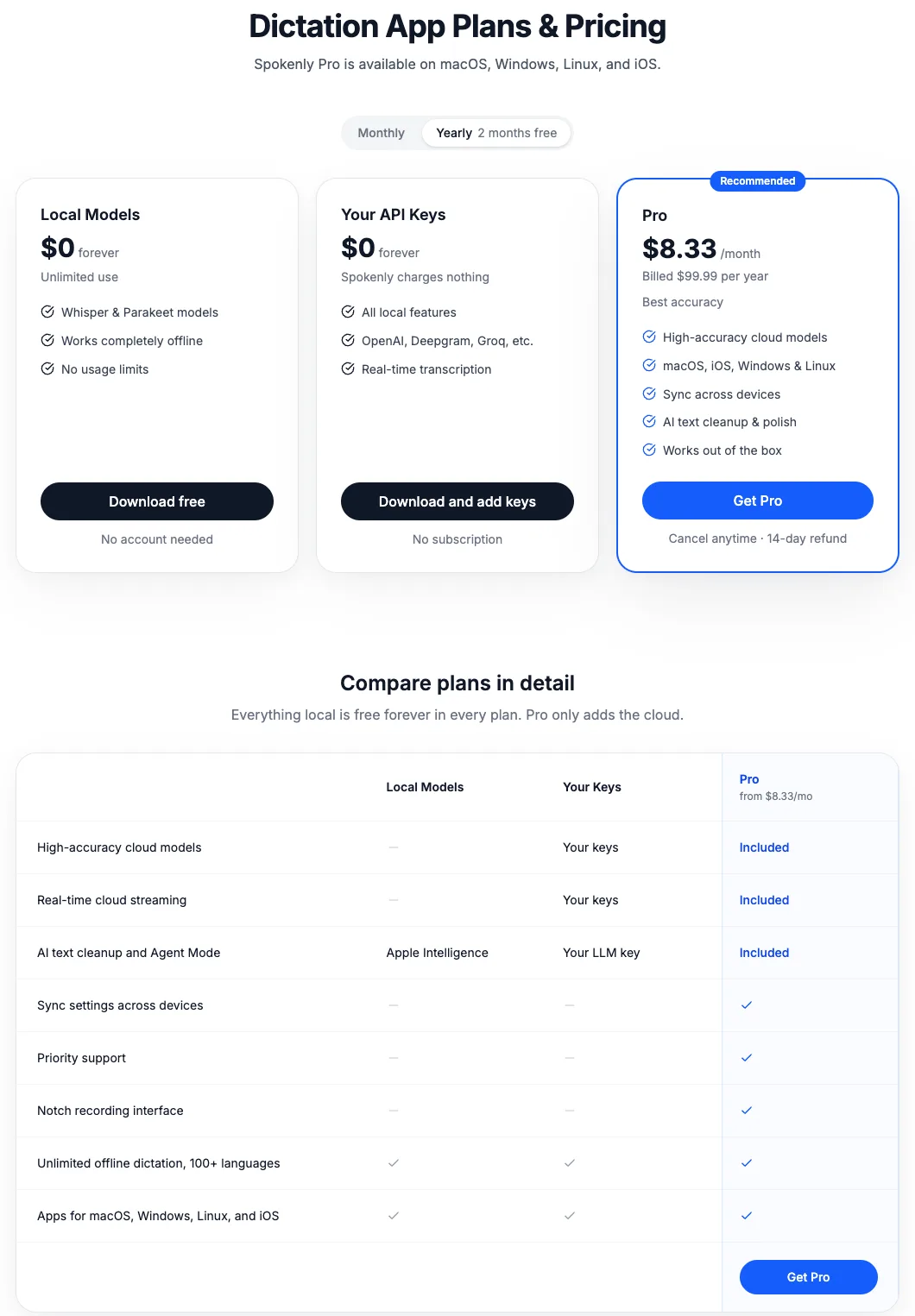
The short answer: Spokenly costs nothing if you use its on-device Whisper or Parakeet models, or your own API keys from providers such as OpenAI, Deepgram or Groq. Spokenly Pro, which adds managed cloud models and hosted AI cleanup, is $9.99 a month or $99.99 a year. It runs on Mac, Windows, Linux and iPhone, but not Android. On a Mac, download it from spokenly.app, not the Mac App Store.
That last point is the one most reviews miss, so it gets its own section below. First, the money.
Three tiers, two of them free
Spokenly’s pricing page is unusually plain about what you pay for. Everything that runs on your device is free. You pay only when Spokenly runs the cloud for you.
| Option | Price | What you get |
|---|---|---|
| Local Models | $0 | Whisper and Parakeet on your device, no usage limits, no account |
| Your API Keys | $0 to Spokenly | Cloud transcription and AI cleanup through your own keys; the provider bills you for usage |
| Pro, monthly | $9.99 a month | Managed cloud models (GPT-4o Transcribe, Deepgram Nova 3 and Soniox are named), hosted AI cleanup, settings sync, priority support |
| Pro, yearly | $99.99 a year ($8.33 a month) | Same as monthly |
| Team | $6.99 per seat a month or $69.99 per seat a year | Full Pro per member, minimum two seats, 30% off “forever” |
| App Store (in-app purchases) | Pro Monthly $9.99 and $10.99; Pro 6-Month Plan $49.99 and $54.99 | The listing shows two prices for each item without explaining why, and no yearly item among those listed |
Sources: the pricing page, the team page and the US App Store listing. Students get 50% off Pro by signing in with an academic email and contacting support. Website purchases come with a 14-day money-back guarantee under the terms. Apple handles refunds for App Store purchases.
If you’re comparing totals, the gap is smaller than it looks: two of the $49.99 six-month App Store items come to $99.98, about the same as the website’s $99.99 year, while twelve months at $9.99 come to $119.88. The website still wins on the 14-day refund and email sign-in. The free tiers aren’t a trial. The FAQ says on-device models are “free forever with no word caps, no trial clock, and no credit card.” Free users also get AI cleanup, through Apple Intelligence or their own model key, per the plan comparison table.
Don’t install the Mac App Store version
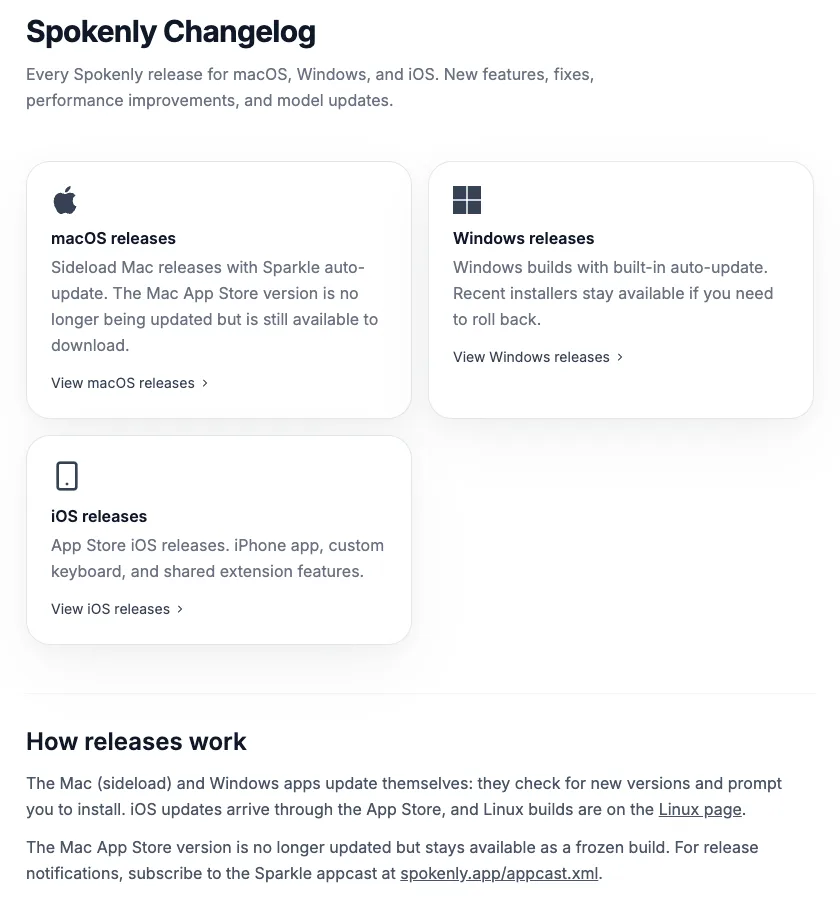
Spokenly ships two Mac apps. The one you download from spokenly.app/download is a “sideload” build that updates itself; its update feed showed version 2.30.9 on October 7, 2026. The other is in the Mac App Store, and Spokenly’s own changelog says that version “is no longer being updated but is still available to download.”
The frozen build is also the weaker one. Spokenly’s documentation says the Mac App Store version “can’t paste text automatically” because “App Store rules don’t allow it to use Accessibility.” Instead of releasing a shortcut and seeing the text appear, you press ⌘V to stop dictation and paste it. Spokenly’s subscription-sync guide says that version “does not support email sign-in yet” (its Mac App Store help page, confusingly, tells subscribers to sign in with email there before switching), and it lacks the MCP server that lets coding agents like Claude Code ask you questions by voice.
Spokenly explains why this happens, which I appreciate. It is also the most out-of-date advice on the first page of Google. Lifehacker’s review, from May 2025 and not updated since, tells readers to install the app “currently free on the Mac App Store” and calls it “completely free as of this writing.” That was accurate then. Today it sends you to the frozen build, and the free cloud default it describes now needs Pro or your own key.
I ship EmberType outside the App Store too, so I recognise the trade-off: an app that types into other apps needs Accessibility permission, and Spokenly says App Store rules don’t allow it. If you already bought Pro through the App Store, the docs describe how to link it to an email address before switching.
Where your audio goes, mode by mode
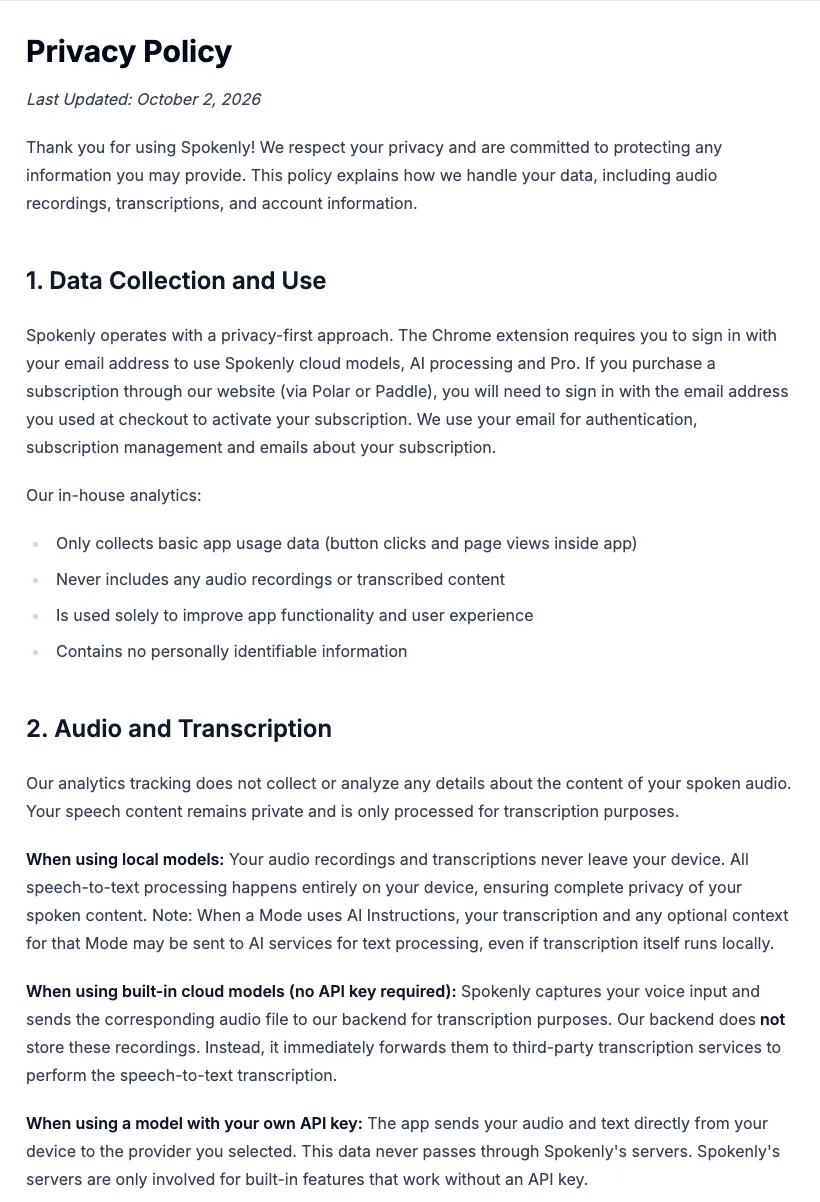
Spokenly’s marketing says “privacy-first,” and with local models that is a fair description. The privacy policy (last updated October 2, 2026) describes a different route for each way you can use it. Here are those routes, with quotes from the policy and the docs:
| You choose | Audio goes to | Text goes to |
|---|---|---|
| A local model | Nowhere. It “never leave[s] your device” | Nowhere, unless the mode has AI Instructions (see the last row) |
| Pro / built-in cloud model | Spokenly’s backend, which “immediately forwards” it to a third-party transcription service | Back to you; Spokenly says its backend doesn’t store recordings |
| Your own API key | Straight to that provider; it “never passes through Spokenly’s servers” | That provider’s terms apply |
| A mode with AI Instructions | Depends on the transcription model above | Your transcript “and any optional context” go to the AI service “even if transcription itself runs locally” |
The last row matters most. Modes are how Spokenly fixes grammar, removes filler words, translates or formats. The Modes documentation lists the context a mode can send to the AI: “clipboard, focused app, text around the cursor, active browser URL.” Clipboard, cursor and focused-app context each have their own toggle, and you choose the AI provider: Spokenly’s hosted AI on Pro, OpenAI, Anthropic, any OpenAI-compatible endpoint with your key, or, on the free local tier, Apple Intelligence per the pricing table. A local transcription model with a cloud cleanup mode means your words, and whatever is on your clipboard if that toggle is on, still leave the Mac.
For Pro’s managed models, the policy lists fourteen providers that may be used, “chosen based on your selected model, feature, and fallback path”: OpenAI, Deepgram, Soniox, Cartesia, ElevenLabs, Groq, Mistral AI, xAI, Microsoft Azure, Google Cloud, AssemblyAI, OpenRouter, fal.ai and Cerebras. OpenRouter can then pass requests on to other model providers.
The strongest privacy feature: Local Only Mode
Spokenly has a switch that I wish more dictation apps offered. Local Only Mode blocks all network activity except local model downloads, so a cloud model simply fails instead of quietly sending audio. It also blocks the app’s anonymous analytics, which the docs say otherwise record things “like which models you select” but never transcripts or audio. Connections to localhost still work, so a model server running on your own machine is allowed. Organizations can force the setting on with an MDM profile (preference domain app.spokenly, key localOnlyMode) so users can’t turn it off. If you handle client data on a managed Mac, that is a better guarantee than any policy paragraph.
What the documents leave out
None of this suggests Spokenly misuses data. These are gaps and loose wording worth knowing before you send it anything sensitive.
- “Never stored” is about Spokenly’s servers only. The homepage says cloud audio “is processed and immediately deleted, never stored.” Section 4 of the policy says the third-party providers “may process and/or store certain data for their own purposes,” and that Spokenly “prefer[s] options that do not use customer data for model training where available.” A preference is not a contract. The policy doesn’t say which provider handles which model, and I found no data processing agreement or subprocessor-change notice of the kind Typeless publishes.
- The default may be the cloud. Spokenly’s own summary for AI tools (llms-full.txt) says the app “uses modern cloud models by default” and that local models are “optional.” Dictato’s comparison page, written by a competitor, says the same. I can’t confirm the first-run default without installing it, so check which model is selected before your first dictation.
- History is local, but its lifespan isn’t documented. The homepage promises searchable history where you can “replay the audio.” The sync docs say history and audio recordings are not synced, so they stay on your device. I found nothing in the privacy policy or the docs about how long that history is kept or how to limit it automatically.
- No data-location section. The policy doesn’t say where Spokenly’s backend runs or where data is transferred. The terms say Spokenly is operated by LLP Inviral Tech, a company registered in Kazakhstan. The App Store lists the developer, Vadim Akhmerov, as seller, and the Microsoft Store lists Inviral Tech as publisher.
- The iPhone keyboard leans on the cloud. Replying to a critical App Store review in February, the developer wrote that local models “can struggle on older devices, especially within iOS keyboard limitations,” and that “for keyboard dictation, online models are actually preferred.” If on-device privacy is why you chose Spokenly, the iPhone may be where that is hardest to keep.
- The ratings differ by storefront. The homepage shows a “4.8 App Store rating.” The US App Store listing showed 4.3 from 61 ratings on October 9. The homepage doesn’t say which storefront its figure comes from.
Who should use Spokenly
For a lot of people, Spokenly is the right answer, and I would rather say so than pretend otherwise. It is free for unlimited local dictation. It runs on Windows (version 1.0.3, which Spokenly says covers “the core dictation and transcription flows”) and Linux as well as Mac and iPhone. The Mac download is a Universal build that still supports macOS 13.3, which helps on older and Intel Macs, though its Mac page says some local models need Apple Silicon and calls cloud transcription “the lighter path” on Intel. It also transcribes audio files, records meetings without a bot, and has a developer-oriented streak: an MCP server, shell scripts in modes and voice control of apps. If you already pay for an OpenAI or Deepgram key, it adds nothing to that bill.
Choose Spokenly if you want a free dictation app, need it on Windows, Linux or an iPhone, use an Intel Mac, or want managed cloud accuracy for $99.99 a year. Look harder if you need written guarantees about where cloud data goes, or you want AI cleanup that works without a subscription and without setting up a model yourself. On the free tiers, cleanup needs Apple Intelligence, your own key or a model server you run.
Where EmberType fits
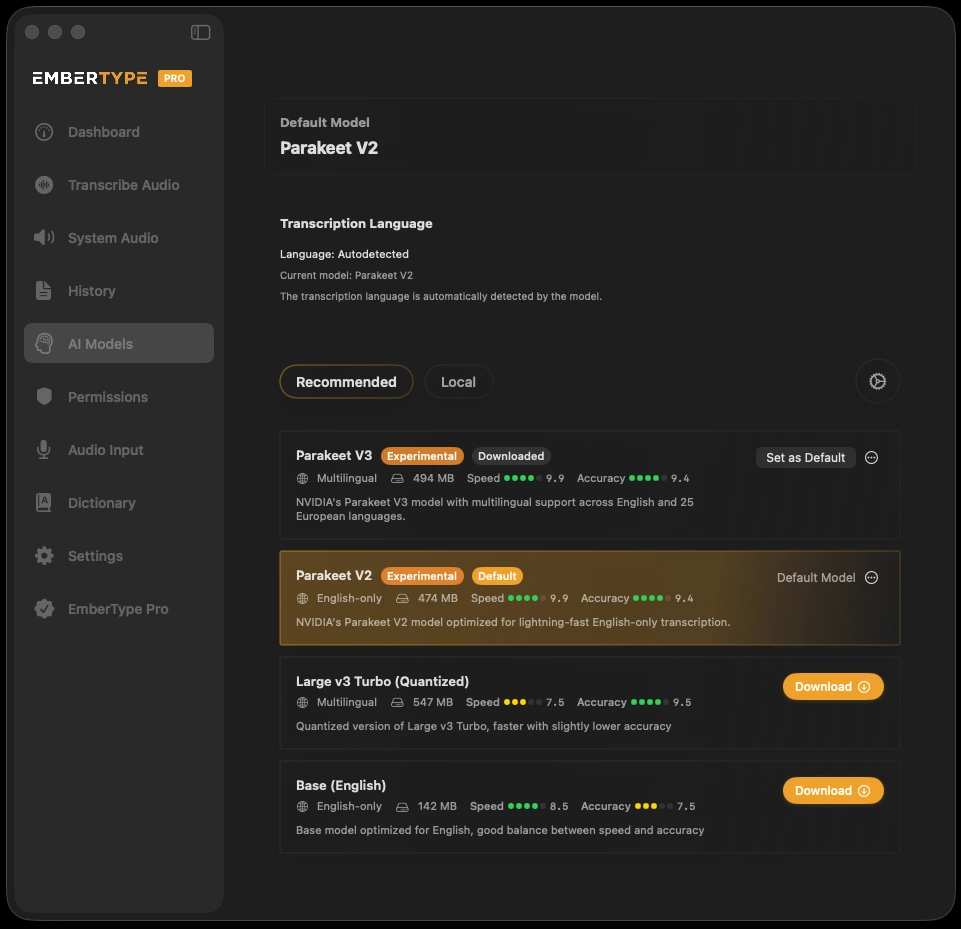
I build EmberType, so weigh this accordingly. It covers less than Spokenly: Mac only, Apple Silicon, macOS 14 or later, with no Windows, Linux or iPhone app and no free tier. Its design is close to Spokenly’s free tiers. Speech recognition runs on your Mac by default, cloud speech models are optional and use your own API key, and AI rewriting is off until you turn it on with your own key or a local model through Ollama. Like Spokenly, it keeps a local history of your audio and transcripts until you delete it. It costs $39 once after a seven-day trial, with no subscription tier inside the app.
If Spokenly’s free local tier does what you need, there is no reason to pay me. EmberType is for people who only dictate on an Apple Silicon Mac and would rather pay once for a smaller app than choose between a free tier and a subscription. For the wider field, see the Mac dictation apps ranked by privacy architecture, the FluidVoice review (a free, open-source alternative) and the Typeless review (a cloud-first one).
Only dictate on an Apple Silicon Mac?
Try EmberType free for seven days, with speech recognition running on your Mac from the first dictation.
Download EmberTypeApple Silicon · macOS 14+ · $39 one-time after the trial
What to check in your first ten minutes with Spokenly
- Install from spokenly.app, not the Mac App Store, so text pastes automatically and the app keeps updating.
- Look at the selected transcription model before you dictate anything private. Download Parakeet or Whisper if you want it local.
- Turn on Local Only Mode if you never intend to use the cloud. It also stops the analytics.
- Open each mode’s context toggles. Turn off clipboard, cursor and focused-app context unless the mode needs them.
- Buy Pro on the website, if you buy at all. You get the 14-day refund in the terms and email sign-in across your devices.
More pricing and privacy readings of dictation apps are in the comparisons hub, including Superwhisper alternatives and MacWhisper’s price split between the App Store and Gumroad.
