Lightning-fast voice to text.
No subscription. Works offline.
The popular Mac dictation apps want $120–180 every year. EmberType is one payment — and by default your voice never leaves your Mac.
“Stumbled on this by accident — it's the best-kept secret in Mac dictation.”
Download NowNo email or credit card required · Just download and start talking
macOS 14+ · Apple Silicon
How EmberType Works for You
Press a shortcut
Activate EmberType from anywhere on your Mac. Toggle mode or push-to-talk -hold to speak, release to transcribe.
Speak naturally
Talk like you normally would -ums, pauses, and all. No need to speak like a robot.
Get polished text
AI cleans it up and inserts it wherever you're typing. Done.
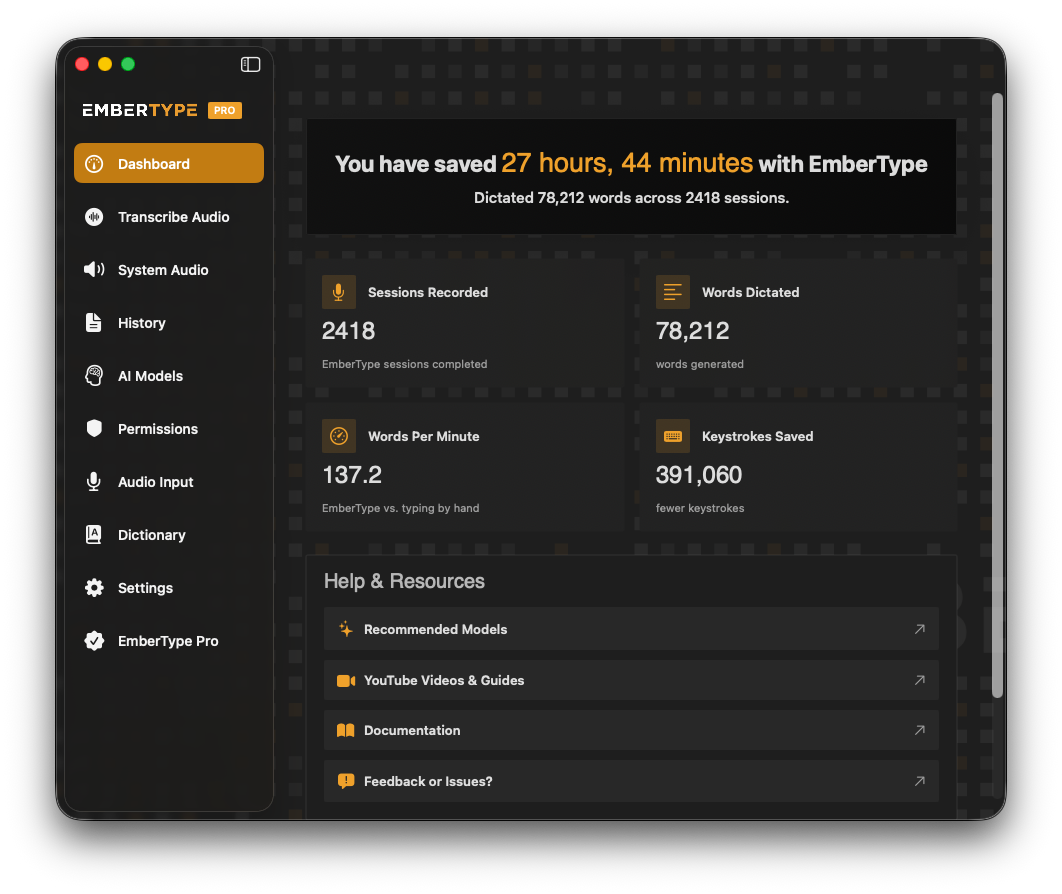
After Just One Month
Here's what a typical EmberType dashboard looks like after 30 days of regular use.
Your voice is yours alone
- Your voice is never sent to us. No accounts. No data collection.
- Whisper AI runs entirely on your Apple Silicon.
- Your voice stays on your Mac, unless you choose an optional cloud model with your own API key.
Why Choose EmberType
Accurate
Voice-to-text that actually works
- Powered by Whisper AI -state-of-the-art speech recognition
- Handles accents, mumbling, technical terms
- Far better than built-in macOS dictation
AI-Driven
Speak messy, get polished
- Smart punctuation added automatically
- Context-aware formatting
- Maintains your voice, just cleaner
100% Private
On-device by default
- Works completely offline -no internet required
- Cloud models only if you add your own API key
- No data collection, no accounts
One-Time Purchase
$39 once, yours forever
- No subscription, no monthly fees
- Free updates included
- 3 Mac activations per license
Works Everywhere on Mac
One shortcut. Every app.
EmberType works in any text field on your Mac. No switching apps, no copy-paste. Just speak.
Key Features of EmberType
Push-to-Talk & Toggle Modes
Hold a key to speak and release to transcribe -like a walkie-talkie. Or toggle on/off. Works from any app, no window switching. A feature most dictation apps still don't offer.
Menu Bar App
Lives in your menu bar, always accessible. Lightweight, stays out of your way.
Blazing-Fast Transcription
Transcribe a 4-minute audio file in 1 second. With local models there's no cloud processing and no upload wait -everything runs on Apple Silicon at speeds no online service can match.
Natural Speech → Polished Text
Speak with pauses, filler words, restarts. AI automatically cleans up the output.
Mac-Native
Built specifically for macOS. Not a web app or cross-platform port. Proper integration and performance.
Works Offline
No internet connection needed. Perfect for airplanes, cafes with bad wifi, or privacy-conscious users.
File & System Audio Transcription
Drop any audio or video file for instant transcription. Or capture system audio live -transcribe YouTube, Zoom calls, podcasts, and lectures directly from your Mac.
Multilingual Speech Recognition
Languages supported out of the box
Auto-detect available -EmberType identifies your language automatically
Who EmberType Is For
Writers & Authors
Capture ideas at the speed of thought. First drafts in minutes, not hours. Break through writer's block by just talking.
Developers
Code comments and documentation without typing fatigue. Write commit messages, Slack updates, emails faster.
Productivity Enthusiasts
Work faster, not harder. 3x faster than typing for most people. Reclaim hours every week.
People with RSI
Type without typing. Give your hands a break. Maintain productivity while healing from carpal tunnel or wrist strain.
Fast Thinkers
For when your brain outpaces your fingers. Don't lose ideas while hunting for keys. Stream of consciousness → polished text.
Mac Power Users
Native app that integrates properly. Keyboard-shortcut driven workflow. No bloat, no electron wrapper.
How EmberType Compares
| Feature | EmberType | Wispr Flow | macOS Dictation |
|---|---|---|---|
| Accuracy | Excellent | Good | Basic |
| Works Offline | Yes | No | Limited |
| Privacy | On-device by default | Cloud-based | Cloud-based |
| AI Polish | Yes | Yes | No |
| Pricing | $39 once | $15/month | Free |
| Annual Cost | $39 total | $144–180/year | $0 |
EmberType costs less than five months of Wispr Flow — and there is no year two. (Wispr Flow Pro, July 2026: $15/month, or $12/month billed annually.)
EmberType Pricing Plans
- Full app, all features
- Works fully offline
- Free updates forever
- 3 Mac activations
- No subscription ever
7-day free trial · No email or credit card required
Buying for a team? One license key covers every seat: 5 seats for $79 or 10 seats for $129
Frequently Asked Questions
How is this different from Wispr Flow?
EmberType transcribes on your Mac and works fully offline, and it's a one-time $39 purchase instead of a $15/month subscription ($12/month billed annually). EmberType costs less than five months of Wispr Flow, and there is no year two. Read our detailed comparison.
Does it work offline?
Yes, completely. With the local models (the default), no internet is required once a model is downloaded, and your voice never leaves your Mac. Optional cloud models are there if you want them, and only run with your own API key.
Why Mac only?
We built EmberType specifically for macOS to ensure the best possible experience. It's a native app optimized for Apple Silicon. Windows version may come later.
What about privacy?
By default your voice is processed entirely on your Mac using local AI, and nothing is uploaded. EmberType has no accounts and no telemetry, and we never receive your audio or text. If you choose an optional cloud model or cloud AI polish, it runs under your own API key with the provider you picked. Read our Privacy Policy for full details.
How accurate and fast is it?
EmberType uses NVIDIA Parakeet and OpenAI Whisper -the same AI that powers professional transcription services. It transcribes a 4-minute audio file in about 1 second on Apple Silicon, making it one of the fastest transcription tools available. Accuracy rivals cloud services, with excellent handling of accents, technical terms, and natural speech. See our recommended models for details.
Is there a free trial?
Yes! Download EmberType and try it free for 7 days. No credit card required. If you love it, purchase a license to continue.
How does EmberType compare to other AI apps for Mac?
EmberType is the dictation piece of a broader Apple Silicon AI stack. For the full picture — including ChatGPT, Ollama, DiffusionBee, and the other 12 tools we actually use — see our guide to the best AI apps for Mac in 2026, including which ones are optimized for M-series chips.
Stop typing. Start talking.
Your voice. Your Mac. On-device by default.
Download Free TrialNo email or credit card required
or buy now for $39 -one-time, no subscription