
By Steve Mount, builder of EmberType, a Mac dictation app that competes with MacWhisper’s dictation feature. Prices and features below come from MacWhisper’s website, its Gumroad store, its support documentation and the US App Store listing, all checked on September 25, 2026. This is a documented price guide, not a hands-on review.
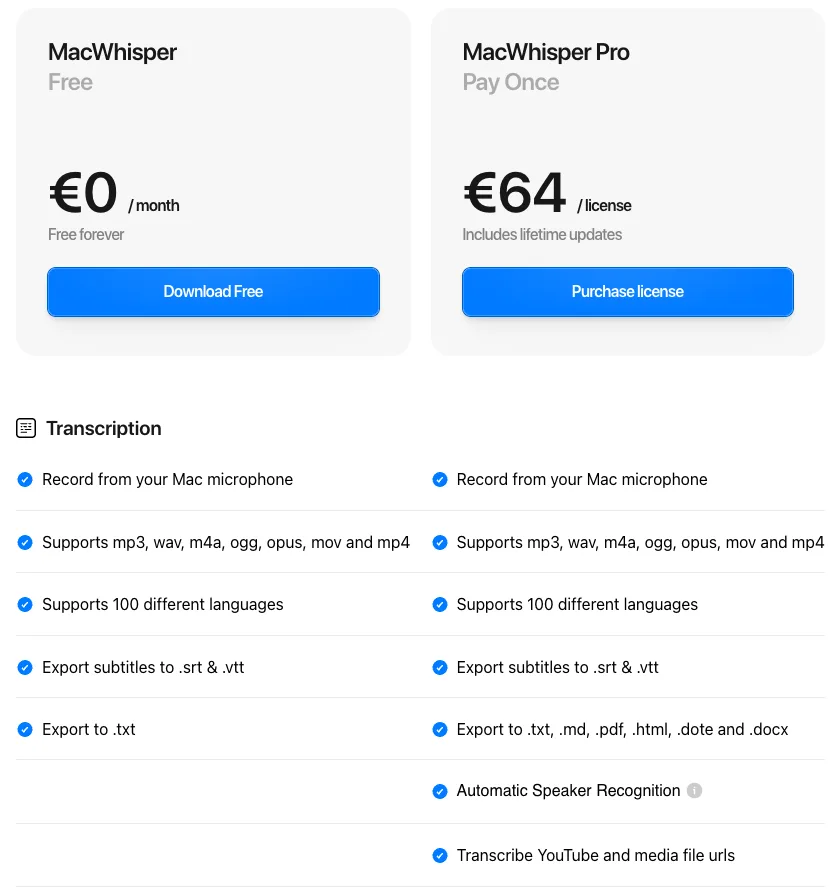
MacWhisper Pro is a one-time purchase that the official site lists at €64, including lifetime updates. Gumroad, where it is actually sold, listed it at €65 on September 25 and showed that as $74.12 to a US visitor. The Free version is a permanent tier, not a trial. The App Store version is a different app called Whisper Transcription, with its own in-app purchases and fewer features. Buying in the right place saves money and gets you more features. That is the main thing to know.
The price list, with dates
| What you buy | Where | Price | Billing |
|---|---|---|---|
| MacWhisper Free | macwhisper.com / Gumroad | €0 | Free forever |
| MacWhisper Pro, 1 personal license | Gumroad | €64 on the official site; €65 on Gumroad (shown as $74.12 in the US) | Once, “includes lifetime updates” |
| Pro license packs | Gumroad | 5 at €54 each, 10 at €49, 20 at €45, 50 at €44 | Once |
| Whisper Transcription “Pro” | App Store | $6.99, $8.99 and $29.99 items | Subscriptions (the listing does not say which period is which) |
| Whisper Transcription “Pro Lifetime” | App Store | $89.99 and $99.99 items | Once |
| Assistant (cloud transcription and AI) | App Store | $5.99 weekly, $9.99 monthly, $89.99 yearly; “Pro & Assistant” $12.99 | Subscription, optional |
Sources: the official site’s pricing table, the Gumroad listing, the US App Store listing and the developer’s page on the difference between the two versions, updated August 6. That page describes the App Store subscriptions as weekly, monthly and yearly, but the store’s in-app purchase list shows only names and prices. I have not assigned periods to them, and you should check the period on the purchase sheet before you pay.
What Free actually includes
Most pricing pages describe MacWhisper Free as a demo. The official table describes more than that. Free records from your Mac’s microphone, opens mp3, wav, m4a, ogg, opus, mov and mp4 files, transcribes 100 languages, exports subtitles as .srt and .vtt, exports plain text, and includes system-wide dictation. (The Gumroad listing’s longer feature list puts a few items, such as extra export formats and filler-word removal, above its Pro heading. Where the two disagree, I have followed the pricing table.) Transcription runs on your Mac. The Gumroad page says “All transcription is done on your device, no data leaves your machine.”
Pro adds the features that save time on large amounts of audio:
- Volume: batch transcription, watched folders that transcribe new files automatically, and a command-line tool.
- Sources: YouTube and media URLs, system audio from other apps, and automatic meeting recording for Zoom, Teams, Webex and others.
- Speakers: automatic speaker recognition and separate files per podcast host.
- Models: NVIDIA Parakeet on M-series Macs, Qwen3-ASR on macOS 26 and WhisperKit models. Gumroad says Free “supports all Whisper models” but “some models are only fully available for Pro users.” I found no official list of which ones, so I would not rely on third-party claims that Free is limited to particular Whisper sizes.
- Output: .md, .pdf, .html, .dote and .docx export, translation and auto cleanup.
- AI: dictation that corrects grammar, AI prompts and app-specific prompts. These use an AI service you connect with your own API key (OpenAI, Anthropic, Groq, Google and others) or a local model through Ollama or LM Studio.
So the Pro license includes the app features, but not the AI processing. If you use cloud AI for grammar correction or summaries, your provider bills you for that. Pro also adds optional cloud transcription through OpenAI, Groq, ElevenLabs, Deepgram or Gladia, again with your own key. That is useful for a slow Mac, but when it is switched on, that audio does not stay on your computer.
Gumroad or App Store: two apps sharing one name
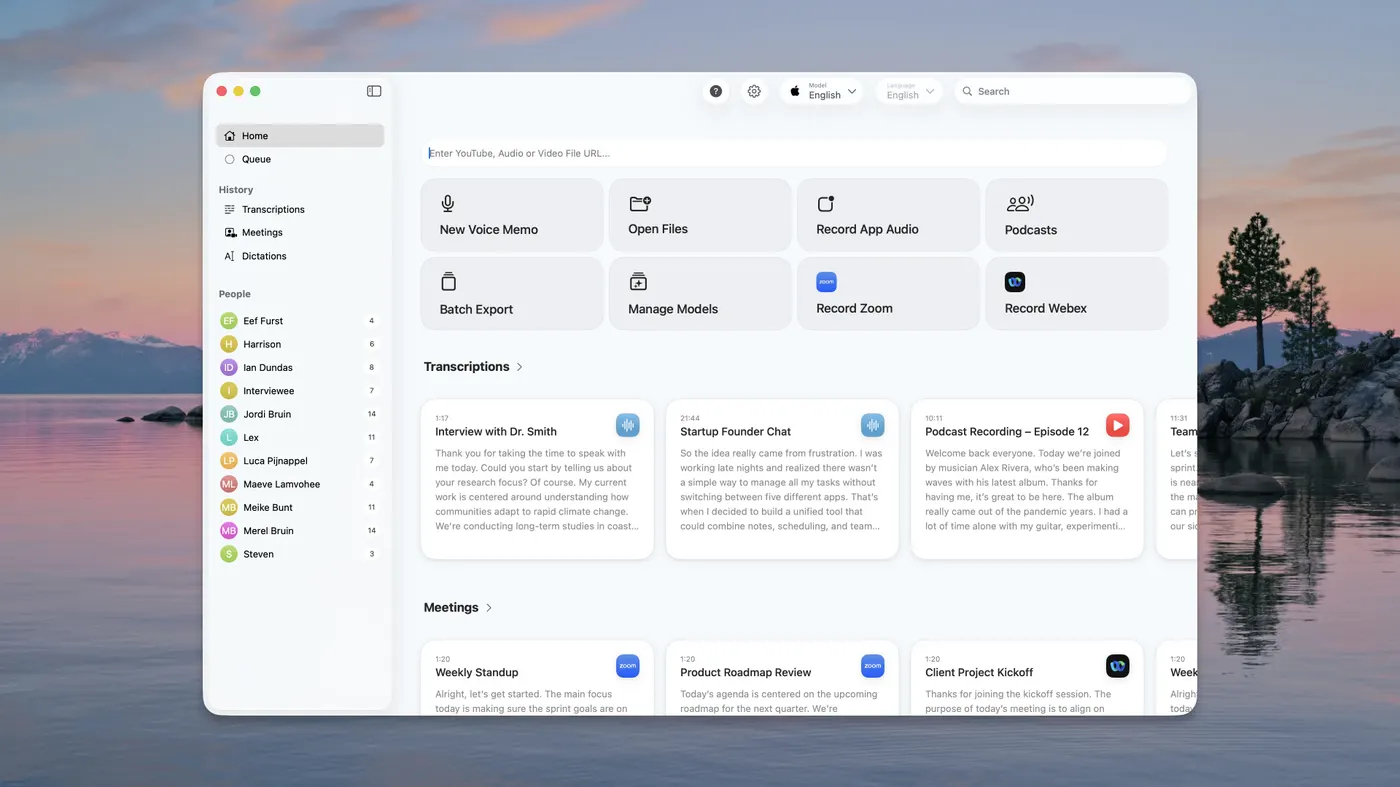
MacWhisper is sold through Gumroad. The Mac App Store sells Whisper Transcription, made by the same developer, Good Snooze. The developer’s own comparison lists what is missing from the App Store version:
- No system-wide dictation. The dictation documentation says dictation is “only available in MacWhisper sold on www.macwhisper.com, not on the App Store version due to restrictions that Apple puts on apps sold on the Mac App Store.”
- No meeting detection, CLI or MDM deployment. The comparison lists these for the direct download only.
- Fewer AI providers, which the developer attributes to App Store restrictions.
- License keys don’t transfer. Gumroad license keys work only in the direct version, and the App Store version has no field for entering one. I found no documented way to move a purchase from one version to the other.
The App Store version is also more expensive for the same kind of purchase. The Pro Lifetime in-app purchases are listed at $89.99 and $99.99. The direct license is €64 to €65, about $74. In a 2024 Reddit thread, an account that introduced itself as the developer said the website version “has a few more features” and is “cheaper there since we pay less fees.” The Mac App Store version also requires macOS 15 or later.
The App Store version is still the right choice in some cases. If your company only allows App Store software, or you want Apple to handle billing (the listing says some purchases may be shareable through Family Sharing), it makes sense. It also adds the optional Assistant subscription, which transcribes on Good Snooze’s servers and runs summaries and chat without you managing API keys. The developer’s documentation says not to use cloud transcription for sensitive files, and says Assistant is not included with a purchase of the Mac app. On iPhone and iPad there is no Pro unlock: local models are free, and Assistant is the only thing you can pay for.
Why the dollar price moves, and why old figures are wrong
MacWhisper is priced in euros. The Gumroad page’s metadata gives the currency as EUR, and the $74.12 I saw is Gumroad’s conversion of its €65 listing for a US visitor on one day. Your bank’s rate, and any sales tax Gumroad adds where you live, can change what you pay. For budgeting, treat the price as about $75.
The price has gone up over time, which is why so many figures online are wrong. In a November 2024 r/macapps thread, the developer’s account said it had cost 6 euros more than a year and a half earlier and 39 euros for most of 2024, then went up after the version 11 update. The buyer who started that thread quoted 49 euros. Several vendor pricing pages ranking for this search in September 2026 still quote €59, including one updated in July and one labelled September 2026. The official page now says €64, and the Gumroad listing itself says €65. That thread also mentioned a 50% student discount. The current Gumroad listing and documentation offer 25% off to students, journalists and non-profits who email the developer.
One of the top results for “macwhisper pro” is macwhisper.org. It is not the developer’s site. Its footer credits a different person, it shows a “$29 once” Pro price that appears on no official page, and when I checked, its main download buttons linked to an unrelated domain rather than to Gumroad or the App Store. The official site warns that “there are scam websites online that pretend to be the official website for MacWhisper, and they may contain malware downloads,” and says all purchases go through Gumroad or the App Store. Buy from those two places only.
What it costs over one, three and five years
| Option | One year | Three years | Five years | What it mainly does |
|---|---|---|---|---|
| MacWhisper Free | $0 | $0 | $0 | File transcription, basic dictation |
| MacWhisper Pro, Gumroad (€65) | ~$74 | ~$74 | ~$74 | Full file, meeting and dictation toolkit |
| Whisper Transcription Pro Lifetime, App Store | $89.99–$99.99 | $89.99–$99.99 | $89.99–$99.99 | Transcription without system-wide dictation |
| Wispr Flow Pro, annual (checked September 18) | $144 | $432 | $720 | Cloud dictation on Mac, Windows and phones |
| EmberType | $39 | $39 | $39 | Mac dictation into any app |
The Wispr Flow row uses the prices in my Wispr Flow pricing breakdown. It is here because people shopping for MacWhisper’s dictation often compare it with Flow. The App Store subscriptions are not in the table because the listing does not give their billing periods. Whatever the periods are, a recurring $29.99 charge costs more than the direct license by the third payment, and a recurring $6.99 charge does so by the eleventh. If you expect to use MacWhisper for more than a few months, the Gumroad license is the cheapest paid option. None of the one-time rows include API costs, which apply only if you connect a cloud AI service.
Who should buy MacWhisper, and who should not
MacWhisper does a lot for a one-time price. Buy Pro on Gumroad if you transcribe interviews, lectures, podcasts or meetings, make subtitles, or have enough recordings to need batch jobs and watched folders. Its speaker recognition, automatic meeting recording, CLI and integrations are features a dictation app like EmberType does not try to offer. For that work, about €65 once is a good price, and I would not steer you away from it.
Stay on Free if you transcribe a file now and then and plain text or subtitles are all you need. Try Free first if you only want to dictate, because Free includes system-wide dictation. You may not need to pay anyone.
This is where my interest comes in, so here it is plainly. EmberType is the app I build. It is built mainly for dictation: press a shortcut, speak, and the text appears where your cursor is. It costs $39 once after a seven-day trial and runs on Apple Silicon Macs with macOS 14 or later. Local speech models run on your Mac, and cloud models are an option that needs your own API key. It can transcribe audio files and capture system audio, such as a call, but it does not detect or auto-record meetings, recognise speakers or batch-process folders. If you need those, MacWhisper is the better buy. If dictation is most of what you need, EmberType costs about half of MacWhisper Pro. For a longer comparison, see EmberType vs MacWhisper.
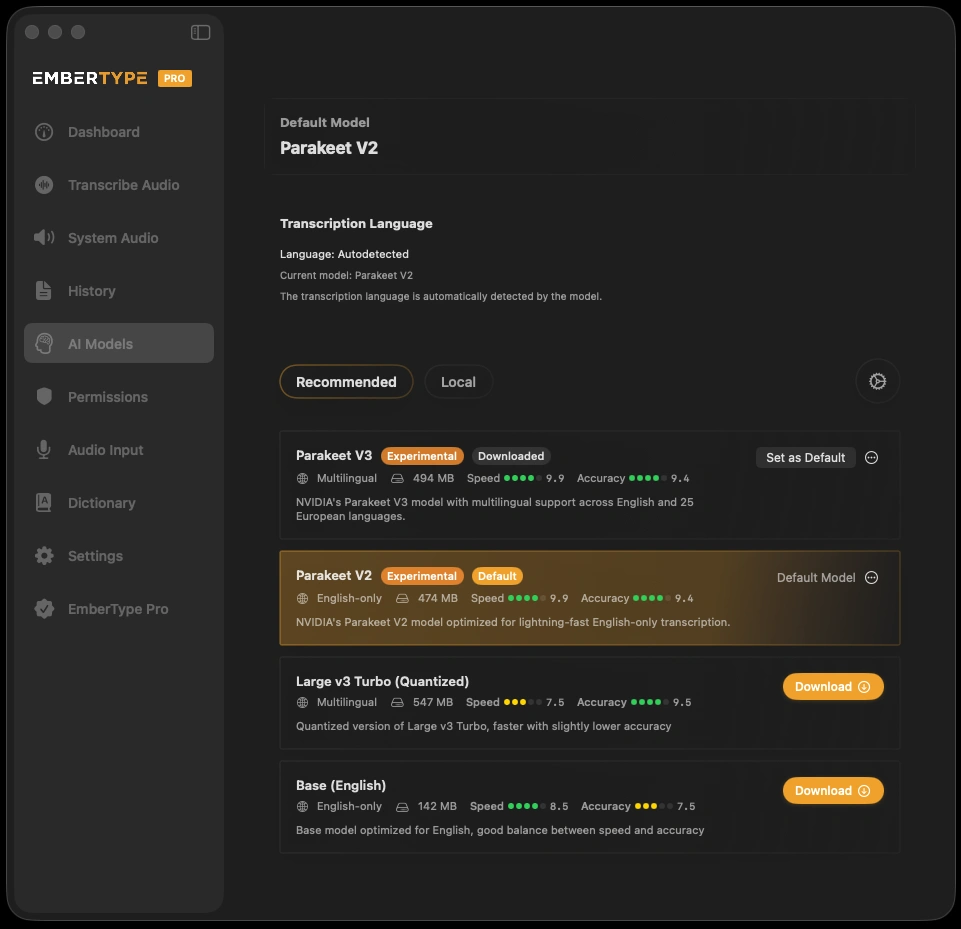
Only need dictation? Compare it at $39
Try EmberType free for seven days, dictating into your own email and documents. No card required.
Download EmberTypeApple Silicon · macOS 14+ · $39 one-time after the trial
Before you pay
- Buy on Gumroad unless you have a specific reason to use the App Store. The Gumroad version costs less and includes dictation.
- Test your hardest file within seven days. The developer offers a refund within seven days of purchase. A November 2025 Reddit post titled “Do not get MacWhisper” described Pro repeating sentences and skipping parts of a recording. Most replies disagreed, several from people who said they use it daily, though one agreed. Another said turning off speaker recognition helped with the repeated sentences, and the developer’s account said looped segments can happen with AI models but should be uncommon on the best ones. These are user reports, not tests. They are a good reason to try your own difficult audio before the refund window closes.
- Ask for the discount if you are a student, journalist or non-profit: 25% off by email.
- Count your Macs. The license is for your personal devices. The licensing documentation mentions a soft limit of three and says licenses can be disabled automatically if abuse is detected. Teams should look at the license packs.
- Check your macOS version. The developer offers older builds for Monterey and Ventura from the purchase page, and the App Store version needs macOS 15.
For how MacWhisper compares with other apps, see Wispr Flow vs MacWhisper, MacWhisper vs Superwhisper and the MacWhisper alternatives guide. More pricing and comparison articles are in the comparisons hub.
