
By Steve Mount, builder of EmberType, a Mac dictation app that competes with Typeless. Everything below comes from Typeless’s own pages, its trust center, the US App Store and Google Play listings, and archived copies of its pricing page, all checked on October 2, 2026. I have not used Typeless. This is a close reading of its documents, not a hands-on test.
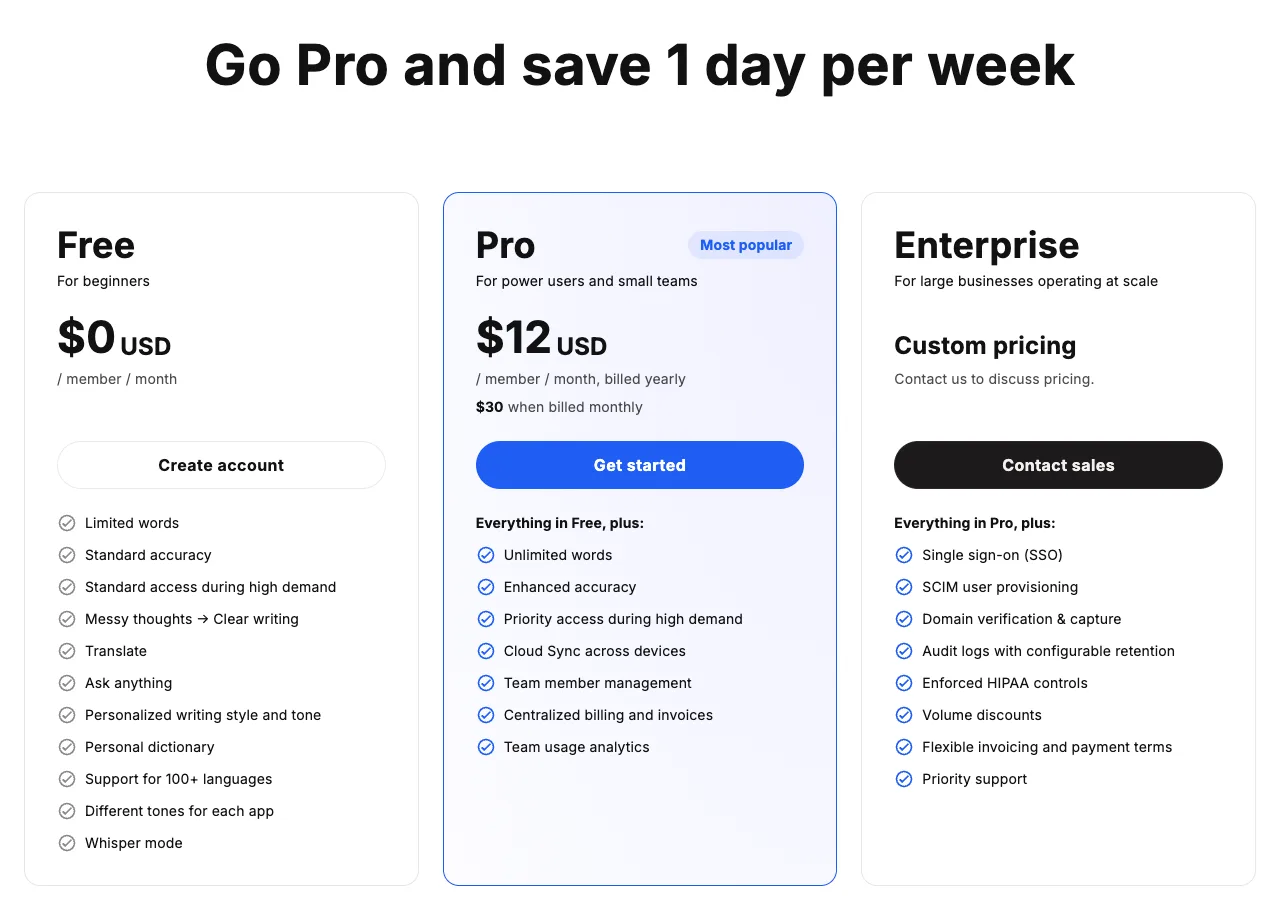
Typeless Pro costs $12 a month billed yearly ($144 a year) or $30 billed monthly. The Free plan has a weekly word limit that the pricing page no longer puts a number on. Every dictation is transcribed and rewritten in Typeless’s cloud, together with the name of the app you are using and “relevant text within it.” Typeless says it discards your audio and that context as soon as the text comes back, and it lists six AI providers that may process requests. Those policies are clearer than most reviews suggest. A few of the documents also disagree with each other, and that is worth knowing before you pay.
What Typeless is
Typeless is a dictation app that rewrites what you say. You hold a shortcut (Fn by default on a Mac), talk, and it types polished text where your cursor is. It removes filler words, drops the half of a sentence you corrected, formats spoken lists and adjusts tone to the app you are in. It also translates, answers questions (“Ask anything”) and, since September, drafts text from short instructions with a feature called Help me write. The help center lists apps for macOS (Apple Silicon and Intel), Windows and Linux, plus an iPhone keyboard and an Android keyboard. Each dictation can run for up to 9 minutes. The company is listed on its about page as Simply CA LLC of Palo Alto, California.
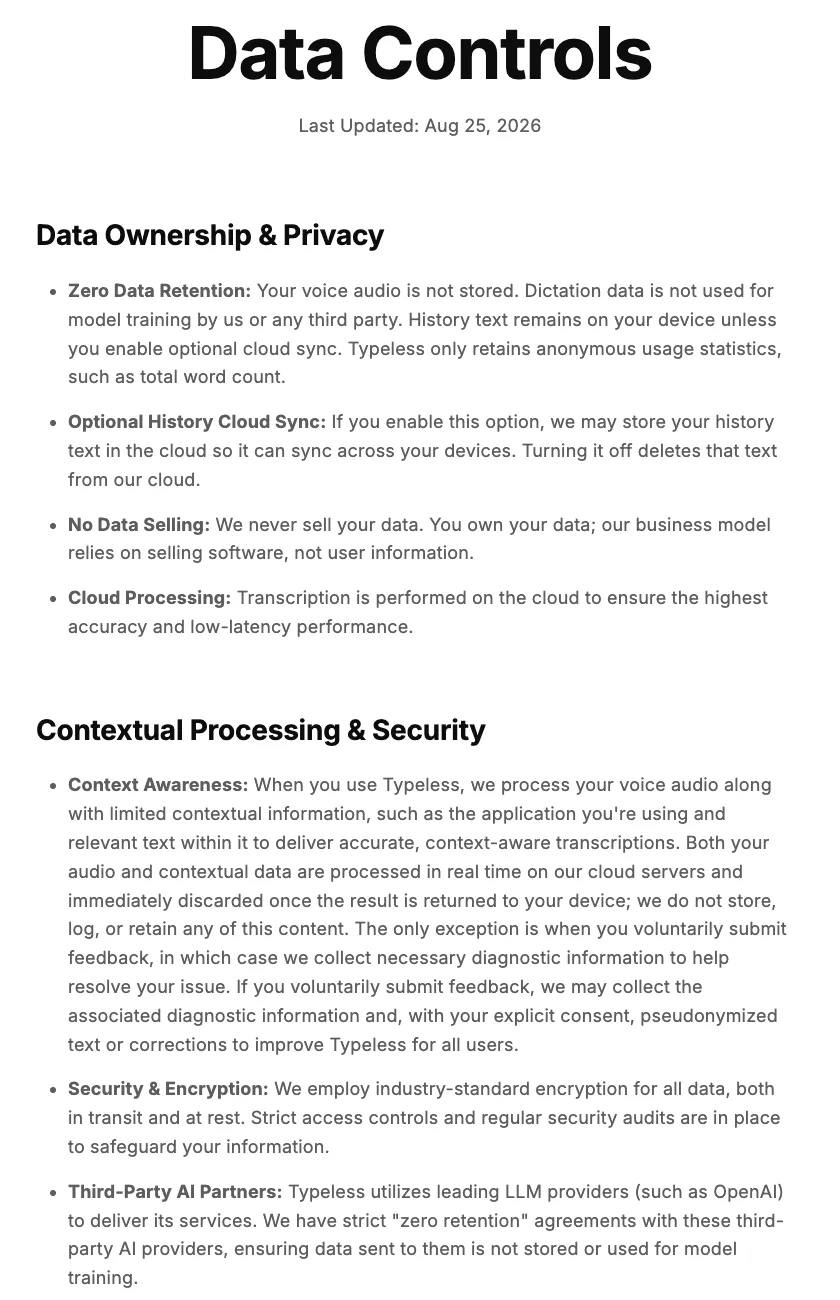
The design follows from one decision: the speech recognition and the rewriting both happen on servers. Typeless’s data controls page says so directly: “Transcription is performed on the cloud to ensure the highest accuracy and low-latency performance.” There is no on-device mode in any of the documentation. Everything else in this article follows from that.
The price list, dated
| Plan | Price | What the page says you get |
|---|---|---|
| Free | $0 | “Limited words” each week, standard accuracy, standard access during high demand, most writing features |
| Pro, annual | $12 per member per month, billed yearly ($144) | Unlimited words, “enhanced accuracy,” priority access during high demand, Cloud Sync, team billing and analytics |
| Pro, monthly | $30 per member per month | Same as annual |
| Enterprise | Custom | SSO, SCIM, audit logs, enforced HIPAA controls, BAA, invoicing |
| iPhone app (in-app purchases) | Typeless Pro at $143.99, $30.00 and $60.00 | The App Store lists three items without saying which period each one covers |
| Students | 50% off Pro | New subscribers only, “Valid for Desktop checkout only” |
Sources: the pricing page, the US App Store listing and the students page. The $143.99 item lines up with $12 times twelve, and the $30.00 item with the monthly web price, but the listing does not label them, so I haven’t assigned periods. Check the purchase sheet before you confirm.
Two lines in the terms of service matter more than the plan names. Refunds “will only be issued when legally required or in accordance with the applicable third-party app store’s refund policies.” Typeless says it will email you before an annual plan renews, and that price changes take effect at renewal after notice. So if you start on the annual plan, you are committing $144 up front with no promised refund.
Why every review quotes a different free limit
If you have read other Typeless reviews, you have seen two different free allowances. Both used to be correct. Archived copies of the pricing page on the Internet Archive show the plan changing:
- January 18, 2026: Free was “4,000 words per week,” and every new account started with a 30-day free trial of Pro.
- June 4, 2026: 8,000 words per week, still with the 30-day trial.
- August 6, 2026: 8,000 words per week, and new accounts “automatically start on the Typeless Free plan.” The trial language was gone.
- October 2, 2026 (live page): “Limited words,” and no trial.
Two vendor reviews ranking on the first page for “typeless” are each accurate for a different month. One quotes 4,000 words; the other quotes 8,000 words plus a 30-day trial and attributes both to the pricing page. Neither is what the page says today. I can’t tell you the current number, because Typeless doesn’t publish it. If the free limit decides whether you pay, check what the app shows after you sign up.
Where your voice goes
This is the part most reviews summarize in one line: “zero data retention.” Here is the full route, put together from the privacy policy and the data controls page (both last updated August 25, 2026), the subprocessor list and the help center.
1. On your device
On a computer, Typeless asks for microphone access and Accessibility access. The help center says Accessibility is what lets it type into other apps and listen for the Fn key. On iPhone, Typeless is a third-party keyboard. Apple’s developer documentation says a keyboard has no network access unless you turn on “Allow Full Access” for it, and that a keyboard with Full Access “can send keystrokes and other input events for server-side processing.” One App Store reviewer describes giving the Typeless keyboard full access during setup. Typeless says its keyboard sometimes needs to switch briefly to the Typeless app to access the microphone. Typeless says the microphone “stays off when idle.”
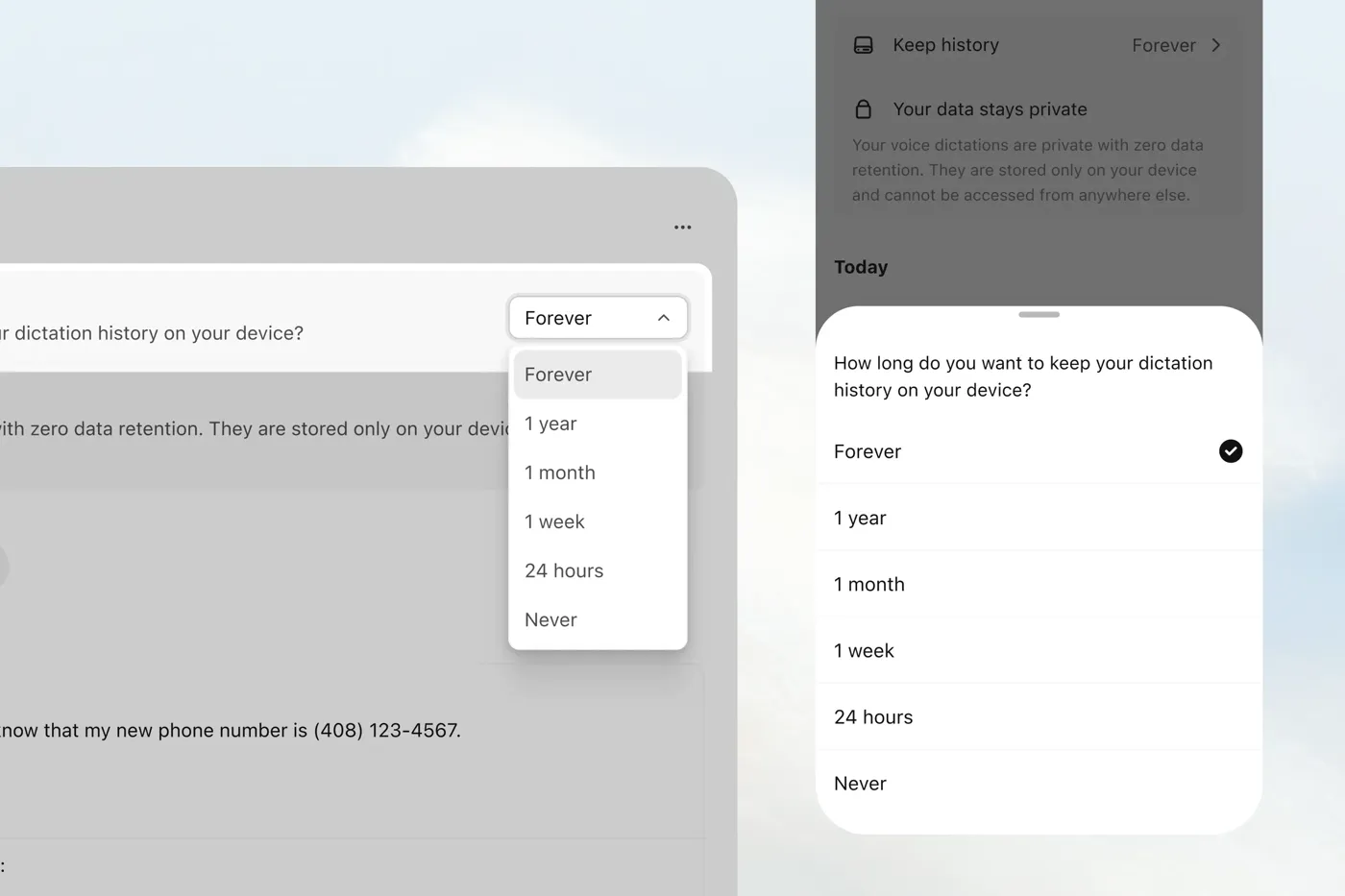
Your dictation history is stored on the device, and it includes more than text. The History help page lets you “download audio” to “save the original audio to your device” and retry a transcript “with the same audio.” You choose how long history is kept: forever, a year, a month, a week, 24 hours or never. “Zero retention” describes Typeless’s servers. Your own Mac or phone keeps the recordings for as long as that setting allows, and the help center’s screenshots show it set to Forever.
2. To Typeless’s servers
When you dictate, the privacy policy says Typeless processes “your voice audio along with limited contextual information, such as the application you’re using and relevant text within it.” That context is how it decides that Slack gets a casual reply and Gmail gets an email. It also means text from the app you are working in leaves your computer along with your voice. The policy says both are “processed in real time on our cloud servers and immediately discarded once the result is returned to your device; we do not store, log, or retain any of this content.” Section 6 adds: “No voice recordings or screen context data are stored on our servers.” If you are outside the United States, section 7 says your data is transferred to the US and processed there.
That is a specific, written commitment, and I give Typeless credit for it. It is also a policy, not an architecture. The text has to reach a server to be processed, so you are relying on the company to delete it as promised. That difference mattered in the Wispr Flow screenshot episode, when a user who asked why screenshots of their active window were going to AI servers was banned before the CTO apologized.
3. To AI providers
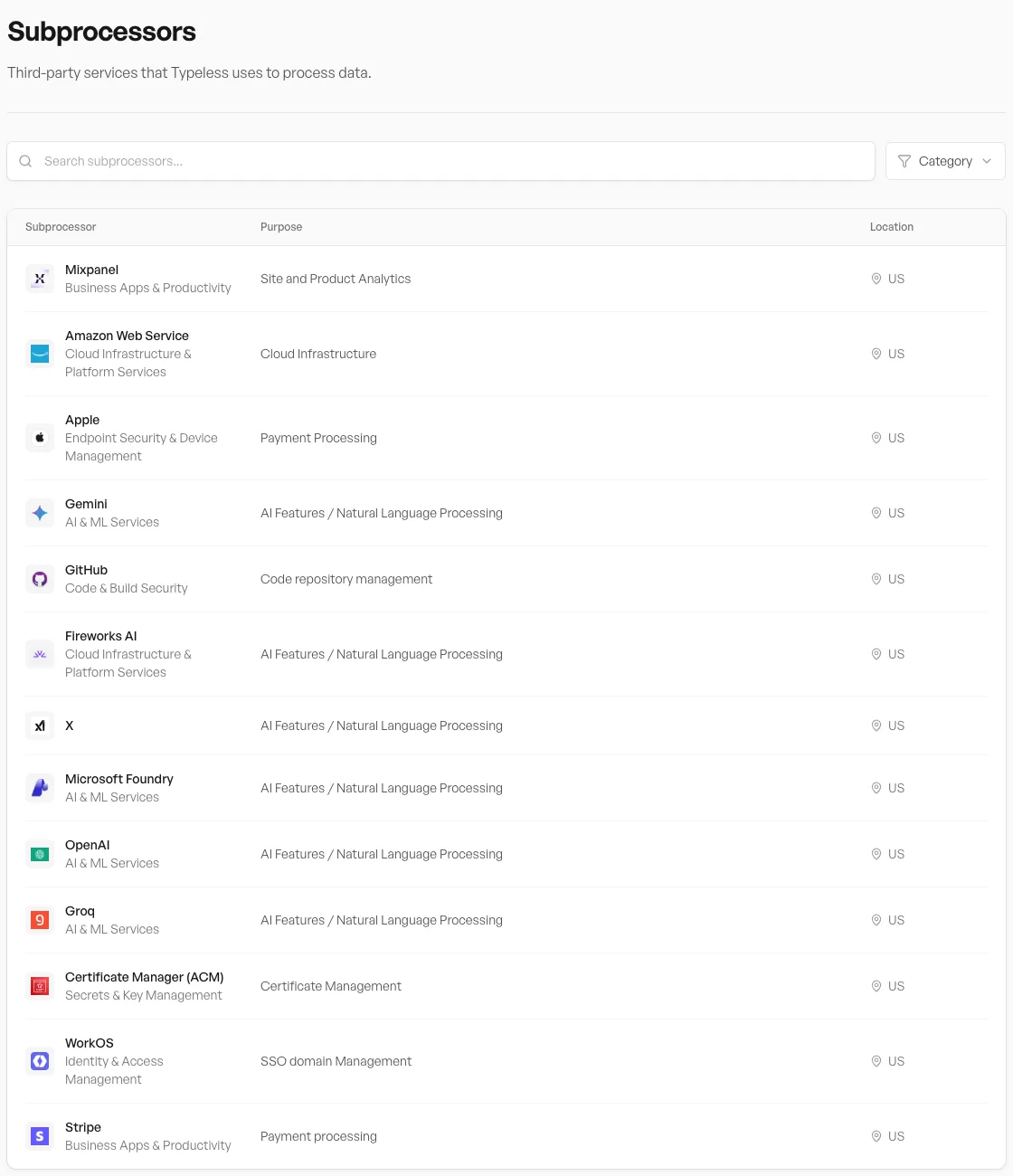
Typeless doesn’t do all of the processing itself. The data controls page says it “utilizes leading LLM providers (such as OpenAI)” under “strict ‘zero retention’ agreements … ensuring data sent to them is not stored or used for model training.” The trust center’s subprocessor list names six services for “AI Features / Natural Language Processing”: Gemini, Fireworks AI, X, Microsoft Foundry, OpenAI and Groq, all located in the US. The rest of the list covers hosting (Amazon Web Services), analytics (Mixpanel), payments (Stripe and Apple), sign-in (WorkOS), code hosting (GitHub) and certificates.
The documents don’t say which provider handles which request, or whether one dictation can pass through more than one. For most people that is fine. If you work under a contract or policy that names approved AI vendors, that list is the thing to send your compliance person. Typeless’s data processing agreement promises business customers 14 days’ notice before a new subprocessor starts.
4. What Typeless keeps
According to the data controls page, Typeless keeps “anonymous usage statistics, such as total word count.” The privacy policy adds your account and billing records. It also keeps diagnostics when you send feedback, and, “with your explicit consent, pseudonymized text or corrections to improve Typeless for all users.” Since the macOS 2.4.0 release on August 25, 2026, there is also optional History Cloud Sync. When it is on, your history text is stored on Typeless’s servers so it can appear on your other devices. Turning it off “deletes that text from our cloud.” Cloud Sync is listed as a Pro feature.
Where the documents disagree
None of what follows shows that Typeless misuses anything. These are places where its own pages say different things, which matters when the pages themselves are what you are trusting.
- Training. The data controls page says dictation data “is not used for model training by us or any third party.” The terms of service give Typeless a license to use your content “for the purpose of providing, improving, and protecting the Services” and add: “you can control whether your content is available for training Typeless’s AI models through settings provided in the Services.” The likely reading is that training only happens through the opt-in corrections sharing described above. But the terms say there is a setting, so find it and check how it is set.
- “Everything stays local.” The August 2025 beta entry in the macOS release notes still lists “Everything stays local on your device” under Private by design. The full beta announcement explains that line as “full control over how long you keep your dictation history on your device,” so it is about history, not transcription. The summary on its own reads more broadly than that. The History help page also still says history “stays only on your device,” although Cloud Sync now exists.
- Compliance labels. The pricing page lists “GDPR compliance,” “ISO 27001 compliance” and “HIPAA-ready.” The trust center shows ISO 27001 as Compliant, GDPR and HIPAA as Self-Attested, and SOC 2 Type I and Type II as In Progress. Its opening paragraph still says “Here you’ll find our SOC 2 Type II report.” If an audit report decides your purchase, ask for it rather than relying on the badge.
- Store privacy labels. On the App Store, Typeless declares “Data Used to Track You: Identifiers.” The privacy policy mentions Google Analytics and advertising partners such as LinkedIn. Google Play’s data safety section says no data is shared with third parties and does not list audio as collected. That doesn’t contradict the AI subprocessors: Google’s rules leave data processed “ephemerally” out of the public label and do not count transfers to service providers as sharing. It does mean the store labels can’t tell you where your voice goes. The policy documents can.
What Typeless does well
Typeless is built for people who want finished text more than an exact transcript, and who want that on every device they use. Few dictation apps cover Linux and Android as well as Mac, Windows and iPhone. Wispr Flow, the closest rival, lists Mac, Windows, iOS and Android on its pricing page. The rewriting features (tone per app, translation, Help me write, editing selected text by voice) are what most of its fans describe in the App Store reviews, where it holds 4.5 stars from 729 ratings. Its retention policy is written out in specific terms, which is better than many cloud tools, and teams can get SSO, a BAA and enforced HIPAA controls on Enterprise.
Choose Typeless if you dictate on a phone as much as on a computer, if you use Windows, Linux or Android, or if you want the AI to restructure what you say and you are comfortable with that happening in the cloud. Look elsewhere if you can’t send audio or on-screen text off the machine at all, if you need dictation to work offline, or if you would rather not pay a subscription for dictation.
What it costs over time
| Option | One year | Three years | Five years | Platforms |
|---|---|---|---|---|
| Typeless Pro, annual | $144 | $432 | $720 | Mac, Windows, Linux, iPhone, Android |
| Typeless Pro, monthly | $360 | $1,080 | $1,800 | Same |
| Wispr Flow Pro, annual | $144 | $432 | $720 | Mac, Windows, iPhone, Android |
| Wispr Flow Pro, monthly | $180 | $540 | $900 | Same |
| EmberType | $39 | $39 | $39 | Mac (Apple Silicon) |
On the annual plan, Typeless and Wispr Flow cost exactly the same. Wispr’s pricing page showed $12 a month billed yearly on October 2. Month to month, Typeless is $30 and Wispr Flow is $15, so if you want to pay monthly while you decide, Typeless costs twice as much. My Wispr Flow pricing breakdown covers that plan in more detail, and Superwhisper vs Wispr Flow covers the configurable alternative.
Where EmberType fits
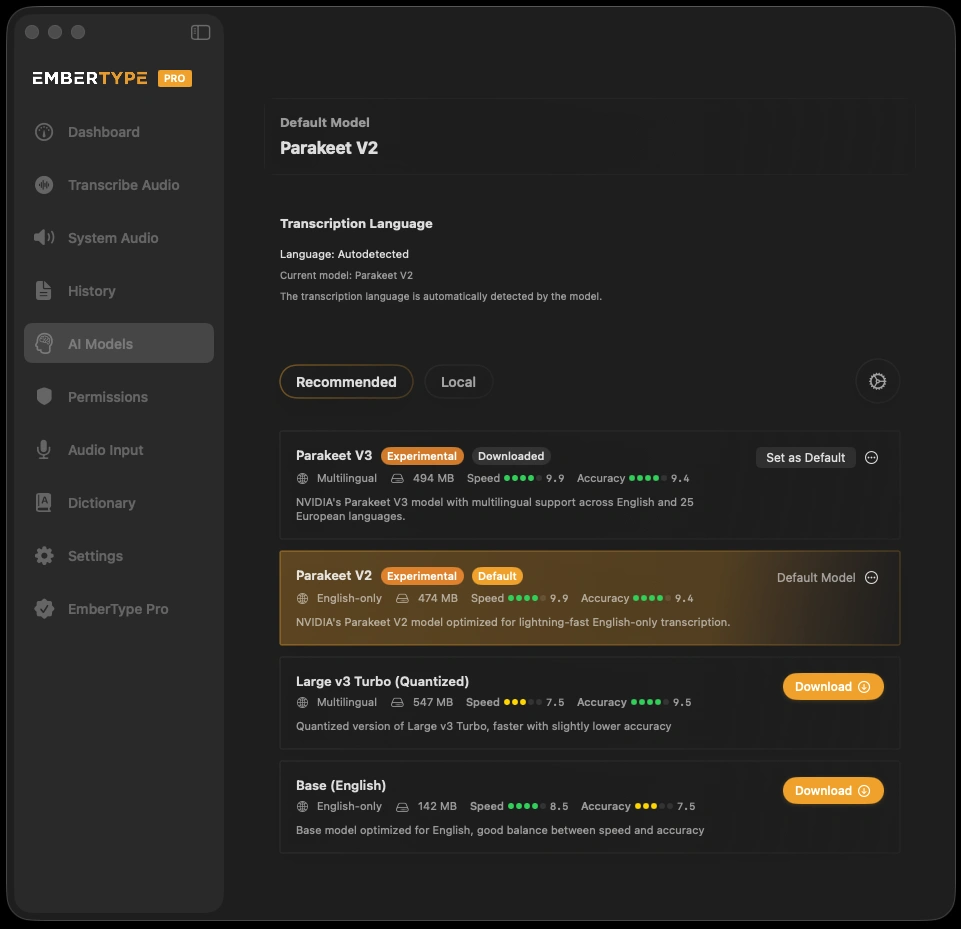
I build EmberType, so read this with that in mind. It is a narrower product than Typeless: Mac only, Apple Silicon, macOS 14 or later. It has no phone keyboard and no Windows app. What it does differently is where the work happens. Speech recognition runs on your Mac by default, with Parakeet set as the default model. Cloud speech models are optional, and only with your own API key. AI rewriting is off by default. If you turn it on, you choose the provider with your own key, or run a local model through Ollama so the text never leaves the Mac. The context features (clipboard and on-screen text) only go where that provider goes. It costs $39 once after a seven-day trial.
If you need Typeless on your phone and your PC, EmberType won’t replace it. If you only dictate on a Mac and the idea of app text going to a server bothers you, it is the cheaper and more private setup. For a broader view, see the Mac dictation apps ranked by architecture and the Wispr Flow alternative guide, which apply to Typeless too.
Only dictate on a Mac? Try it on-device
Use EmberType free for seven days in your own email and documents, with speech recognition running on your Mac.
Download EmberTypeApple Silicon · macOS 14+ · $39 one-time after the trial
Before you subscribe to Typeless
- Check the free limit in the app. The pricing page doesn’t state it, and third-party figures are out of date.
- Find the training and feedback settings. The terms say you control whether your content is available for training. Make sure it is set the way you want, and remember that sending feedback can share diagnostics.
- Decide on Cloud Sync. Leave it off if you don’t want history text on Typeless’s servers.
- Shorten Keep history. Original audio is kept on your device for as long as this setting allows.
- Think about Full Access on iPhone. A networked keyboard can send what you type to its developer. Use the system keyboard for passwords and anything you wouldn’t dictate.
- Don’t pay annually until you’ve used it for a week. Refunds are only what the law or the app store requires.
- US buyers: the terms include mandatory arbitration. You can opt out by emailing Typeless within 30 days of registering.
More pricing and privacy comparisons are in the comparisons hub.
