
There is a particular kind of clarity you only get from watching someone build the opposite of your product. For most of 2024 we were heads-down on a dictation app with one stubborn rule: the audio stays on the Mac by default. No cloud unless you choose it, no account, no telemetry. We argued about that rule constantly — it made the app harder to build and easier to criticise. Then Microsoft announced Recall, the internet reacted, and the argument was settled for us. Not by us. By the reaction.
This is not a Windows-bashing piece. Recall is a genuinely interesting idea, and the redesigned version is far more defensible than the one that got torn apart. But Recall is a near-perfect case study in architecture — in the difference between what a feature promises and what its structure makes possible — and that case study is worth a lot to anyone choosing software on a Mac.
Recall, in one paragraph
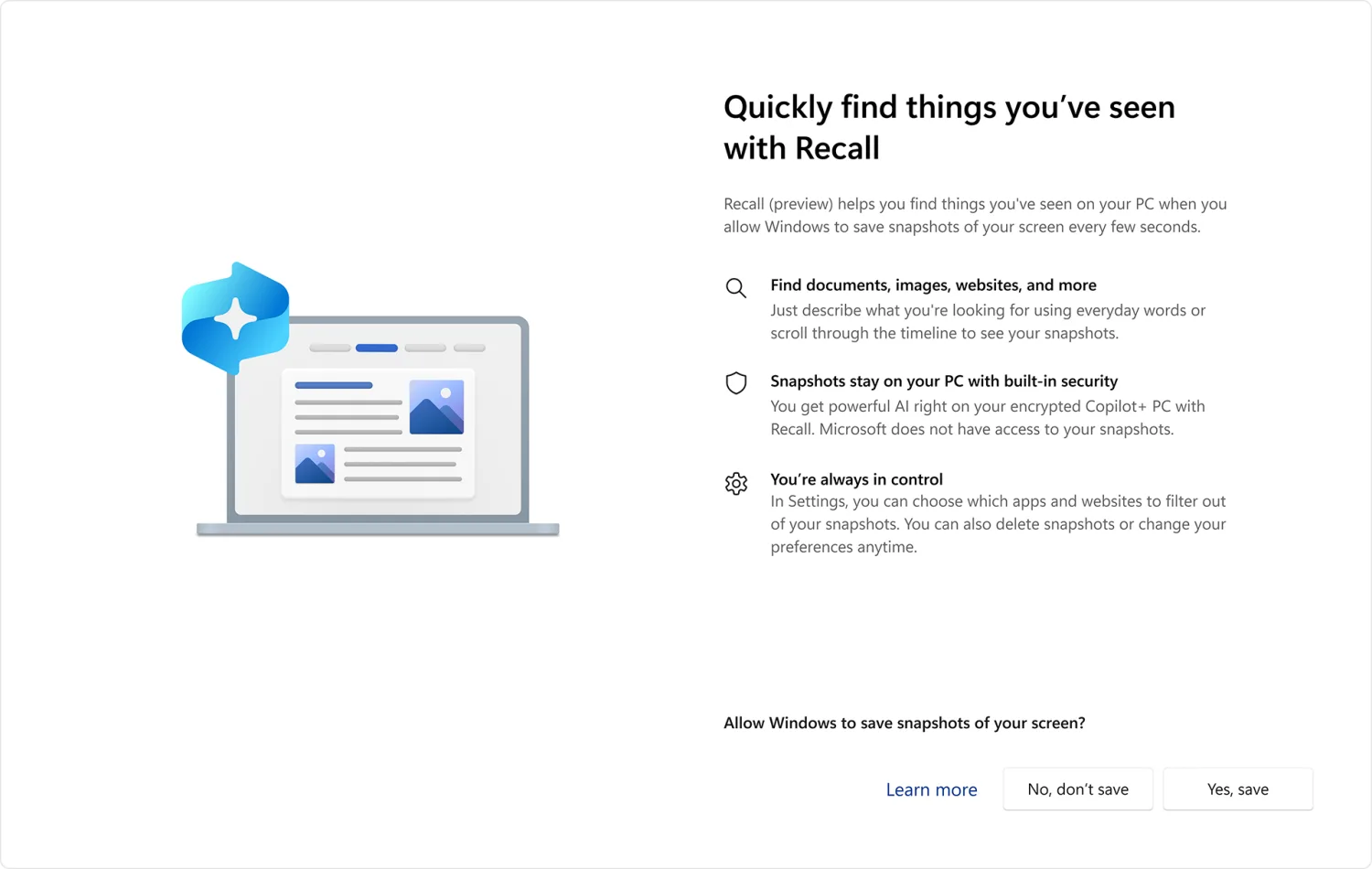
Microsoft Recall is a Windows feature for Copilot+ PCs. When it is enabled, it periodically saves snapshots of your screen — every few seconds — and feeds them to an on-device AI model that reads and indexes everything in them. The promise is a searchable, photographic memory of your computer: you type "the orange backpack I saw last week" and Recall surfaces the exact moment that thing was on your screen, whether it was in a browser, a document, or a chat. It is, on paper, a remarkable feature. It is also a system that, by design, watches everything you do. Both of those sentences are true at once, and that tension is the whole story.
What the May 2024 announcement said it would do
Microsoft unveiled Recall in May 2024 at its Build developer conference, as a headline feature of the new Copilot+ PC class. The pitch leaned hard on the word local: the snapshots stayed on your PC, the AI ran on the device's neural processing unit, nothing went to Microsoft's servers. On the company's own framing, this was a privacy-respecting feature — local processing, no cloud.
And technically, the "local" claim was accurate. Recall did not upload your screen history to Microsoft. If you had stopped reading the spec there, it sounded like exactly the kind of on-device AI a privacy-minded person should want.
But "it runs locally" answers only one question — does a company see my data? — and quietly skips a second one that matters just as much: what happens if someone else gets onto my machine? A feature that builds a complete, indexed, searchable history of everything you have ever looked at has changed the answer to that second question for every other piece of malware, every nosy housemate, every stolen laptop, every abusive partner. Local does not mean safe. Local means the blast radius is now your hard drive instead of a server farm.
What changed when Recall met the internet
Within days of the announcement, security researchers started looking at where Recall actually put its data. What they found is the part everyone remembers. In the original preview, the snapshot history — including the AI-extracted text of everything Recall had seen — was stored in a database that was not encrypted at rest. A researcher published a small proof-of-concept tool, pointedly named "TotalRecall," that demonstrated how trivially that database could be copied off a machine by anything already running on it.
Think about what that means in practice. Ordinary information-stealing malware — the cheap, common kind — is built to grab browser passwords and cookies. Against a PC with the original Recall enabled, that same malware could instead walk away with a screenshot-by-screenshot, fully-transcribed record of the user's last several months: every bank page, every private message, every password manager that was briefly on screen, every medical result. Recall did not create new malware. It dramatically upgraded the payout of malware that already existed.
The reaction was swift and close to unanimous. This was not a fringe-privacy-advocate complaint; mainstream security professionals, the kind who normally choose their words carefully, called it one of the most concerning default features they had seen ship from a major OS vendor. That unanimity is the data point. The market did not need a lecture on threat models. It looked at capture everything, index it, store it and recoiled on instinct.
The redesign — what consent and Windows Hello actually buy you
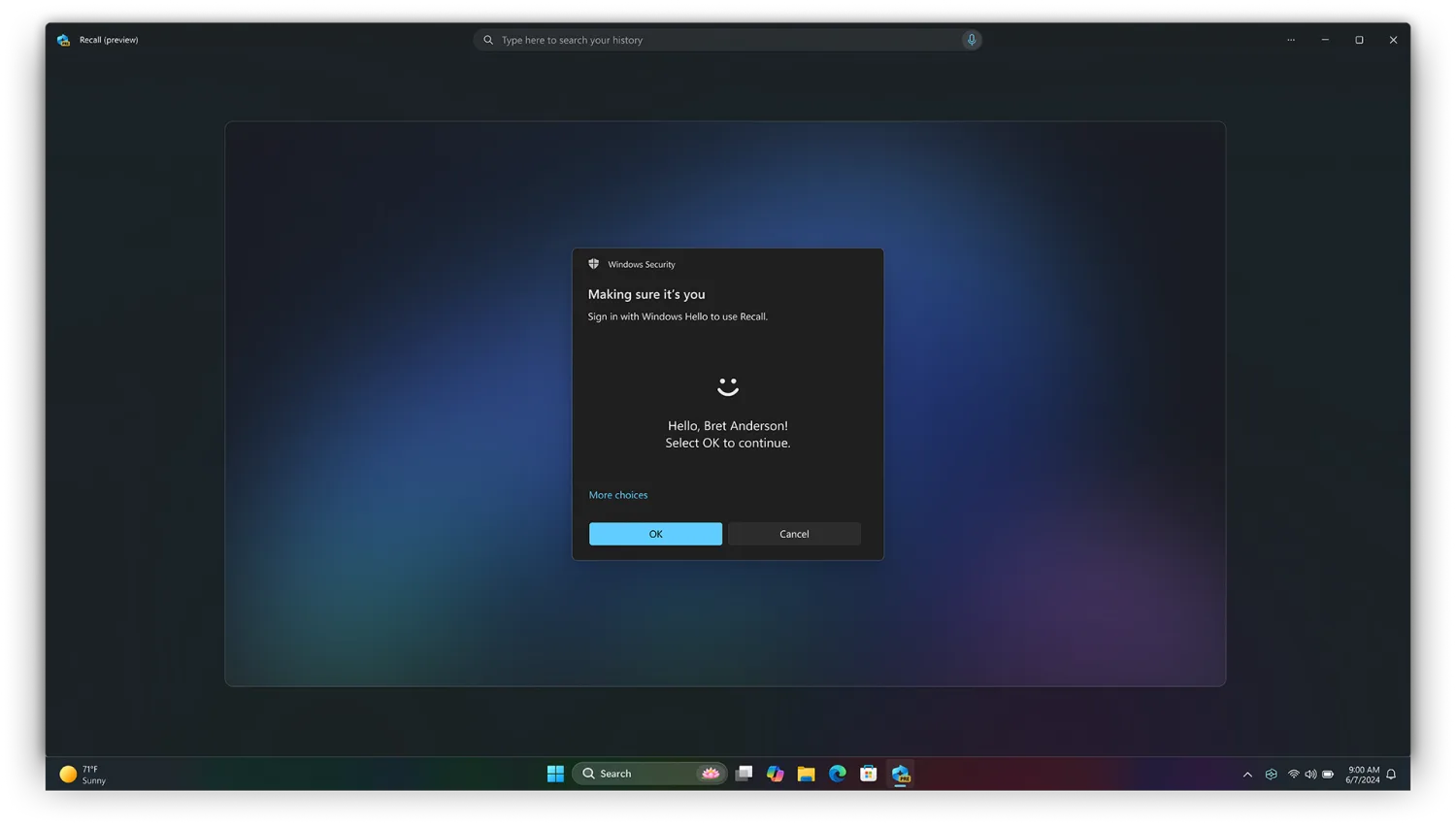
To Microsoft's credit, the company moved. Before Recall reached general availability, it was substantially re-architected. In a June 2024 update, Microsoft announced that Recall would become opt-in rather than on-by-default; that enabling it would require Windows Hello enrolment; that the snapshot database would be encrypted; and that decryption would be "just in time," gated behind a fresh biometric or PIN check so snapshots are only readable when the authenticated user is actually present. Microsoft also pulled Recall from the original Copilot+ PC launch and moved it into the Windows Insider testing program first. The feature later began rolling out as an opt-in option to Copilot+ PCs in 2025.
This is a real improvement, and it is worth being fair about it. Opt-in consent is the single most important change on that list — a feature that does nothing until you say yes is a categorically different thing from one that watches by default. Encryption-at-rest closes the trivial copy-the-file attack. The biometric gate raises the cost of casual access.
But notice what the redesign did and did not change. It hardened the walls around the data. It did not change the nature of the data. A redesigned Recall still, when enabled, builds a complete indexed history of your screen. The vault is much stronger; the vault still contains a copy of everything. Security researchers have continued to probe the hardened version — into 2026 — looking for ways that an attacker who has already cleared the authentication bar could still reach the contents, and Microsoft has maintained that the feature behaves within its intended protections. We are not going to adjudicate that ongoing back-and-forth here, because the back-and-forth is the point: when a feature is built around a giant store of sensitive data, its security becomes a permanent, open research project. Every month is another chance for someone to find the gap.
Why this matters to a Mac user who never opened Windows
You might reasonably be thinking: I use a Mac, Recall is a Windows feature, none of this touches me. On the narrow point, you are right — there is no Recall for macOS, and you cannot accidentally turn it on.
But the reason to care is not the feature. It is the pattern. Recall is the most visible example so far of a design philosophy that is spreading across the entire industry, Apple included: capture broadly now, apply AI later. The economic logic is strong. AI models are most useful when they have the most context, and the easiest way to give a model context is to record everything and let the model sort it out afterward. Every platform vendor feels that pull. The question for the next five years of computing is not whether your Mac gets AI features — it obviously will — but whether those features are built to capture only what you asked for, or to capture everything just in case.
Recall matters to a Mac user because it ran the experiment in public. It took the capture-everything philosophy, shipped it at full strength, and let the world react. The result of that experiment is now part of the record, and every product team — at Apple, at Microsoft, at small shops like ours — gets to learn from it for free. The lesson is not "AI is bad." The lesson is that users have a sharp, fast, intuitive immune response to passive capture, and they do not have the same response to a company promising to be careful with it.
The on-device defense, and what it doesn't defend against
Here is the part that matters most to us, because we use the phrase "on-device" constantly and we want to be honest about what it does and does not buy you.
On-device processing defends against exactly one thing: the company. If your data never leaves your machine, then the vendor cannot read it, cannot get subpoenaed for it, cannot get breached and lose it, cannot change a privacy policy and start monetising it, and cannot have an employee browse it. That is a genuine, valuable guarantee, and it is the guarantee Recall's "local" marketing leaned on.
But on-device processing does not, by itself, defend against anything that gets onto the device. Malware, another user of a shared computer, a thief, someone with brief physical access, a coerced unlock — none of those threats care that the data is local. For those threats, the only thing that helps is having less data sitting there to take. And that is the variable Recall's architecture maximises and a privacy-first dictation app minimises. Same two words — "on-device" — wrapped around opposite amounts of stored data.
This is why we are wary of "on-device" being treated as a finish line. It is the start of a privacy story, not the end of one. The honest version of the question is two questions: does the data leave? and how much data is there at all? A feature can ace the first and fail the second. Recall, even redesigned, aces the first. The whole controversy lives in the second.
The architectural inverse — what we built, and why
We did not set out to build "the anti-Recall." We started EmberType because typing was our bottleneck and every dictation tool on the Mac made us choose between privacy and quality. But once Recall existed as a public reference point, it became a very useful way to explain our own choices, because the two designs are mirror images.
Recall captures continuously; EmberType captures only the seconds you hold a key and speak. Recall stores a permanent, growing history of everything on screen; EmberType keeps only what you chose to dictate — the recording and its transcript, in a local history on your Mac that you can delete, or set to clean itself up automatically — and the text goes straight into whatever app you were already using. Recall's value depends on accumulation; the more it has seen, the better it is. EmberType's value does not: its history is a convenience you can switch off, not the product. Recall asks you to trust a vault of everything you've seen. EmberType's vault holds only what you said on purpose, and stays on your Mac.
This is not us claiming sainthood. It is a design trade-off, and we gave things up for it. Scoped capture means EmberType can never offer you a searchable archive of everything you did on your Mac, because it never saw it. We decided that was a feature, not a limitation — that for the specific job of turning speech into text, the right thing to retain is only what you dictated, on your own disk, under your control. Recall made a different call for a different job. But watching Recall's launch convinced us that when the call is close, you should err toward keeping less, because the market punishes keeping more far harder than it rewards convenience.

Dictation With No Vault to Trust
EmberType runs OpenAI's Whisper model on your Mac by default. It captures only the seconds you choose to speak, types the result into any app, and keeps its recordings and history only on your Mac, where you can delete them or turn on automatic cleanup. There is no cloud unless you add your own API key, no account, and nothing synced anywhere.
Try EmberType Free for 7 DaysmacOS 14+ • Apple Silicon • $39 one-time after trial
The Spotlight question — and why Spotlight is fine
Whenever we draw this line, a fair objection comes back: your Mac already indexes a huge amount of your stuff. Spotlight reads your files, your mail, your messages, and builds a searchable index of all of it. Is that not the same thing as Recall?
It is a good question, and the answer is instructive. Spotlight is not the same thing, and the reasons it is not are exactly the design principles worth holding onto.
Spotlight indexes data you already chose to create and keep. A file you saved, an email you received, a message someone sent you — these already exist on your machine as deliberate artefacts. Spotlight makes them findable; it does not bring anything new into existence. Recall is different in kind: it manufactures a new artefact — a screen history — that did not exist before and that you would never have created on purpose. The difference between indexing what you kept and recording what you merely looked at is the entire difference. One organises your decisions. The other removes the decision.
Spotlight also indexes discrete things with natural boundaries — this file, that message — not an undifferentiated stream of everything that crossed your display, banking pages and disappearing messages included. The boundary is doing real work. "Index the documents I saved" is a scoped, legible promise. "Index everything I saw" is not a scope at all. So no, an on-device index is not automatically a Recall. Spotlight is the proof that local indexing can be done in a way that respects the line. The line is just: index what the user chose to keep, not what the user happened to see.
What "always-on" features look like when they're built defensively
None of this is an argument against ambitious AI features. It is an argument for a particular way of building them. After Recall, here is the checklist we apply to any always-on or capture-oriented feature — our own included — and that we would suggest you apply as a Mac user evaluating what to install:
- Off by default. The feature should do nothing until the user makes an explicit, informed choice. Recall's single most important fix was becoming opt-in. Treat any capture feature that is on by default as a red flag, not a convenience.
- Scoped capture. The feature should record the narrowest thing that does the job — the seconds you spoke, the file you saved — not "everything, continuously, just in case."
- Minimal retention. Ask what the feature keeps and for how long. The safest store is the one that does not exist. The next safest is the one that is small and short-lived.
- Legible boundaries. You should be able to state in one sentence what the feature can and cannot see. "It transcribes what I dictate" is legible. "It remembers what I did" is not.
- A real off switch — and a real delete. You should be able to turn it off and remove what it has, easily, and trust that off means off.
A feature can be powerful and still pass this checklist. The two are not in tension. They were only ever in tension in the version of Recall that skipped the checklist entirely.
What Mac users should watch for as Apple ships more AI
Apple has, so far, not shipped a Recall-style timeline, and its Apple Intelligence features lean more toward processing things you act on than toward passive capture. Apple's on-device-first marketing is genuine, and its track record on privacy is, on balance, good. But "Apple is generally careful" is a promise, and the whole point of this essay is that promises are the weak part of a privacy story. Architecture is the strong part.
So as a Mac user, here is what is worth watching — not with paranoia, just with attention — as more AI lands in macOS:
- When a new feature is announced, ignore the adjectives and ask the structural question: what does this capture, and what does it keep? "Smart," "personalised," and "on-device" are not answers to that question.
- Watch for the word "context." When a feature wants "more context to be helpful," that often means more capture. Sometimes that trade is worth it. You should at least know you are making it.
- Check the default. A feature you must turn on is respecting you. A feature you must hunt down and turn off is not.
- Be most careful with the apps that touch your most sensitive streams — anything reading your screen, your microphone, your messages, your meetings. Those are exactly where minimal-retention design matters most, and exactly where always-listening tools have run into trouble.
This is not a reason to fear AI on the Mac. It is a reason to read it structurally. The Mac users who do that will end up with a machine full of genuinely useful AI and free of quiet little archives they did not ask for.
The setting that matters most on every machine
If you take one practical action from this essay, make it this: on every computer you own, go through the AI and privacy settings and find the capture features — screen, microphone, activity history — and make a deliberate decision about each one. On a Copilot+ PC, that means deciding about Recall on purpose rather than by default. On a Mac, it means knowing which apps have screen-recording and microphone permission, and revoking the ones that do not need them.
The goal is not to turn everything off. Some capture is worth it; we sell a microphone feature, and we think it earns its permission. The goal is that every capture feature on your machine is there because you said yes to it, knowing what it does — not because it was the default and you never looked. The single most private setting on any computer is the same one it has always been: the one you actually chose.
What to do this week
Two things, both small.
First, audit one machine. Open its privacy settings, look specifically at what has screen-recording, microphone, and history permissions, and turn off anything you do not recognise or do not use. It takes ten minutes and it is the highest-leverage privacy thing most people never do.
Second, if you dictate — and if you are reading a 3,000-word essay about screen capture, you probably type a lot — try a tool built on the opposite of Recall's architecture. EmberType captures only the seconds you speak, transcribes them on your Mac by default, with no account and no cloud unless you add your own key, and keeps only what you dictated, on your Mac, for as long as you choose. It is free for seven days, and the point of the trial is not really to sell you an app. It is to let you feel, directly, the difference between software that hoards everything and software that keeps only what you gave it. Once you have felt it, you will recognise it everywhere — and you will choose it on purpose, which is the whole lesson Recall taught us.
The Opposite of Capture-Everything
EmberType is dictation built on the architecture Recall's backlash argued for: scoped capture, local-only storage you control, on-device by default on Apple Silicon. Press a shortcut, talk, and your words land in any app — with nothing synced, and nothing sent unless you choose a cloud model.
Download EmberType Free7-day free trial • macOS 14+ • Apple Silicon • $39 one-time after trial
Frequently Asked Questions
Recall is a Windows feature for Copilot+ PCs that periodically saves snapshots of your screen and indexes them with on-device AI, so you can later search your past activity in natural language. Microsoft announced it in May 2024. After a security backlash it was redesigned to be opt-in, encrypted, and gated behind Windows Hello, and it began rolling out to Copilot+ PCs in 2025.
No. Recall is a Windows-only feature and requires a Copilot+ PC. There is no Recall app for macOS, and Apple has not shipped an equivalent screen-snapshotting feature. Mac users were never exposed to Recall directly — but the design questions it raised apply to any always-on AI feature on any platform.
Recall's original 2024 preview was widely criticised because the snapshot database was stored unencrypted and could be copied off the machine easily. Microsoft's redesign added encryption, opt-in consent, and Windows Hello authentication. Security researchers have continued to probe the redesigned version and Microsoft maintains it behaves as intended. The honest summary: the redesigned Recall is far more defensible than the original, and the safest setting for anyone uneasy about it is simply to leave it off.
Yes. After the 2024 redesign, Recall is opt-in — it does not save snapshots unless you explicitly enable it, and it can be turned off or removed in Windows Settings. If you never opt in, Recall does not capture anything.
No. macOS Spotlight indexes your files and some content for search, but it does not take periodic screenshots of everything you do. As of 2026 Apple has not shipped a Recall-style timeline feature. Apple Intelligence focuses on processing content you act on, not on capturing everything passively.
Both involve sensitive data and on-device AI, but they sit at opposite architectural extremes. Recall captures everything and processes it later. A privacy-first dictation app like EmberType captures only the few seconds you choose to speak, transcribes them on-device by default, and keeps only that dictation, in a local history you can delete. Watching the reaction to Recall confirmed that the capture-only-what-the-user-asked-for model is the one people actually trust.