

The Quick Version
- Ollama has no voice input. It runs the model and nothing else — no audio, no speech-to-text, confirmed in its own docs and GitHub README.
- Voice is a three-model chain — speech-to-text, then the LLM, then optionally text-to-speech. Ollama is only the middle one. You supply the other two.
- Most tutorials hand the first link to a cloud API, which puts your actual voice on the network before the "local" model ever sees the text.
- The Apple Silicon trap: your speech model and your language model compete for the same unified memory. Run a small speech model and give the headroom to the LLM.
- Turn AI text cleanup off for prompts. It is built to smooth prose, and smoothing a prompt removes the specificity the model needs.
Ollama runs the model. That is genuinely all it does.
This is not a criticism. Ollama is a focused tool that does one job unusually well: it makes running open-weight models on your own machine roughly as hard as installing a package. It is MIT-licensed, it runs on macOS, Windows, Linux and Docker, it ships a Mac app alongside the CLI, and it serves models like Qwen, Gemma, DeepSeek and gpt-oss through a local HTTP API that other tools can point at.
What it does not do is hear you. There is no audio pipeline in Ollama, no speech-to-text, no Whisper integration. I went looking for one in the documentation and the README before writing this, because I did not want to assert an absence I had not checked. It is not there.
That matters because "add voice to Ollama" is not one problem. It is three. A complete voice loop needs speech-to-text to turn your talking into tokens, the language model to respond, and text-to-speech if you want it to answer out loud. Ollama covers exactly the middle one. The three-model chain framing is the correct mental model, and it explains why the setup guides are all longer than you expect.
Most people, though, do not want the full loop. They want the first link. They want to stop typing.

Ollama's official mark. Source: ollama.com.
The part that makes me wince
Search for how to add voice input to Ollama on Mac and you will find a pile of genuinely helpful open-source projects — GitHub repos, DEV posts, Medium write-ups, people solving this for themselves and publishing it. I like that this is where the answers live. It is also where a specific mistake gets repeated.
A good number of these setups wire the speech layer to a hosted transcription API. It works, it is a few lines of code, and it is the default in most tutorials because it is the easiest thing to demonstrate.
It also quietly undoes the entire reason you installed Ollama.
Think about what is actually in the audio. You installed a local model so your prompts would not leave the machine — and prompts are where the sensitive material is. The client name. The unreleased feature. The thing you are debugging that you have not told anyone about. When you route the microphone through a cloud API, that content leaves your Mac before the local model ever touches it, and it leaves as a recording of your voice rather than as text. You have not reduced your exposure. You have moved it one step earlier in the pipeline and made it biometric.
If the reason you run models locally is privacy, compliance, or simply working on a plane, the speech layer has to be local too. Otherwise the guarantee breaks at the first link in the chain.
What actually works: dictation that types into anything
The approach I would defend is unglamorous. Rather than building voice into Ollama, run a dictation layer that sits above every app on macOS: hold a hotkey, speak, release, and the transcribed text appears wherever your cursor already is. Your terminal running ollama run. A GUI client pointed at Ollama's API. Your editor. A browser tab. It does not need to know Ollama exists.
On macOS there are several apps that do this with Whisper running on-device — MacWhisper, SuperWhisper, and EmberType, which is the one I build. They differ on pricing, model handling and polish, and I have written a neutral comparison of the two best-known ones if you want that. For this article the important thing is the architecture, not the brand: transcription on-device, output into the focused window, no network hop.
The nice property of this arrangement is that it composes. The same hotkey that dictates a prompt into Ollama dictates a commit message, a Slack reply, and a comment in your editor. You are not adopting an Ollama feature; you are adding an input method to the whole operating system, and Ollama happens to be one of the things it types into.
The Apple Silicon trap nobody mentions
Here is the thing I only learned by building a dictation app and then using it alongside local models, and it is the reason I wanted to write this piece rather than another setup walkthrough.
On Apple Silicon, memory is unified. The CPU, GPU and Neural Engine all draw from the same pool. That is normally a feature — it is why a MacBook can run models that would need a discrete GPU elsewhere. But it means your speech model and your language model are competing for the same resource, and neither of them tells you that is happening.
A large quantised model in Ollama can occupy the majority of a 64GB machine by itself. If you then keep a large Whisper model resident so dictation feels instant, you have two hungry models in one pool, and the failure mode is not an error message — it is your Mac starting to swap, your model's tokens-per-second quietly collapsing, and you blaming Ollama.
The fix is counterintuitive if you assume bigger is better: use a smaller speech model. Transcription accuracy plateaus much faster than people expect for clean microphone input in a quiet room. The jump from a small model to a large one buys you very little on a decent USB microphone, and it costs you memory that the language model can actually put to work. Spend the headroom where it changes the output. If you want to go deeper on which speech models are worth the memory, I keep notes on that here.
Two habits that make dictated prompts better
Turn off AI text cleanup. Most dictation apps offer an enhancement pass that fixes grammar and removes filler. It is genuinely good for prose. It is bad for prompts, because the awkward specificity you spoke — the exact function name, the precise qualifier, the "but only when" clause — is the part the model needs, and smoothing is exactly the process that files it off. I dictate prompts raw and turn enhancement back on for documentation.
Build a small custom dictionary. Whisper handles the general technical vocabulary well out of the box — JSON, OAuth, regex, localhost, Kubernetes. What it cannot know is your particular nouns: internal service names, package names, the acronym only your team uses. Ten minutes teaching the app those terms removes most of the friction people blame on "dictation not working for technical stuff."
There is also a behavioural thing worth naming. People dictate longer prompts than they type, and with a local model that is free rather than expensive — there is no per-token bill, so the rambling, over-specified prompt that would feel wasteful against a metered API is simply a better prompt here. Local inference and voice input suit each other for a reason that has nothing to do with either technology.
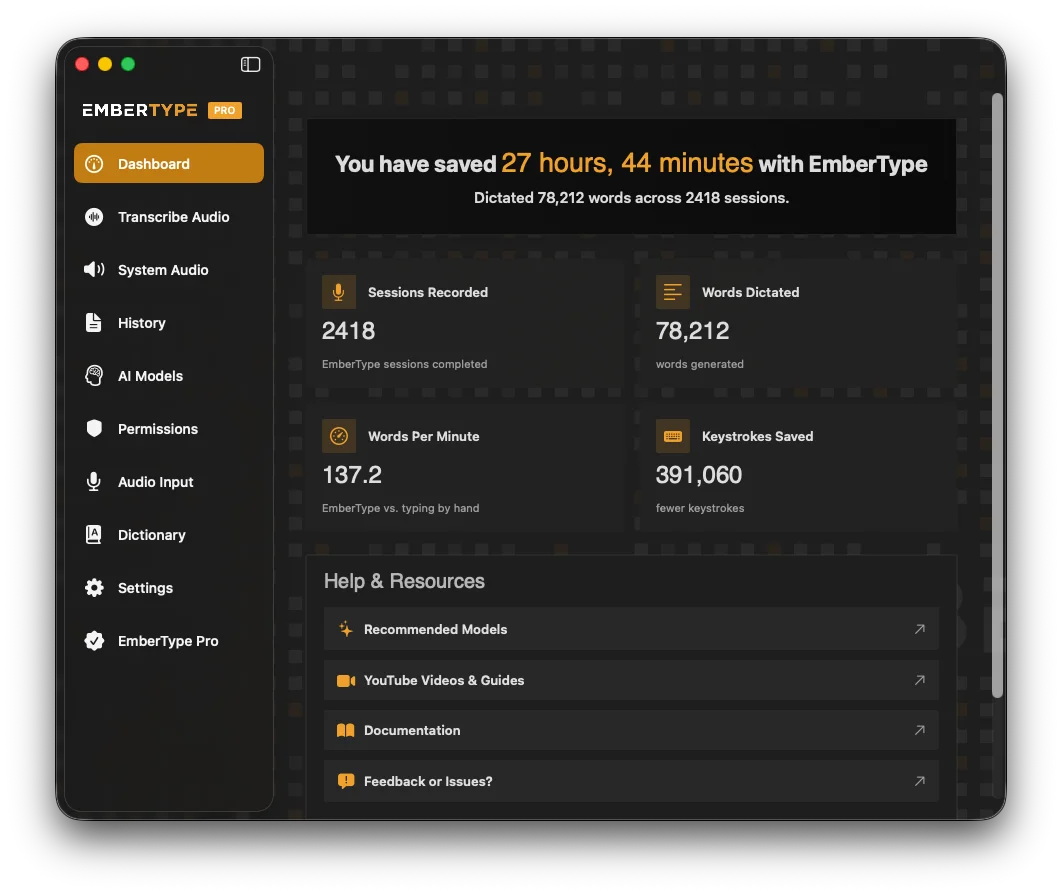
EmberType's dashboard — hotkey, microphone and active local model in one place. Source: embertype.com.
When you should ignore all of this
If you use Ollama occasionally, from a terminal, for short prompts, you do not need any of this. Typing ollama run qwen and asking a two-line question is not a workflow with a problem in it. Dictation earns its place when prompts get long, when you are going back and forth for an hour, or when your hands or wrists have opinions about how much typing you do — which, for a lot of people who end up here, is the actual reason.
And if you genuinely do not care whether your audio goes to a third party — personal projects, nothing confidential, no compliance obligation — a cloud speech API is easier to wire up and often more accurate on messy audio. I would just want you to make that trade knowingly, rather than discovering it in a tutorial and assuming that "local model" meant the whole pipeline was local. It does not, and nothing in Ollama will tell you.
Talk to Your Local Models Without Breaking the Local Part
EmberType runs Whisper on-device and types into any macOS app — your terminal, your Ollama client, your editor. No account, no API key needed, and with its local models no audio leaves your Mac.
Download EmberType FreemacOS 14+ required. Apple Silicon only. $39 one-time after a 7-day trial. No subscription.
Frequently asked questions about Ollama and voice input on Mac
No. Ollama runs language models locally and exposes them through a CLI and an HTTP API, and its documentation and GitHub README make no mention of audio, voice, or speech-to-text support. Ollama is one link in what is really a three-model chain — speech-to-text, then the language model, then optionally text-to-speech — and it only handles the middle link. If you want to talk to a model running in Ollama, you supply the speech-to-text layer yourself.
Use a system-wide dictation app that transcribes on-device and types the result into whatever window has focus — including your terminal running the ollama command, or any GUI client pointed at Ollama's API. Apps that run Whisper locally on macOS include EmberType, MacWhisper and SuperWhisper. Because the transcription happens on your Mac and the model already runs on your Mac, the entire round trip stays local. The alternative is wiring a speech-to-text API into a custom script, which works but sends your audio to a third party.
In most cases, yes. People install Ollama specifically so prompts and outputs never reach someone else's servers. Adding a cloud transcription API puts the most sensitive part of the exchange — your actual spoken words, in your actual voice — back on the network, often before the model ever sees it. If your reason for running local models is privacy, compliance or working offline, the speech layer has to be local too, or the guarantee is broken at the first step.
It can, and this is the part most guides skip. Apple Silicon uses unified memory shared between the CPU, GPU and Neural Engine, so a local speech model and a local language model are drawing on the same pool. A 70B model quantised into Ollama can occupy most of a 64GB machine on its own; add a large Whisper model held in memory for instant dictation and you can push the system into swapping. The practical fix is to run a smaller, faster speech model — transcription quality plateaus quickly for clean microphone input — and reserve the headroom for the LLM, which is where it actually matters.
Usually yes. Most dictation apps offer an enhancement pass that fixes grammar, removes filler words and smooths phrasing. That is excellent for prose and quietly destructive for prompts, because the specificity you spoke is exactly what the model needs. I keep enhancement off when dictating to a model and rely on raw transcription, then turn it back on when writing documentation or commit messages in the same session.
Ollama's codebase is open source under the MIT license and the local tooling is free to download and run on macOS, Windows, Linux and Docker. Ollama has since added paid cloud-hosted model options alongside the local runner, so 'free to start' is the accurate description of the product as a whole — but running open-weight models on your own Mac remains free.

Free Mac Dictation Tips
Get tips on voice-to-text, dictation workflows, and developer productivity. No spam.
Unsubscribe anytime. We never share your email.
You're in! Check your inbox.
One Hotkey, Every App, Nothing Leaves the Mac by Default
The same dictation layer that prompts your local models also writes your commits, your docs and your email. Works 100% offline with local Whisper models.
Download EmberType FreemacOS 14+ required. Apple Silicon only. $39 one-time. No account required.