
The Quick Version
- LM Studio Bionic has real-time voice transcription, announced 16 July 2026, and it runs locally — "your voice and audio data is processed locally and never leaves your device."
- That is the correct architecture and they deserve credit for it. A local-AI tool with a cloud speech API would break its own promise at the first step.
- But Bionic is a separate app, currently in initial preview for macOS and Windows. The main LM Studio application has no built-in voice.
- The gap is scope, not quality. App-scoped voice works in one window; running local AI happens across a terminal, an editor, a browser and LM Studio itself.
- If you only live in Bionic, use what ships with it. Genuinely. The rest of this is for people who don't.
Credit where it is due
On 16 July 2026, LM Studio introduced Bionic, described as an agent made for open models — less a chat window, more something you hand a task to. Among the features is real-time voice transcription, and the sentence on their page that matters most is this one: "Your voice and audio data is processed locally and never leaves your device."
I want to sit on that for a second, because I spend a lot of time being critical of how voice gets bolted onto AI tools, and this is the opposite of the usual story.
The lazy way to ship voice input is to send the microphone stream to a hosted transcription API. It takes an afternoon, the accuracy is good, and for most products nobody notices. But in a tool whose entire reason for existing is that the model runs on your hardware, that shortcut is self-defeating: your spoken words — the most sensitive part of the exchange, and biometric data besides — leave the machine before the local model ever sees the text. I have watched several local-AI projects do exactly this. LM Studio did not. They put the speech model on-device where it belongs.
So this is not an article about a missing feature. It is an article about the edges of a good one.
Bionic is not LM Studio
Here is the thing worth being precise about, because the two names get used interchangeably and they are not the same product.
LM Studio is the established desktop app — the one people have been using for a couple of years to browse, download and run open-weight models locally on M-series Macs. Bionic is new, separate, has its own download, its own documentation section, and is described as being in initial preview. Voice transcription is a Bionic feature.
Which means that if you are one of the many people whose local-AI setup is the main LM Studio app — loading a model, chatting with it, pointing other tools at its local server — the voice feature announced in July is not in the application you are using. You would need to adopt a different, preview-stage app to get it.
That may well be worth doing; Bionic looks genuinely interesting and agentic workflows suit voice unusually well. But "LM Studio has voice now" and "the app I actually use has voice now" are different statements, and the gap between them is where most people's confusion is going to live for the next few months.

LM Studio's official product imagery for the main local-model application. Source: lmstudio.ai.
The real limitation is scope, and it is not a bug
Say you adopt Bionic and the voice input is excellent. You will still hit the same wall every app-scoped voice feature hits, and it is worth naming clearly because it is the deciding factor for most people.
Bionic's voice works in Bionic. That is the correct design decision for an agent app — a focused product should not be trying to become a system input method. But look honestly at an hour of your own local-AI work. You prompt the agent. You drop into a terminal to check something. You edit a config file. You look up a model card in a browser. You paste a result into your notes. You go back to LM Studio proper because that is where your quantised 30B lives.
Voice covered one of those. You typed the rest.
This is the pattern I have watched play out with every app that ships its own dictation: the feature is good, people love it for a week, and then the inconsistency starts to grate. Having voice in one window and not the others is, in daily use, sometimes worse than not having it at all, because your hands keep reaching for a hotkey that only works in one place. The muscle memory forms and then breaks against every other application.
The alternative: put voice under everything instead of inside one thing
The other approach is to run dictation at the operating-system level. Hold a hotkey anywhere in macOS, speak, release, and the transcribed text lands wherever your cursor already is — Bionic, LM Studio, iTerm, VS Code, Mail, a browser field. The app being typed into does not need to know or cooperate.
On macOS the established options that run Whisper on-device are MacWhisper, SuperWhisper, and EmberType, which is the one I build — so weigh that accordingly, and I have written a straight comparison of the first two that does not mention mine. They vary on pricing model, how they handle models, and how much they try to rewrite what you said. What they share is the property that matters here: one input method, every application, transcription on-device.
If you are running local models specifically to keep data on your machine, this also keeps the story consistent. The model is local, the transcription is local, and there is no step in the chain where a network request would surprise you.
One thing to watch on Apple Silicon
Whichever route you take, there is a resource interaction that is easy to miss and hard to diagnose after the fact.
Apple Silicon uses unified memory shared across the CPU, GPU and Neural Engine. It is the reason a MacBook can hold a large model at all. It also means a resident speech model and a loaded language model are drawing on the same pool, and the failure mode is not an error — it is your Mac beginning to swap and your tokens-per-second quietly falling off, at which point you will blame the model, or the quantisation, or LM Studio.
The practical answer is to run a smaller speech model than your instincts suggest. Transcription accuracy plateaus quickly with a decent microphone in a quiet room; the memory you save is worth far more to the language model, where it converts directly into speed or into being able to run a better model at all. I keep notes on which speech models are worth the memory if you want specifics.
When to ignore all of this
If Bionic becomes the place you do your local-AI work, and you are content to type in the handful of other apps you touch, the built-in transcription is the obvious choice. It is local, it is free of setup, it supports multiple languages, and it is right there. Adding a second tool to solve a problem you do not have is how people end up with cluttered Macs and three hotkeys that do the same thing.
The case for a system-wide layer is specific: you work across many applications, you dictate more than a few sentences at a time, you also use the main LM Studio app, or your wrists have made the decision for you. That last one is more common in this audience than people admit, and it is the reason a good number of readers of this site went looking for dictation in the first place.
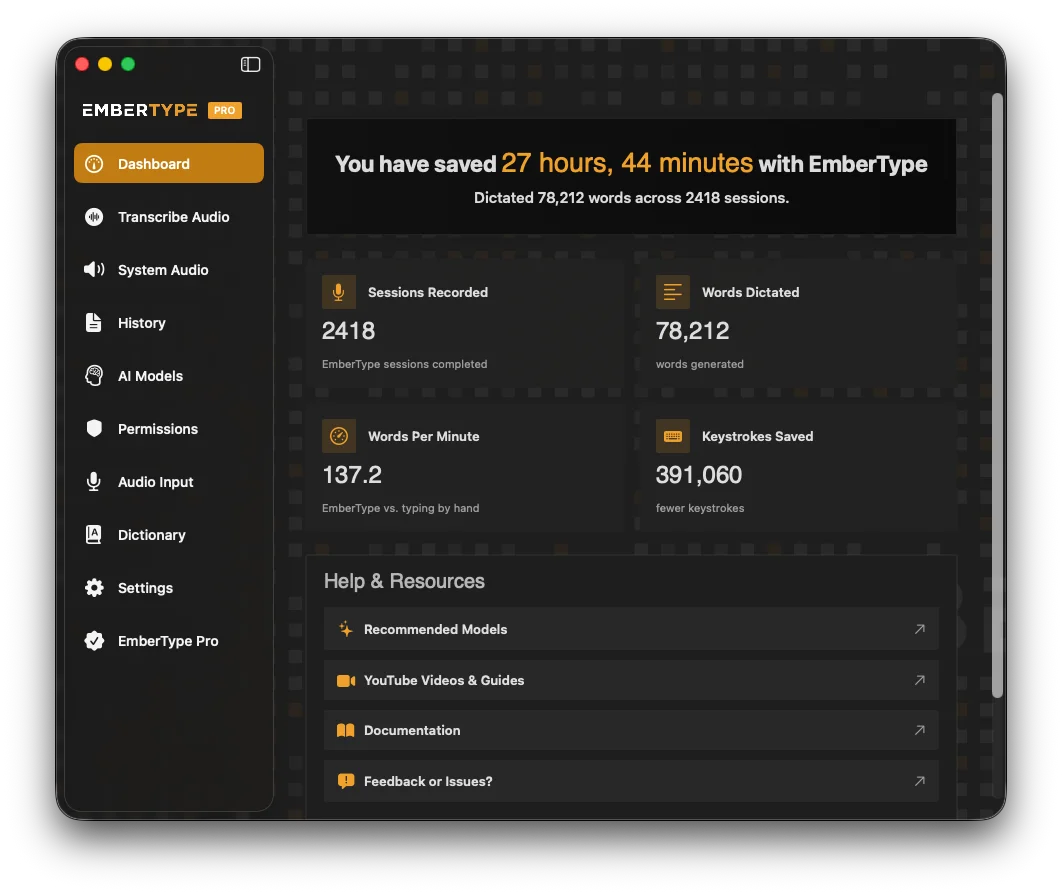
A system-wide dictation layer surfaces one hotkey, one microphone and one local model for every app. Source: embertype.com.
One Hotkey for Every App, Not Just One
EmberType runs Whisper on-device and types into anything on macOS — Bionic, LM Studio, your terminal, your editor. No account, no API key, no audio leaving your Mac.
Download EmberType FreemacOS 14+ required. Apple Silicon only. $39 one-time after a 7-day trial. No subscription.
Frequently asked questions about LM Studio and voice input on Mac
Partly. On 16 July 2026 LM Studio introduced Bionic, a separate agent app for open models, and Bionic includes real-time voice transcription — its product page states that you can talk to it naturally and your speech is transcribed in real time. The main LM Studio application, the one most people mean when they say LM Studio, does not have built-in voice input. So the accurate answer is that voice exists in the LM Studio family, in one specific app, currently in initial preview for macOS and Windows.
Local. LM Studio's Bionic page is explicit: your voice and audio data is processed locally and never leaves your device, and it supports multiple languages. That is the correct architecture for a tool whose entire premise is running open models on your own hardware, and it is worth saying plainly that they got this right — plenty of local-AI tools bolt on a cloud speech API and quietly break the privacy promise at the first step.
LM Studio is the established desktop application for discovering, downloading and chatting with open-weight models locally. Bionic, announced 16 July 2026, is a newer and separate product described as an agent built for open models — aimed at getting tasks done rather than just chatting, with its own download and its own documentation. They share a company and a philosophy, not a binary. Voice transcription is a Bionic feature, and Bionic is in initial preview.
Because Bionic's voice works inside Bionic. That is not a flaw, it is a scope decision, and it is the right one for an agent app. But running local AI is rarely a single-window activity: you are also in a terminal, an editor, a browser, a notes app, and often in LM Studio's main application rather than Bionic. App-scoped voice means learning one input method that works in one place and reverting to the keyboard everywhere else. A system-wide dictation layer types into whatever has focus, so the same hotkey covers Bionic, LM Studio, your IDE and your email.
Yes. LM Studio has long been a mainstay of local inference on M-series Macs, and Bionic's download page offers a Darwin ARM64 build alongside Windows x64 — so Apple Silicon is a first-class target. Apple Silicon's unified memory is a large part of why local model runners work as well as they do on Macs, though it also means a speech model and a language model held in memory simultaneously are drawing from the same pool.
LM Studio's local application has been free to download and use for individuals, and Bionic is currently available in initial preview. LM Studio's site does list Pricing and Enterprise pages, and Bionic's page does not state a price, so the commercial terms for Bionic specifically are not yet spelled out publicly. Check lmstudio.ai directly before assuming — pricing on preview products tends to change.

Free Mac Dictation Tips
Get tips on voice-to-text, dictation workflows, and developer productivity. No spam.
Unsubscribe anytime. We never share your email.
You're in! Check your inbox.
Local Model, Local Transcription, No Exceptions
If you run open models to keep your data on your machine, your dictation should follow the same rule. EmberType is 100% offline, powered by Whisper.
Download EmberType FreemacOS 14+ required. Apple Silicon only. $39 one-time. No account required.