

If you're searching for a MacWhisper alternative, EmberType is the answer for most users -especially anyone who wants to dictate into any app instead of transcribing audio files. Both apps run the same Whisper AI engine, so transcription accuracy is identical. The real difference is the workflow: MacWhisper takes audio files and gives you transcripts; EmberType lets you press a shortcut, speak, and have text appear at your cursor in any Mac app.
That single design choice -plus EmberType's $39 one-time price (vs €64 for MacWhisper Pro) and on-device-by-default transcription -is why most people land on EmberType after researching MacWhisper.
Why EmberType Is the Best MacWhisper Alternative
- Wispr Flow vs MacWhisper -- real-time vs file-based
- Mac Dictation With No Subscription -- one-time-purchase roundup
- EmberType types into any app instantly -press a shortcut, speak, text appears at your cursor. MacWhisper is a file-based transcription tool.
- $39 one-time vs MacWhisper's free / €64 tiered pricing -pay less, in dollars, for the Whisper-powered dictation most users actually need.
- On-device by default. Local models work 100% offline. Cloud models stay off unless you add your own API key, and EmberType never receives your audio.
- Same Whisper AI engine underneath. Identical transcription accuracy -EmberType wraps it in a faster, simpler dictation workflow.
What Is MacWhisper?
MacWhisper is a native macOS transcription app built by indie developer Jordi Bruin. It uses OpenAI's Whisper models (and NVIDIA Parakeet) to turn audio files into text — podcasts, interviews, meeting recordings, lectures. You drag an MP3 or video file into the app and it produces a timestamped transcript with optional speaker labels. The underlying model runs 100% locally on your Mac, so no audio is sent to the cloud unless you explicitly pick a cloud-model option.
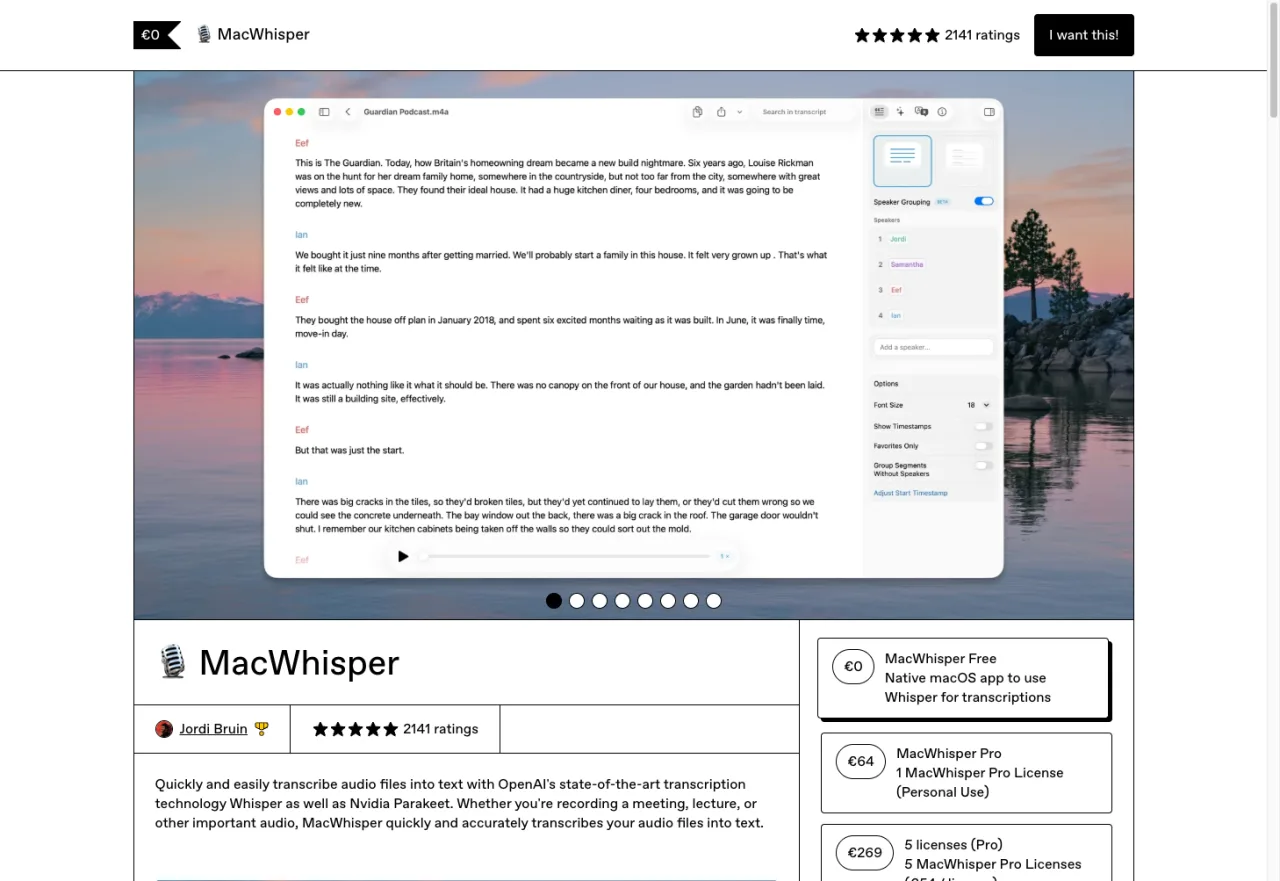
MacWhisper has a free tier that covers basic transcription and a Pro tier at €64 one-time (lifetime updates) for features like speaker identification, batch processing, larger models, and export formats. It's one of the most polished indie Mac apps in this category, and when people search for "macwhisper" directly, they're usually either checking if it's still the right tool for them or comparing it to a newer alternative. If your budget is the main constraint, our roundup of free dictation options for Mac covers what's actually viable at $0.
The key thing to understand: MacWhisper is a file-based transcription app. You give it a recording, it gives you text. It is not a real-time dictation app — you can't press a shortcut, speak into any Mac window, and have text appear where your cursor is. That distinction is why EmberType exists as a category-adjacent tool rather than a direct competitor. If you've never used either and you're not sure which you need, jump to "When MacWhisper Is Genuinely Better" below.
Feature-by-Feature Comparison
| Feature | EmberType | MacWhisper Pro |
|---|---|---|
| Price | $39 one-time | Free–€64 |
| Live Dictation | Yes | Yes |
| File Transcription | Yes | Yes |
| Desktop Audio Transcription | Yes | Yes (meeting recording) |
| AI Text Cleanup | Yes (automatic) | Via cloud AI integrations |
| 100% Offline | Yes with local models (default); optional cloud with your own key | Optional (has cloud features) |
| Cloud AI Integrations | Optional, off unless you add your own API key | ChatGPT, Claude, Deepgram, ElevenLabs |
| Third-Party Integrations | None | Notion, Zapier, n8n, Obsidian |
| Speaker Identification | No | Yes |
| Batch Transcription | No | Yes |
| Open Source | Yes (GPL v3) | No |
| Free Trial | 7 days (full access) | Free tier (limited) |
| Device Activations | 3 Macs | Not specified |

Try EmberType Free for 7 Days
On-device dictation for Mac. $39 one-time -no subscription, no cloud unless you choose it.
Download Free TrialNo credit card required • macOS 14+ • Apple Silicon
The Features We Said No To (and Why)
When I was scoping EmberType's feature set, I had MacWhisper open on one monitor and my planning doc on the other. Here's every major MacWhisper feature I considered and the actual reasoning behind cutting it.
Speaker Identification: Considered, Cut
MacWhisper can label who said what in a multi-person recording. It's genuinely useful for meeting transcription. We prototyped speaker diarization during early development and found two problems: it added meaningful processing latency (which matters for live dictation), and it pulled in dependencies that complicated the offline-only architecture.
The deeper reason: EmberType is fundamentally a dictation tool -one person speaking, getting their text. Speaker identification solves a meeting transcription problem, not a dictation problem. Building it would have meant optimizing for a use case that wasn't ours.
Batch Processing: Considered, Cut
MacWhisper lets you queue up dozens of audio files and transcribe them all at once. If you have a backlog of interview recordings or podcast episodes to transcribe, this is legitimately MacWhisper's killer feature.
We cut it because EmberType's core user doesn't have a pile of audio files. They have a cursor blinking in an email field and something they need to say. Batch processing would have added UI complexity (queue management, progress tracking, error handling per file) for a workflow that isn't our primary one. EmberType does handle individual file transcription -drag an audio file in, get a transcript out -but the batch pipeline wasn't worth the complexity cost.
YouTube Transcription: Considered, Cut
MacWhisper can transcribe YouTube videos from a URL. Useful, but it requires downloading video content from the internet -which immediately conflicts with our on-device architecture. The moment your "offline" app is making HTTP requests to YouTube, the privacy story gets complicated. We decided the clean line was more valuable than the feature.
Cloud AI Integrations: Off Unless You Add a Key
MacWhisper Pro integrates with ChatGPT, Claude, Deepgram, and ElevenLabs. These are optional features -you don't have to use them. EmberType has optional cloud providers too (cloud transcription and AI cleanup through services like Groq, Deepgram, OpenAI or Anthropic), so the difference isn't that the code is missing. It's how you get to it.
EmberType is on-device by default. Transcription runs on local models, AI enhancement is off until you turn it on, and no cloud provider can run until you paste in your own API key. Nothing is bundled, there is no EmberType account, and EmberType never receives your audio. If you do pick a cloud provider, your audio or text goes to that provider under your own account. For lawyers, healthcare workers, journalists, and anyone handling sensitive information, "nothing leaves unless you set it up yourself" is a clear line you can check in the open-source code.
Third-Party Integrations: Deliberately Skipped
MacWhisper sends transcripts to Notion, Obsidian, Zapier, n8n, and more. We took a different approach: EmberType types text wherever your cursor is. That means it already works with Notion, Obsidian, Slack, VS Code, Google Docs, and literally every other app -without dedicated integration code. Press the shortcut in Notion, dictate, and your text appears in Notion. No API configuration, no webhooks, no setup.
Is that as powerful as a dedicated Notion integration with automatic page creation and tagging? No. Is it simpler and more universal? Yes.
Fewer Features. Better Dictation.
EmberType does less than MacWhisper. What it does, it does for about $35 less and on your Mac by default.
Download EmberType FreeWhen MacWhisper Is Genuinely Better
I'm not going to pretend EmberType is the right tool for everyone. MacWhisper is the better choice -and worth the €64 -if your workflow matches any of these:
- You transcribe meetings regularly -speaker identification alone is worth the price if you're transcribing multi-person recordings every week
- You have a backlog of audio files -batch processing 50 interview recordings is exactly what MacWhisper was built for. EmberType handles one file at a time
- You need YouTube transcription -if you regularly pull transcripts from video URLs, MacWhisper does this natively
- You want automation pipelines -watch folders, webhooks, Notion/Obsidian integrations. If your workflow involves routing transcripts through other tools, MacWhisper's integration ecosystem is deep
- Speed over everything -MacWhisper's Parakeet v2 engine claims 300x realtime transcription on Apple Silicon. If you're processing hours of audio and need results fast, that's significant
MacWhisper is a genuinely impressive piece of software. Jordi, the developer, has built something comprehensive. Our apps overlap on the Whisper AI core but diverge on everything else.
What EmberType Does That MacWhisper Doesn't
The flip side. Here's where EmberType's design decisions pay off:
Live Dictation as the Primary Use Case
EmberType's entire UX is optimized for one workflow: press a shortcut, speak, get polished text. The shortcut works from any app. The AI cleanup runs automatically. The text appears wherever your cursor is. There's no "open the app, find the right panel, configure the output" friction. It's designed to be invisible until you need it, then instant.
AI Text Cleanup Without Cloud AI
When you speak naturally, you pause, restart, use filler words. EmberType cleans all of that up automatically -adds punctuation, removes "um" and "uh," fixes capitalization, structures paragraphs -and does it locally on your Mac. No ChatGPT API key required. MacWhisper's equivalent functionality routes through cloud AI services, which defeats the privacy purpose for users who chose a local-first tool specifically to avoid the cloud.
Privacy You Can Verify
I keep coming back to this because it's the architectural difference that matters most. EmberType is licensed under GPL v3. You can read the source code. You can build it yourself. You can verify exactly what it connects to: license and update checks, a small announcements file, model downloads you start, plus any cloud provider you choose to add your own key for. With local models, your audio has no path off your Mac. MacWhisper is proprietary -you're trusting the developer's word. For most users, that's fine. For people in legal, healthcare, journalism, or government, "trust us" isn't sufficient. "Read the code" is.
Price
EmberType is $39. MacWhisper Pro is €64 (full MacWhisper pricing breakdown). Both one-time, no subscription. If you need MacWhisper's feature set, the extra ~$35 is justified. If you don't, it's ~$35 for features you'll never open.
Frequently Asked Questions

Free Mac Dictation Tips
Get tips on voice-to-text, dictation workflows, and productivity. No spam.
Unsubscribe anytime. We never share your email.
You're in! Check your inbox.
The MacWhisper Alternative That Chose Simplicity
$39. On-device by default. AI text cleanup. Dictation that works in every app. 7-day free trial -decide for yourself.
Download Free TrialmacOS 14+ required. Apple Silicon only. $39 after trial.