
By Steve Mount, builder of EmberType, a paid Mac dictation app that competes with OpenWhispr. I have not installed or used OpenWhispr. This review is based on its public source code at commit 95f2196 (October 9, 2026), its README, release list, documentation, pricing page and privacy policy, all read on October 9, 2026. I did not build or run the app.
OpenWhispr is a real, MIT-licensed dictation app for Mac, Windows and Linux, and it can transcribe entirely on your computer for free with no word limit. It is also the app for a paid hosted service, OpenWhispr Cloud, and that is the option the setup screen recommends. If you want OpenWhispr to be the private, offline app people describe, pick the local card during setup and check three more settings afterwards. Expect three different official answers about what the cloud keeps.
What OpenWhispr is
OpenWhispr is made by Gizmo Labs Inc., a Delaware company, and the repository began on June 19, 2025. It had 9,187 GitHub stars when I checked. The latest release is 1.10.2, from September 15, 2026. It is built with Electron, so the same code runs on all three desktop systems. Each Mac download is about 334 MB, with separate files for Apple Silicon and Intel. The requirements page lists macOS 12 or later. Paid plans add an iPhone and iPad app.
It does far more than put dictation at your cursor. There is a voice assistant that answers you, dictation that translates as you speak, meeting recording that detects Zoom, Teams and FaceTime calls and labels each speaker, notes with search, team spaces, a public API and an MCP server for connecting AI assistants. Local speech models include Orukeet (a multilingual Parakeet fine-tune and the default local model), Whisper from Tiny to Large, NVIDIA Parakeet and Nemotron, and Cohere Transcribe. If you mostly want meeting notes, OpenWhispr covers more ground than most dictation apps, mine included.
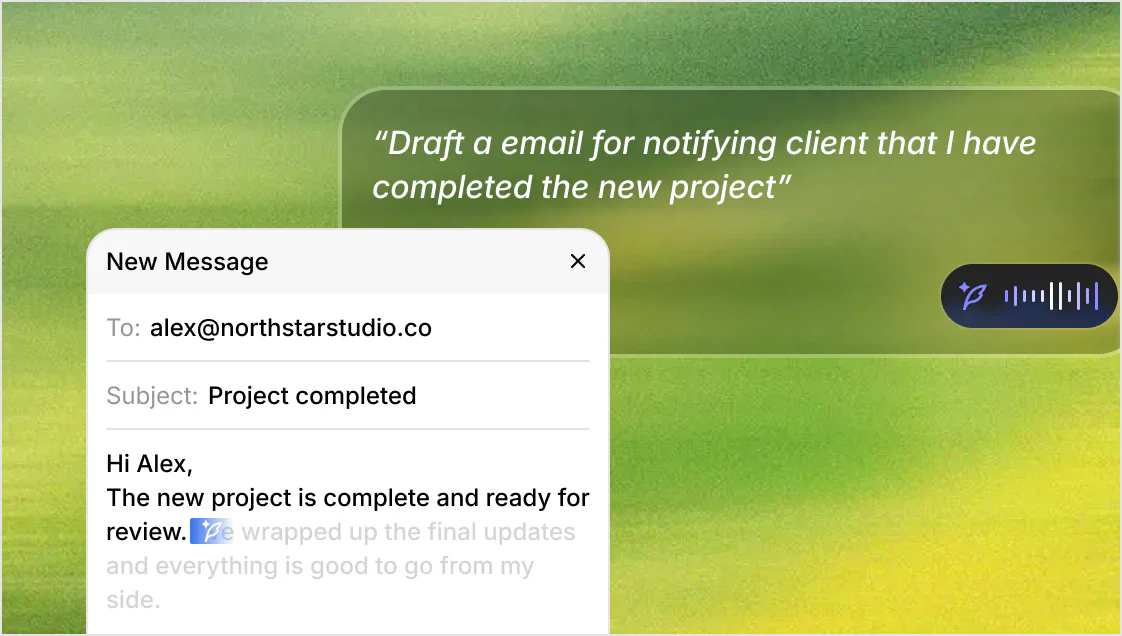

Searching for the name also turns up two other projects. MrPrinceRawat/OpenWhispr, ninth in Google’s organic results, is an unrelated Mac-only Swift app created in March 2026 with seven stars. It is not a fork. A Reddit thread on the same results page describes “OpenWhisper”, spelled with an e, as an open-source Whisper transcriber. Everything in this review refers to OpenWhispr/openwhispr.
The free part and the paid part
The pricing page says it plainly: “Unlimited local dictation is free for everyone.” Transcription with a downloaded model has no word limit, needs no account and works offline. Using your own API key with a provider such as OpenAI or Groq is also unlimited, because you pay the provider directly.
OpenWhispr Cloud is metered. The Free plan includes 2,000 words of cloud transcription per rolling seven days, which OpenWhispr’s own help page estimates at “roughly 15 minutes of speech”, plus five hours of meeting recording a month and a 25 MB limit on uploaded files. According to the plans page, Pro costs $8 a month or $80 a year (the pricing page shows the annual rate as $6.67 a month), or $9.99 a month through the iPhone app. Business costs $16 per user a month, or $160 a year. Pro removes the cloud word limit and adds sync, the agent mode, API and MCP access, and the iPhone app.
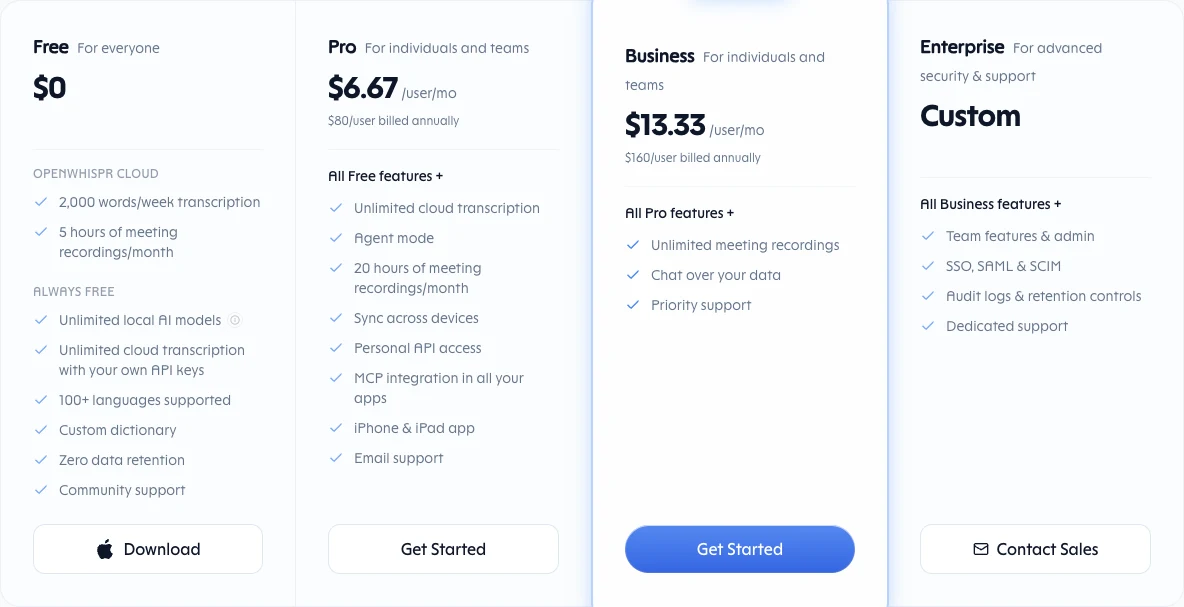
None of this is hidden; the company’s documents state the limits clearly. But two competing vendors’ comparison pages on the first page of Google describe OpenWhispr as free and local, with cloud as something you bring your own key for. Spokenly’s page lists the price as “Free (open source)” and describes “BYOK cloud” with “on-device audio by default”. Yaps says cloud processing is “optional and bring-your-own-key”, though further down the same page it does mention the 2,000-word cloud allowance. OpenWhispr Cloud is a hosted service that OpenWhispr runs itself.
An open-source app with a cloud default
This is the part most reviews miss. At the last step of onboarding, the setup screen offers OpenWhispr Cloud marked “Recommended”, with the promise of “Clear privacy and zero data-retention”. The local option is a separate card marked “Free”. It asks for at least 2 GB of free disk space and comes with a warning that local setup “takes a few extra steps.” You can skip creating an account and pick local. The code makes that path work: when you choose local, it also moves the AI cleanup step to a local model, or turns cleanup off if you don’t install one. A comment in the source says this is so cleanup does not “silently fall back to a cloud default.”
Below those cards, the app’s stored defaults point to the cloud. In settingsStore.ts, local transcription defaults to off, and both transcription and cleanup default to OpenWhispr Cloud. The project’s own network guide for IT departments says it directly:
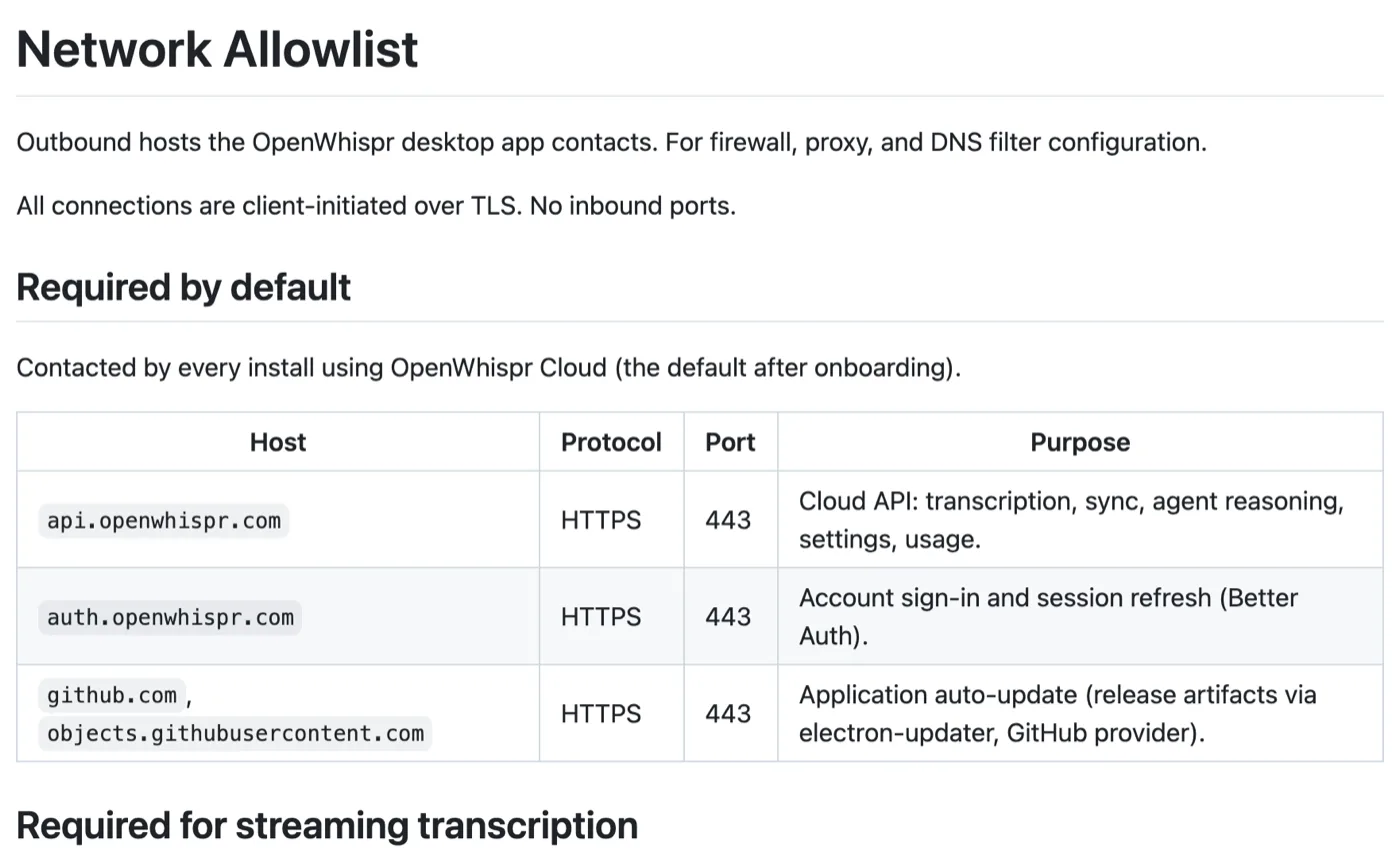
I don’t think this is sinister. Cloud gives a new user good accuracy on any computer without a model download, and someone has to pay for the servers. But it means “open source and local” describes what the app can do, not what it does by default. My ranking of private dictation apps asks where your audio becomes text. For OpenWhispr, the answer depends on which card you click.
Three answers to one question: what does the cloud keep?
I compared OpenWhispr’s published statements about what OpenWhispr Cloud keeps after it transcribes your speech. They don’t agree:
| Where | What it says about cloud transcripts |
|---|---|
| Pricing page and the setup screen | “Zero data retention”; the pricing FAQ adds “We never store, sell, or train on your data” |
| Help center: where your voice and text go | OpenWhispr keeps “The transcript text, not the audio”, plus word count, provider, model, language, duration and timestamp |
| Privacy policy (updated October 1, 2026) | Audio is “not stored by us”; it keeps a usage record “but not the text itself unless you turn on cloud backup” |
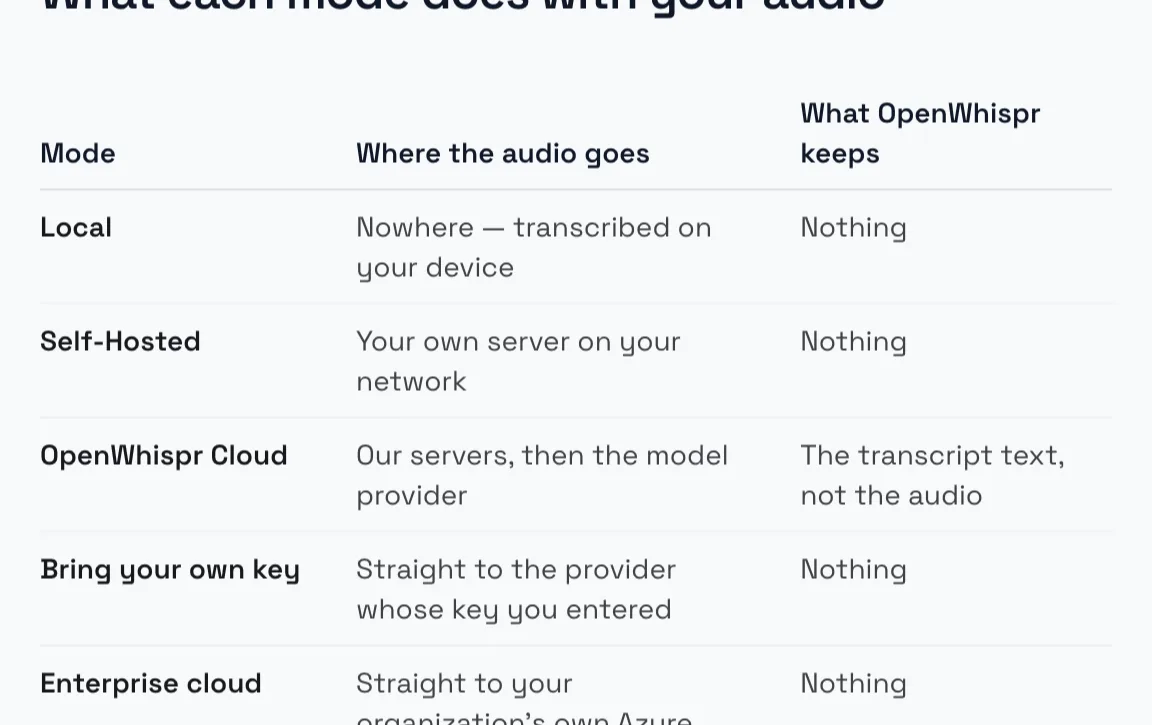
All three agree that the audio is not stored. The disagreement is about the text. “Zero data retention” is often used to mean that the AI providers don’t keep your data, and the pages may mean that. But either the help center or the privacy policy is out of date, and I can’t tell which from the outside. If the answer matters to you, use local mode, where all three say nothing is kept. The same help page also says something many people won’t expect: your custom dictionary words are sent with every cloud transcription request, so client or project names you add there go along too.
“No telemetry”, read carefully
The README says: “No data collection, no telemetry.” For the desktop app’s own code, that mostly holds. I found no analytics SDK such as PostHog, Sentry or Mixpanel. Insights sync, which uploads word counts and dictation times, asks for consent before it turns on. The “Usage analytics” switch in Settings is off by default.
The privacy policy fills in the rest. Every OpenWhispr Cloud request is logged on the server with audio length, provider, model, language, word count, timings, errors and app version, linked to your account. That data is used partly “to see which marketing channels bring active users”, and it is recorded “whatever your settings — the ‘Usage analytics’ setting in the desktop app does not currently turn them off.” The source matches: the desktop app itself attaches details such as its version, a per-session ID, provider, model and timings to cloud requests, and at this commit the toggle’s value is saved, but no other code in the desktop app reads it. None of this includes your words or audio. It is ordinary bookkeeping for a hosted service, and it stops when you stop using the cloud. But “no telemetry” describes the app running in local mode, not the product as a whole.
Local is four switches, not one
This is the practical detail that matters most if you want OpenWhispr to stay offline. Its own help page puts it this way: “The mode is set three times, not once.” Dictation, note and meeting recording, and audio upload each have their own speech engine setting. Dictation cleanup, the language model that removes filler words and fixes grammar before pasting, is on by default and has a fourth setting of its own. The voice assistant uses its model setting too. It’s possible to have local dictation while your uploads and cleanup go to the cloud. The onboarding local route sets these consistently. Changing one setting later in Settings doesn’t change the others.
The AI agent adds a few more network calls. The privacy policy says agent web searches go through OpenWhispr to a search provider, Exa, whichever model you use, and that through OpenWhispr Cloud the agent keeps a long-term memory of your conversations with a provider called Mem0.
How text lands in your apps
OpenWhispr pastes through the clipboard. Its documentation describes three steps: copy the text, send the paste keystroke, then restore your previous clipboard, unless something new was copied in the meantime. The code does the same thing, and it’s the same approach EmberType uses. On a Mac it needs Accessibility permission. OpenWhispr also uses that permission for “correction learning”: for 30 seconds after a paste, it watches the text field for words you fix and adds them to your dictionary. The policy says that text never leaves your machine, and you can turn the feature off.
Locally, history is kept forever and audio for 30 days by default, both in an SQLite database that OpenWhispr doesn’t encrypt itself (its docs say so and point you to FileVault). You can turn both off in Settings under Privacy & Data.
Who should use OpenWhispr, and where EmberType fits
Use OpenWhispr if you want free dictation and are willing to choose local during setup, if you work on Windows or Linux, if you want meeting transcription with speaker labels in the same app, or if you want an MIT-licensed codebase you can change. Configured for local use, it is a strong free option, and it is better value than paying for something you won’t use. If you are still comparing it with paid apps, see my Wispr Flow alternatives, or my source-code read of FluidVoice, the other free app people compare it with.
Here is where my interest comes in. EmberType is the app I build, and it is narrower. It is Mac only (Apple Silicon, macOS 14 or later) and dictation only, with no meeting bot, team spaces or Windows build. It costs $39 once after a seven-day trial, with no subscription and no account. Speech runs on your Mac with Parakeet or Whisper by default. Cloud models are optional and need your own API key, so there is no service of mine for your words to go through. It is also built on open-source code: EmberType started from VoiceInk’s GPL-licensed source, and why a paid app built on open models still has to earn its price is the subject of Whisper is open source, so where is the moat? If you want a Mac app where local processing is the default and you pay once, that is what you get. If you want the extra features and free, OpenWhispr is the better choice.
Want local dictation without the setup choices?
Try EmberType free for seven days. It transcribes on your Mac with no account and no subscription.
Download EmberTypeApple Silicon · macOS 14+ · $39 one-time after the trial
If you install OpenWhispr, make it local
- Download from the GitHub releases page or openwhispr.com, picking the Apple Silicon or Intel file to match your Mac. Homebrew users can run
brew install --cask openwhispr, a community-maintained cask. - At the setup screen, choose “On your device”, not the recommended Cloud card. You can continue without an account.
- Open Settings → AI Models → Speech-to-Text and check that Dictation, Note Recording and Audio Upload are all set to Local.
- Check Language Models → Dictation Cleanup: choose a local model, or turn cleanup off.
- Leave “Share screen context” off unless you want the voice assistant to send a screenshot with each request, and set history retention under Privacy & Data.
More reviews of Mac dictation apps are in the comparisons hub, including what Parakeet v3 does on a Mac.
