
By Steve Mount, builder of EmberType, a paid Mac dictation app that competes with Handy. EmberType is built from VoiceInk’s open-source code and solves many of the same problems Handy does. This article is based on Handy’s source code at the v0.9.8 release (commit 14f6f0d), its README, documentation, privacy policy and GitHub issues, all checked on October 16, 2026. It is a reading of the code and documents. I haven’t installed or tested Handy, so nothing below is a hands-on result.
The short answer: Handy is a free, MIT-licensed speech-to-text app by CJ Pais for macOS (Apple Silicon and Intel), Windows (x64 and ARM) and Linux. You press a shortcut, speak, and it pastes the text into whatever app you’re in. Transcription runs on your device with no account. The current version is 0.9.8, released October 3, 2026. If it pastes your old clipboard instead of your words, which is the most-discussed open bug, the fix is in a hidden Debug menu.
What you get for nothing
Handy does one job: put what you say into a text field. On a Mac the default shortcut is Option+Space. Hold it to record and release to stop, or tap it once to start and again to stop. Handy decides which you meant from how long you held the key. Hold-only and toggle-only modes are there if you want them. You don’t need an account and there’s no trial. The download page has builds for every platform listed above, and the code is on GitHub, where the repository had 33,930 stars on October 16.
It’s a Tauri app, with the core in Rust and the settings window in React. That’s a sensible choice for a project that ships one codebase to three operating systems. It’s also why the Linux notes in the README are long. Wayland, compositors and typing tools each need their own workaround, and the README documents them honestly. The project is funded by donations, GitHub Sponsors and four named sponsors. The code is MIT-licensed, but the Handy name and logo are not, so forks have to rebrand.
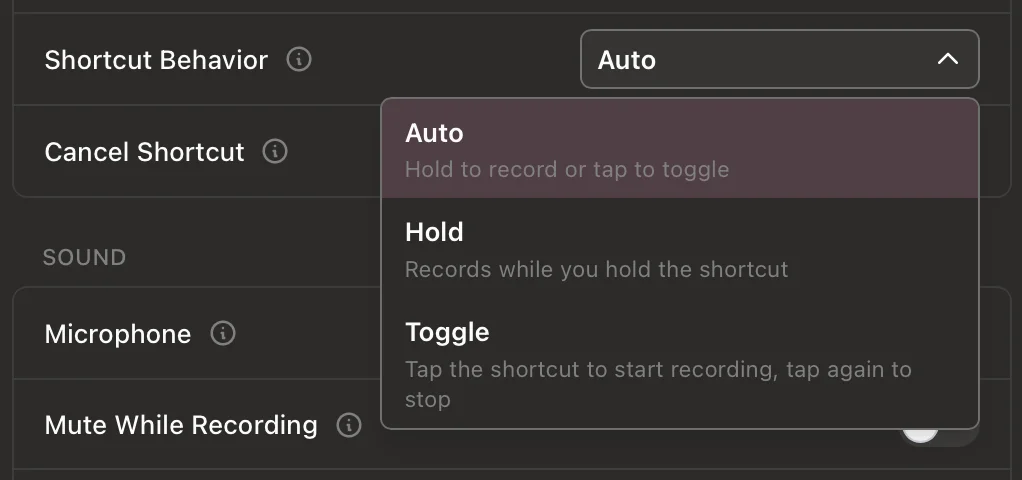
HoldOrToggle in the settings code): one key for both quick bursts and long dictation. Image from Handy’s 0.9.7 release notes in its MIT-licensed repository.
The model menu has moved past Whisper
Almost every Handy review describes it as a Whisper app with Parakeet V3 as an option. Handy’s README still says that too. The app itself has moved on. The model catalog in v0.9.8 lists 69 models: Whisper, several Parakeet variants, Canary, Moonshine, Cohere Transcribe, Granite Speech, Qwen3-ASR, Voxtral and others, all downloaded as GGUF files from Hugging Face. On first launch, the setup screen features two of them, Parakeet Unified for English and Nemotron Streaming for multilingual dictation. The old Whisper files the README lists aren’t offered there any more; Whisper now comes in the same GGUF format as everything else. Even Handy’s models page, which still recommends Parakeet V3, hasn’t caught up.
I wouldn’t choose a dictation app by its model list. Most of the good open models now run well on a recent laptop, which is why the model alone isn’t much of an advantage for anyone. Handy offers plenty of choice. If you’re on an Apple Silicon Mac and want to know why Parakeet is the usual starting point, I wrote about it in Parakeet v3 on Mac.
The part I’d look at first: how your words get into the app
Every dictation app has to get its text into another program, and that’s harder than it sounds. Handy’s default on Mac and Windows is the method most of us use, EmberType included. It saves what’s on your clipboard, puts the transcript there, presses ⌘V for you, then puts your old clipboard back. In the v0.9.8 code, Handy waits 60 milliseconds before the paste keystroke and 60 milliseconds after it before restoring your clipboard.
The trouble is the second wait. If the app you’re typing into is busy and reads the clipboard late, Handy has already put your old content back, so that’s what gets pasted. A user reported exactly that in issue #502, “Pastes clipboard instead of spoken text”, on December 30, 2025. On October 16 it was still open, labeled critical, and had 89 comments, more than any other open issue in the repository.
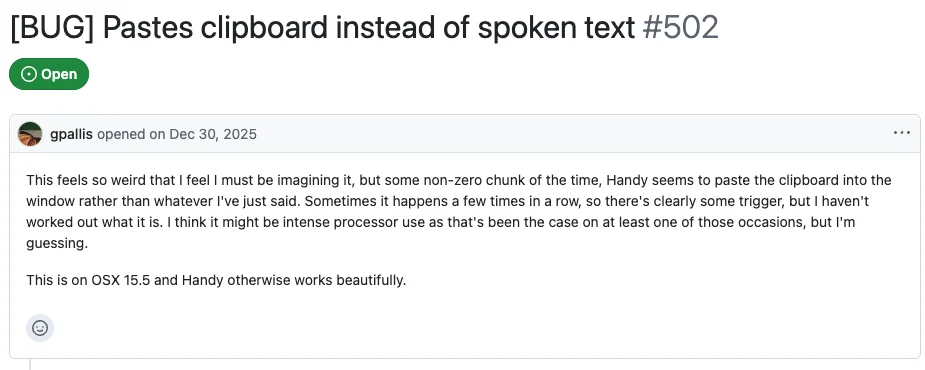
Handy has a real fix, but it’s hard to find. Press ⌘⇧D in the settings window to open Debug, then turn on Reliable Paste (Beta). Instead of waiting a fixed time, it restores your clipboard only after the receiving app has actually read the transcript. It works on Mac and Windows, and the README still calls it experimental. If it doesn’t help, raise “Paste Delay (After)” in the same panel. There’s also a Direct mode that types the text character by character without touching the clipboard. Handy’s docs suggest it for apps that don’t accept pasting.
This is a trade-off every dictation app makes, not a Handy failing. EmberType waits a full second before restoring the clipboard, and you can raise that to five seconds in Settings. A longer wait means fewer stale pastes. It also means that for that second your clipboard holds the transcript, not what you copied. Handy chose speed and is now building the better fix. That shows a maintainer who takes the problem seriously. I’d still rather Reliable Paste weren’t hidden in a debug menu.
“Works completely offline,” with three footnotes
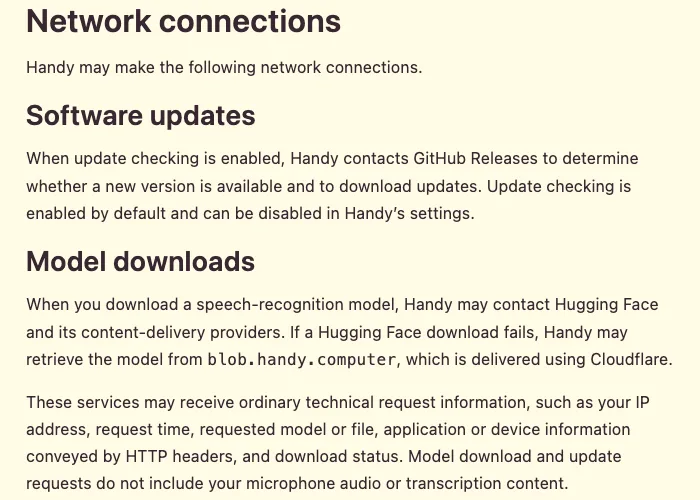
Handy’s GitHub tagline is “a free, open source, and extensible speech-to-text application that works completely offline.” Speech recognition does run on your device, and I found no analytics or tracking code in the source. Handy’s privacy policy (effective September 18, 2026) says the same, and it’s one of the clearer policies I’ve read. It also lists the exceptions, which the tagline leaves out.
- Update checks are on by default. Handy contacts GitHub Releases to look for new versions. You can turn that off in settings.
- Models come from Hugging Face. If that download fails, Handy falls back to blob.handy.computer, which runs on Cloudflare. Handy’s policy says those requests don’t include your audio or transcripts. After a model is downloaded, dictation needs no internet connection.
- Cloud post-processing is optional and off by default. If you add an API key, Handy can send your transcript to an AI provider to clean it up. Supported providers include OpenAI, Anthropic, OpenRouter, Groq, Cerebras, Z.AI and AWS Bedrock. The transcript goes directly to the provider, not through Handy. It also has its own shortcut (Option+Shift+Space on a Mac), so you choose cleanup for each dictation. The “Custom” provider points at
localhost:11434by default, which is where Ollama runs. On Apple Silicon Macs, Apple Intelligence is also offered.
The detail I’d want every reader to know is local, not network. By default, Handy saves an audio file of each dictation alongside the transcript. It keeps the latest five, and older ones are deleted automatically unless you star them. The privacy policy says Handy doesn’t add its own encryption to that history, so it’s protected by your user account like any other file. That’s normal: EmberType keeps a local history with audio too, and by default it keeps every recording until you turn on automatic cleanup in Settings. If you don’t want recent recordings on disk, set the history limit to zero under Advanced.
Who should just use Handy
For a lot of people, Handy is the right answer. Use it if you’re on Windows or Linux, have an Intel Mac, don’t want to pay for dictation, or want to read and change the code. It also suits people who want command-line control: handy --toggle-transcription can be bound in Sway, Hyprland or your own scripts, and there’s a community Raycast extension. It’s also an easy recommendation for accessibility users who need dictation everywhere and shouldn’t have to pay a subscription for it. That’s the point Handy’s homepage makes, and I agree with it.
Look elsewhere if you need what Handy says it doesn’t do yet. Its FAQ says it only transcribes microphone input, not system audio or calls, and that live captions aren’t available yet. Handy also has no file transcription and no phone app. Clean, formatted output takes setup on your part: an API key, a local model server or Apple Intelligence. If you’ve compared it with OpenWhispr or FluidVoice, Handy is the most focused of the three and the one that does the least by default.
Where EmberType fits
I build EmberType, so weigh this accordingly. It covers less ground than Handy: Mac only, Apple Silicon, macOS 14 or later, and it costs money, $39 once after a seven-day trial. Speech recognition runs on your Mac by default with Parakeet or Whisper. Cloud models are optional and use your own API key. It also transcribes audio files and can capture system audio, two things Handy says it doesn’t do. Like Handy, it pastes through the clipboard. Unlike Handy, the restore delay is a normal setting rather than a debug option.
If Handy does what you need, keep the $39. EmberType is for people who only dictate on an Apple Silicon Mac and want those extras in an app they pay for once. If you’re leaving a subscription, the Wispr Flow alternative page compares the options.
Dictate only on an Apple Silicon Mac?
Try EmberType free for seven days. Speech recognition runs on your Mac from the first dictation, and you can transcribe audio files too.
Download EmberTypeApple Silicon · macOS 14+ · $39 one-time after the trial
If you install Handy today
- Download from handy.computer or GitHub. The README says the Homebrew and winget packages aren’t maintained by the Handy developers.
- Pick the model the setup screen recommends unless you have a reason not to. You can try others later from the full list.
- If a dictation ever pastes old clipboard text, open Debug with ⌘⇧D and turn on Reliable Paste before you decide Handy is unreliable.
- Set the history limit to what you’re comfortable keeping, or zero for no saved recordings.
More dictation app reviews are in the comparisons hub.
