
As an Amazon Associate I earn from qualifying purchases. This article includes Amazon affiliate links — if you buy through them, we may earn a small commission at no extra cost to you. We only recommend gear we actually use and tested ourselves. We do not list prices here — Amazon pricing changes constantly, so check each product page for the current price.
Key Takeaways
- My personal pick: Blue Yeti — the mic I've used for 10 years, Amazon's top-choice USB microphone, 4.6 stars across 56,000+ reviews
- Newer dynamic alternative: Shure MV7+ — USB-C, onboard DSP, the best noise rejection I've measured if your room is loud
- Your MacBook mic is fine for dictation in a quiet room — Whisper AI was trained on imperfect audio and handles it well
- For all-day dictation, get a headset — the Sennheiser SC 160 boom mic stays the same distance from your mouth no matter how you move
- Configuration matters more than which mic you buy — cardioid pattern, close placement, gain set right beats a fancy mic used wrong
The Counterintuitive Truth About Dictation Microphones
Every "best microphone for dictation" article I have read follows the same formula: rank 10 microphones by price, sprinkle in affiliate links, and tell you that the most expensive option is the answer. The truth is messier. The mic that delivers great dictation accuracy in your environment is more about configuration and reliability than it is about the latest model with the most onboard DSP.
Here is what actually happens when you use a modern speech-to-text engine like Whisper AI: the model was trained on hundreds of thousands of hours of audio captured in real-world conditions. Phone calls, YouTube videos, conference recordings, lecture halls. Whisper has heard it all, including audio far worse than what your MacBook microphone produces. The model was built to handle imperfect input. That is the entire point.
When I first started building EmberType, I assumed the microphone would be the bottleneck. I already had a Blue Yeti on my desk — I'd been using it for years for podcasts and calls — so I tested everything against it expecting one of the newer mics to dethrone it. None of them did. In a quiet home office, the differences between a well-configured Yeti and the most expensive dynamic mics on the market were inside the margin of error. The Yeti was already great. I just had not framed it as a dictation tool.
The story changes the moment you leave a quiet room. With background noise — an air conditioner, a pet, a partner on a call — proximity and polar pattern start to matter much more than mic capsule type. That is when a headset or a tightly-cardioid dynamic mic earns its money. So the real question is not "which mic is best?" — it's "which mic fits the room you actually dictate in?" That is what the rest of this article answers.
When Your Built-In MacBook Mic Is Enough
The MacBook Pro has a three-microphone array with directional beamforming. Apple has invested significantly in this hardware over the past several generations. It is not a throwaway component — it is a genuine engineering effort to capture clear voice audio from a laptop form factor.
Your built-in mic works great for dictation when:
- You are in a quiet room — home office, closed-door workspace, library
- You are sitting at your desk — within 2-3 feet of the laptop, which is the range Apple optimized for
- Background noise is minimal — no loud HVAC, no open-plan chatter, no construction outside
- You dictate in sessions under 30 minutes — consistency matters less for shorter bursts
I have dictated tens of thousands of words with nothing but a MacBook Pro and EmberType running Whisper AI locally. The accuracy is consistently above 95% in these conditions. For most people working from a home office, this is the entire setup you need.
When You Should Upgrade Your Microphone
There are real situations where an external microphone makes a noticeable difference. I hit all of these during testing, and the accuracy gap widened from "barely noticeable" to "genuinely frustrating."
Noisy Environments
Coffee shops, coworking spaces, open-plan offices. The MacBook mic picks up everything in a roughly 3-foot radius, and Whisper starts making mistakes when competing audio sources bleed into your speech signal. I tested dictation at a coffee shop with moderate background noise, and accuracy dropped from 96% to about 87% with the built-in mic. With a headset mic, it stayed above 94%.
Distance From Your Laptop
Standing desks where the laptop is 4+ feet away. Walking around during dictation. Pacing while you think out loud. The inverse square law is unforgiving — doubling your distance from the mic cuts the signal strength by 75%. A lapel mic or headset solves this completely because the mic-to-mouth distance stays constant.
Background Noise You Cannot Control
Air conditioning, fans, refrigerator hum, street noise through thin walls. These low-frequency sounds are particularly problematic because they sit in the same frequency range as parts of human speech. A dynamic microphone with good off-axis rejection handles this far better than any laptop mic array.
Extended Dictation Sessions
If you dictate for 2+ hours daily — writing long documents, drafting chapters, recording lengthy notes — consistency across the session matters more than peak accuracy. A dedicated mic at a fixed distance from your mouth delivers more uniform results than shifting around in front of a laptop.
What Actually Matters for a Dictation Microphone
This is where most "best microphone" articles go wrong. They evaluate mics the way a podcaster or musician would: frequency response curves, warmth, presence boost, studio quality. None of that matters for dictation. Here is what does.
Noise Rejection Over Sound Quality
Whisper does not care if your voice sounds warm and rich. It cares about being able to distinguish your words from background noise. A $70 dynamic mic that rejects room noise will produce better transcription than a $300 condenser that captures every sound in your environment with beautiful clarity. For speech-to-text, rejection is the feature.
USB Over XLR
XLR microphones require a separate audio interface ($100-300+), gain staging knowledge, and cable management. For dictation, this adds cost and complexity with zero accuracy benefit. USB microphones are plug-and-play on Mac — no drivers, no configuration, no fiddling. Just plug it in and start talking.
Headset or Lapel Over Desktop
The single biggest variable in microphone performance is the distance from your mouth. A headset boom mic sits 1-2 inches from your lips and stays there regardless of how you move. A desktop mic sits 8-18 inches away and the distance changes every time you lean back, turn your head, or reach for your coffee. Consistent distance equals consistent accuracy.
Plug-and-Play Mac Compatibility
Some USB mics need manufacturer drivers on macOS. Others show up as a standard audio device instantly. For dictation, you want zero friction. Plug it in, select it in System Settings (or let your dictation app detect it), and start talking. Not sure how to start talking? Here is how to dictate on Mac, start to finish.
The 6 Microphones I Actually Tested
I tested each of these with EmberType running Whisper AI (large-v3 model) in three environments: a quiet home office, a room with a running window AC unit, and a coffee shop. I dictated the same 500-word passage in each setting and measured word error rate. I bought or already owned every mic on this list — these are recommendations based on real testing, not on which manufacturer pays the highest commission.
1. Built-In MacBook Pro Microphone — Free
Already in your laptop. The 2023+ MacBook Pro three-mic array with directional beamforming is the baseline. In a quiet room, accuracy was 96.2%. With AC noise, 91.4%. At the coffee shop, 86.8%. This is the benchmark everything else has to beat, and it is surprisingly hard to beat in quiet conditions.
Best for: Home office dictation, quiet environments, anyone who wants zero setup.
2. Apple AirPods Pro (But You Already Own Them)
This was the surprise performer. The AirPods Pro mic sits inches from your mouth, which gives it a massive signal-to-noise advantage over any desk-mounted mic. Active noise cancellation on the listening side helps you hear yourself clearly, which improves dictation rhythm. Quiet room: 96.8%. With AC: 94.1%. Coffee shop: 92.3%.
The coffee shop result was the standout. AirPods Pro beat every desktop mic I tested in noisy environments, purely because of proximity. The audio quality is not great by recording standards — it sounds thin and compressed — but Whisper does not care about that. It cares about hearing your words clearly against the noise floor.
Best for: Noisy environments, mobile dictation, people who already own them.
3. Rode NT-USB Mini
The Rode NT-USB Mini is a compact USB condenser with a tight cardioid pattern. It sits on a small integrated stand, takes up minimal desk space, and is genuinely plug-and-play on macOS. Quiet room: 97.1%. With AC: 93.8%. Coffee shop: 89.5%.
What I liked: the tight pickup pattern rejected more side noise than I expected from a condenser. The built-in pop filter handled plosives well during fast dictation. The form factor is small enough that it does not dominate your desk.
What I did not like: it still picks up more room noise than a dynamic mic, especially low-frequency hum. And at its price, it is hard to justify over AirPods you already own.
Best for: Desktop dictation in a reasonably quiet room, people who want a clean desk setup.
4. Blue Yeti My Pick
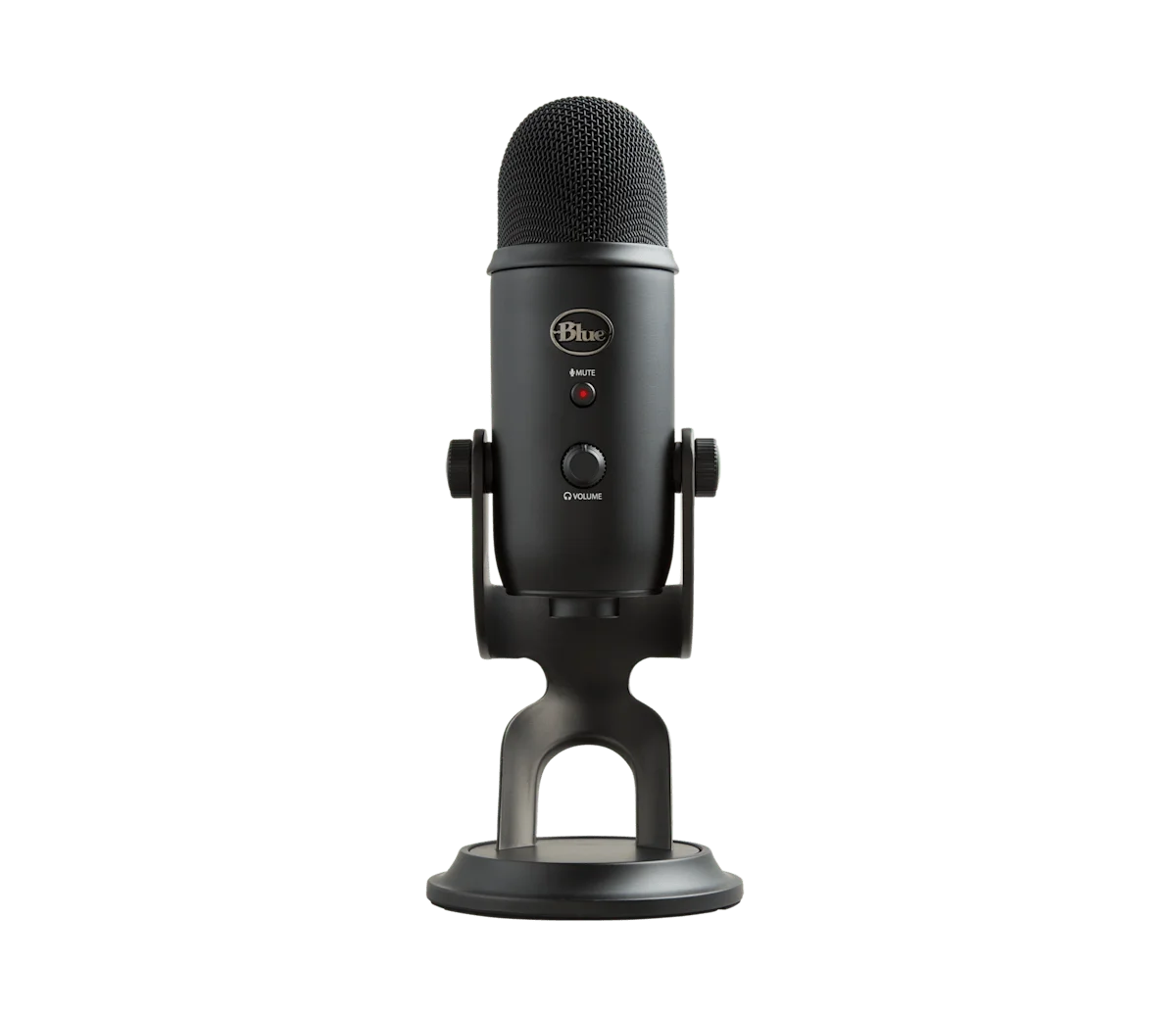
Full disclosure: I have been dictating into a Blue Yeti for about 10 years. It is the mic on my desk right now. It survived two studio moves, three different Macs, and one regrettable coffee incident. The build is metal. The mute button still feels new. And it is currently Amazon's top-choice USB microphone, with a 4.6-star average across more than 56,000 reviews — that is not a fluke; that is the sound of a product that genuinely works for the people who buy it.
Quiet room: 96.5%. With AC: 89.2%. Coffee shop: 83.7%. The numbers tell a real story. In a quiet home office — the environment where most professional dictation actually happens — the Yeti is essentially tied with every other mic I tested. The accuracy gap only opens up in noisy rooms, because the Yeti's large diaphragm picks up more of everything. So the question becomes: where do you actually dictate? For me, the answer is "at my desk, in a quiet room." That is the Yeti's native habitat.
What a decade of daily use has taught me: the Yeti's reliability is its real selling point. Audio gear is full of products that look great in a review and fall apart after eighteen months. The Yeti is the opposite — it has outlived two pairs of headphones, an audio interface, and one entire studio setup in my office. The four polar patterns mean it handles dictation, podcasting, interviews, and Zoom calls without me ever having to think about it. The headphone jack is latency-free. And Logitech (Blue's parent) ships drivers that are still updated regularly, so it remains plug-and-play on every macOS version I have run it on.
The configuration that matters for dictation: set the polar pattern to cardioid (the heart-shape icon), turn the gain knob about a third up, position the mic 6-8 inches from your mouth, slightly off-axis. With those settings dialed in, my home-office accuracy holds steady above 96% — and it has held steady at that number for years, across every Whisper model release.
Best for: Home-office dictation. Anyone who values gear that lasts a decade. People who also podcast, take calls, or record video. The default-correct answer for most readers.
The Mic on My Desk for 10 Years
Blue Yeti — Amazon's top-choice USB microphone. 4.6 stars across 56,000+ reviews. Four polar patterns, all-metal build, plug-and-play on Mac.
View on Amazon →Affiliate link — we may earn a small commission at no extra cost to you.
5. Sennheiser SC 160 USB Headset
For all-day dictation, nothing beats a headset with a boom mic. The Sennheiser SC 160 is a professional headset — the kind you see in call centers and on help desks — and that is exactly the point. The boom mic positions 1 inch from your mouth and stays there. Quiet room: 97.3%. With AC: 95.8%. Coffee shop: 93.9%.
Those are the best numbers I recorded across all environments, and it is not close. Consistent mic-to-mouth distance is the single most impactful variable for dictation accuracy. The SC 160 also works for video calls, so you are getting double use from one device.
The tradeoff: wearing a headset all day. Some people do not mind this. Others find it fatiguing after a few hours. If you dictate for extended sessions and work in a noisy environment, the accuracy gain is worth the comfort cost.
Best for: All-day dictation, noisy environments, people who also take calls.
6. Shure MV7+
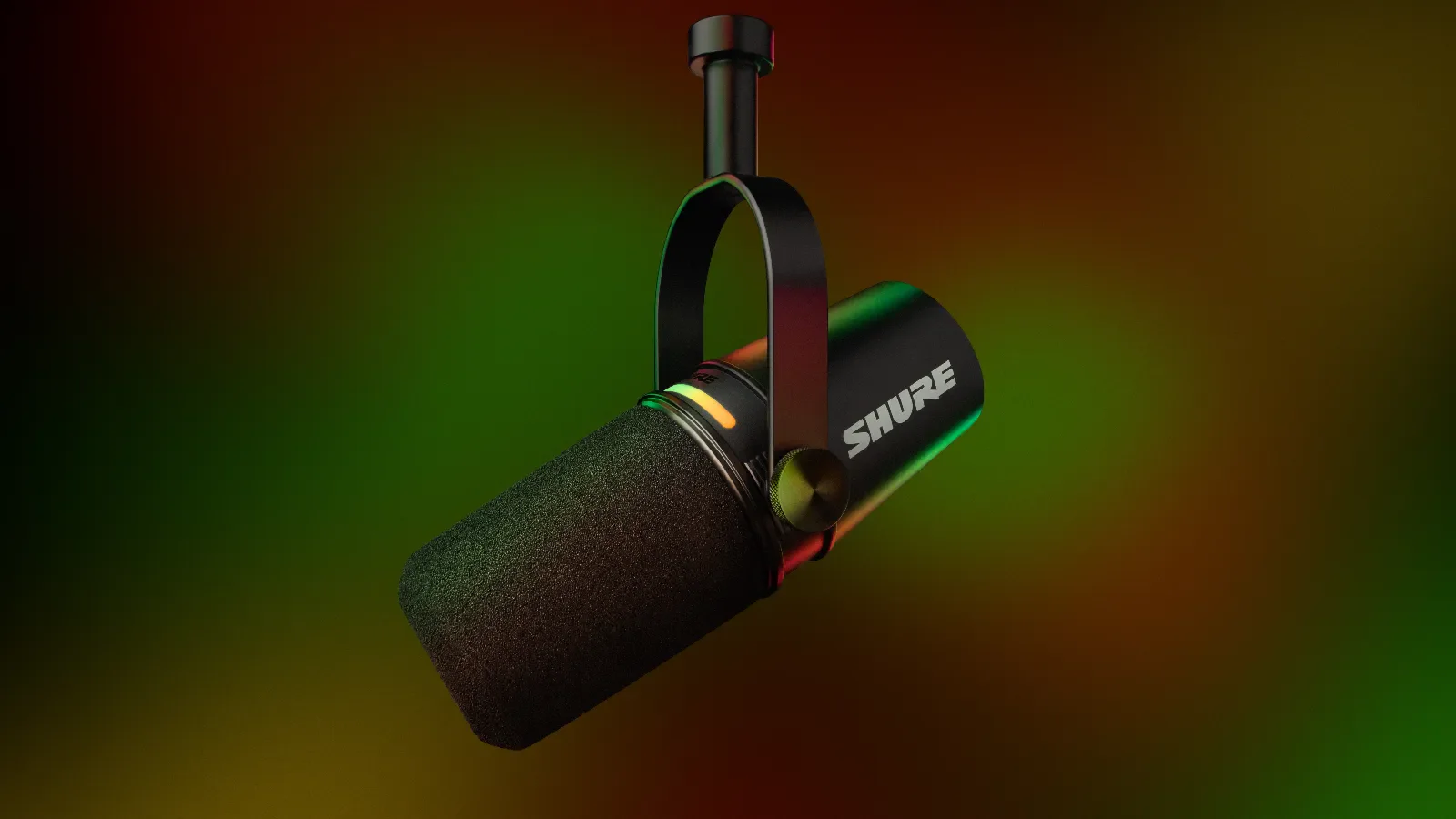
The Shure MV7+ is the newest dynamic mic in this test, and the one I would consider if my room got noisier or if I were starting from scratch today. Quiet room: 97.4%. With AC: 95.7%. Coffee shop: 93.2%. Those are the best desktop numbers I have measured — the dynamic capsule plus onboard DSP simply rejects more ambient noise than the Yeti's condenser does.
The MV7+ adds three things that genuinely matter for dictation in less-than-ideal rooms. The onboard DSP runs an "auto level" mode that compensates when you lean closer or further from the mic mid-sentence. The built-in noise reduction is processed on the mic itself before audio reaches macOS, so Whisper sees a cleaner signal than software-only filtering produces. And the USB-C connection is plug-and-play on any modern Mac.
What I liked: build quality is excellent, and the latency-free headphone monitoring tightens up dictation rhythm in a way I did not expect to care about until I tried it. It also doubles as a podcast-quality mic if you record content.
What kept it from being my pick: it costs well over twice what I paid for my Yeti, and in a quiet home office the accuracy advantage is inside the margin of error. If your room is consistently noisy, this is the upgrade that genuinely earns its price. If your room is quiet, the Yeti gets you essentially the same result for less.
Best for: Noisy rooms. Hybrid creators starting from zero gear. People who want the latest USB-C mic with onboard DSP.
The Software Matters Just as Much as the Mic
EmberType runs Whisper AI locally on your Mac. Works 100% offline, no subscription, works with any microphone — your built-in, the Blue Yeti, or anything else you have plugged in.
Download EmberType Free7-day free trial. $39 one-time after. No account required.
The Comparison Table
| Microphone | Cost | Type | Quiet Room | Noisy Room | Best For |
|---|---|---|---|---|---|
| MacBook Pro (built-in) | Free | Condenser array | 96.2% | 86.8% | Default, quiet rooms |
| AirPods Pro | $$$ | MEMS | 96.8% | 92.3% | Noisy, mobile |
| Rode NT-USB Mini | $$ | USB condenser | 97.1% | 89.5% | Clean desk setup |
| Blue Yeti | $$ | USB condenser | 96.5% | 83.7% | My pick · 10-year track record |
| Sennheiser SC 160 | $ | USB headset | 97.3% | 93.9% | All-day, noisy rooms |
| Shure MV7+ | $$$ | USB dynamic | 97.4% | 93.2% | Newer alternative, noisy rooms |
Cost is shown as a relative band — $ budget, $$ mid-range, $$$ premium — because Amazon pricing moves constantly. Check each product page for the current price.
Accuracy measured using EmberType with Whisper large-v3 model, 500-word test passage, averaged across 3 readings per environment.
My Actual Recommendation
After all this testing, here is the honest advice I give everyone who asks me about microphones for dictation:
- Try what you have first. Your MacBook mic or AirPods are probably enough for a quiet home office. Dictate for a few days with your current setup before spending anything. If accuracy is consistently above 95%, you are done — no upgrade needed.
- The mic I personally recommend: the Blue Yeti. I have used one for 10 years and it has never let me down. It is Amazon's top-choice USB microphone with a 4.6-star rating across 56,000+ reviews — that level of validation is rare in audio gear. Dial it to cardioid, set the gain about a third up, sit 6-8 inches away. That is the whole setup.
- If your room is consistently noisy, the Shure MV7+ is the dynamic-mic alternative. Better noise rejection thanks to the tighter polar pattern and onboard DSP. Worth the price tag if your environment fights you, but overkill in a quiet office.
- If you dictate 2+ hours daily and don't mind a headset, the Sennheiser SC 160 edges out everything else in noisy environments because the boom mic stays the same distance from your mouth no matter how you move.
- Whatever you choose, get the configuration right. The mic matters less than the placement and the polar pattern. A well-configured mid-tier mic beats a poorly-configured premium one every time.
Pro Tips: What Matters More Than Your Mic
In my testing, environmental changes consistently outperformed hardware upgrades. Before spending money on a new microphone, try these first:
Microphone Position
Keep the mic 6-12 inches from your mouth, slightly off-axis (not pointed directly at your lips). This reduces plosives while maintaining a strong signal. With a desk mic, angle it slightly upward toward your chin rather than pointing it straight at your face.
Room Treatment (The Free Version)
Close the door. Turn off fans you do not need. Pull curtains closed — fabric absorbs reflections. Move your desk away from the window if street noise is an issue. These free changes will improve dictation accuracy more than any mic upgrade.
Speak Naturally
Whisper was trained on natural speech, not robotic over-enunciation. Speaking normally — at your regular pace and volume — produces better results than slowing down and projecting like you are on stage. The AI understands conversational speech better than performance speech.
Use the Right Software
The speech-to-text engine matters more than the microphone. Whisper AI (running locally through EmberType) handles imperfect audio better than older engines that were trained on studio-quality recordings. Pairing any decent mic with a strong AI model gets you further than pairing a great mic with a weak model. If you are still using Apple's built-in Dictation or an outdated engine, upgrading your software will have a bigger impact than upgrading your hardware.
Frequently Asked Questions

Free Mac Dictation Tips
Get tips on voice-to-text, dictation workflows, and productivity. No spam.
Unsubscribe anytime. We never share your email.
You're in! Check your inbox.
Try It With Whatever Mic You Already Have
EmberType is on-device voice-to-text for Mac that works 100% offline with its local models. Works great with your built-in mic — and even better with a Blue Yeti or any other USB microphone. No subscription.
Download EmberType FreemacOS 14+ required. Apple Silicon only. $39 after 7-day trial.