

The AI voice recorder category has exploded. What used to be simple audio capture apps are now intelligent tools that transcribe in real time, generate meeting summaries, identify speakers, and even rewrite your words into polished text.
But the market is crowded, and the tools are genuinely different. Some are built for meetings. Others are built for quick personal notes. Some process everything on cloud servers. A few keep your audio entirely on your device.
We tested each tool for accuracy, privacy, pricing, and day-to-day usability. Here's what's worth your time in 2026.
Quick Picks by Category
- Best for privacy (offline): EmberType — $39 one-time, 100% on-device
- Best for meetings: Otter.ai — free tier, auto-joins Zoom/Meet/Teams
- Best professional transcription: Rev — AI + human editors, 99% accuracy
- Best cross-platform: Notta — web, iOS, Android, Chrome extension
- Best for quick notes (iOS): Whisper Memos — $5/month, Apple Watch support
- Best for thought capture: AudioPen — free tier, $99/year non-recurring
- Best AI rewriting: Wispr Flow — $15/month, tone-matching dictation
- Best for power users: SuperWhisper — $8.49/month, local + cloud hybrid
What Makes a Great AI Voice Recorder?
Not all AI voice recorders solve the same problem. Before diving into individual tools, here's what separates the good ones from the great ones:
- Transcription accuracy: The foundation. Modern Whisper AI models hit 95%+ accuracy. Human-assisted services like Rev claim 99%. Anything below 90% creates more editing work than it saves.
- Privacy and data handling: Does your audio leave your device? Cloud-based tools process audio on external servers. Offline tools like EmberType keep everything local. For sensitive conversations — legal, medical, financial — this matters enormously.
- Real-time vs. post-recording: Some tools transcribe as you speak. Others process recordings after the fact. Real-time is better for dictation. Post-recording is fine for meeting notes.
- Platform support: Do you need it on your phone, desktop, and in a browser? Or just on your Mac? Cross-platform tools like Notta and Otter cover more ground, but Mac-specific tools are often more polished.
- Pricing model: Monthly subscriptions, per-minute charges, one-time purchases, and freemium tiers. The total cost over a year varies wildly — from $0 to $360+.
Quick Comparison Table
| Tool | Best For | Price | Offline | Platform |
|---|---|---|---|---|
| EmberType | Privacy / Offline | $39 once | Yes | macOS |
| Otter.ai | Meetings | Free–$20/mo | No | Web, iOS, Android |
| Rev | Professional | Free–$48/mo | No | Web, Mobile |
| Notta | Cross-Platform | Free–$44/mo | Partial | Web, iOS, Android |
| Whisper Memos | Quick Notes (iOS) | $5–$10/mo | No | iOS, Apple Watch |
| AudioPen | Thought Capture | Free / $99/yr | No | Web, iOS, Android |
| Wispr Flow | AI Rewriting | $15/mo | No | macOS |
| SuperWhisper | Power Users | $8.49/mo | Local + Cloud | macOS |
1. EmberType — Best Offline AI Voice Recorder
$39 one-time | Whisper AI (local) | 100% Offline | macOS
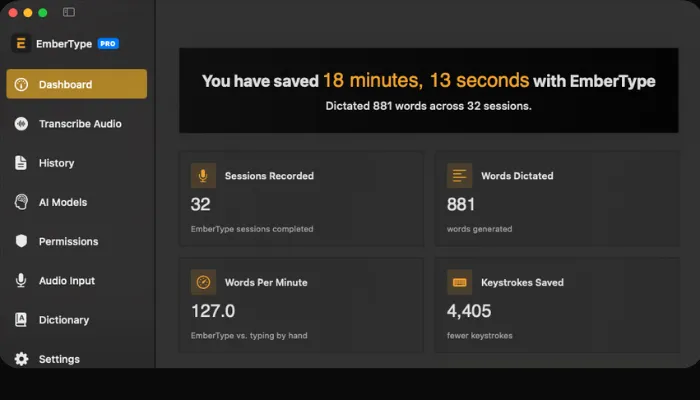
EmberType is a voice-to-text dictation app that runs entirely on your Mac. Press a keyboard shortcut, speak naturally, and polished text appears wherever your cursor is — in any app. No audio ever leaves your device.
Under the hood, it runs OpenAI's Whisper model locally on Apple Silicon. The AI handles punctuation, filler word removal, and text formatting without sending a single byte to the cloud. For anyone working with sensitive information — legal professionals, healthcare workers, journalists, or anyone who values privacy — this is the only AI voice recorder that offers genuine peace of mind.
The pricing model is equally straightforward. One payment of $39 covers three Mac activations with no subscription, no usage limits, and no upsells. Compare that to $180/year for Wispr Flow or $100/year for Otter.ai Pro, and the economics speak for themselves.
What we liked:
- Genuinely 100% offline — no cloud features at all, not even optional
- AI text cleanup (punctuation, formatting, filler removal) all runs locally
- Works in any app — email, Slack, code editors, Google Docs, anywhere you can type
- File transcription and desktop audio capture for recorded content
- Open source (GPL v3) — you can verify exactly what the app does
- 7-day free trial, no account or credit card needed
Limitations: macOS only (14+ and Apple Silicon required). No AI rewriting or tone-matching features. No cloud sync between devices. No meeting bot integration.
2. Otter.ai — Best for Meeting Transcription
Free–$19.99/month | Cloud AI | Internet Required | Web, iOS, Android

Otter.ai has become the default AI meeting recorder for good reason. It auto-joins your Zoom, Google Meet, and Microsoft Teams calls, transcribes everything in real time, identifies speakers, and generates AI-powered meeting summaries with action items.
The free tier is genuinely useful — 300 minutes per month with a 30-minute-per-conversation limit. That's enough for several short meetings. The Pro plan at $8.33/month (annual) bumps that to 1,200 minutes with 90-minute conversations, which covers most professionals.
Where Otter really shines is in its collaboration features. Transcripts are editable, searchable, and shareable. The AI chat feature lets you query your transcripts — "What did Sarah say about the Q2 budget?" — and get instant answers. For teams that live in meetings, this is transformative.
What we liked:
- Auto-joins Zoom, Meet, and Teams calls without any setup
- Speaker identification with customizable names
- AI summaries with action items generated automatically
- Searchable transcript library across all your meetings
- Integrations with Slack, Notion, Salesforce, and Zapier
- Generous free tier (300 min/month)
Limitations: Cloud-only — all audio is sent to Otter's servers for processing. No offline mode. The Business plan at $19.99/month adds up to $240/year per user. Student discount available (20% off with .edu email).
3. Rev — Best Professional Transcription
Free–$47.99/month | Cloud AI + Human Editors | Internet Required | Web, Mobile

Rev offers something no other tool on this list does: human transcription. For $1.99/minute, professional transcribers deliver 99% accuracy — guaranteed. That's the gold standard for legal depositions, medical records, academic research, and any context where every word matters.
But Rev isn't just a human service anymore. Their AI transcription starts free (45 minutes/month for English) and scales with subscription plans — $25.49/month for 5,000 minutes or $47.99/month for 10,000 minutes. The AI engine supports 37+ languages and delivers turnaround in about 5 minutes.
The hybrid model is Rev's real strength. Run everything through AI first, then send critical sections to human editors for polishing. This workflow is common in legal and media production.
What we liked:
- Human transcription option (99% accuracy, 12-hour turnaround)
- AI transcription in 37+ languages
- Captions and subtitles for video content
- Mobile app for field recordings that sync to the cloud
- Rush delivery available (2-hour turnaround for human transcription)
Limitations: Cloud-only processing. Per-minute pricing can get expensive for high-volume users ($1.99/min human = $120 for a 1-hour recording). The free tier is very limited at 45 minutes/month. No real-time dictation — Rev is built for post-recording transcription.
Want AI Voice Recording That Stays on Your Mac?
EmberType processes everything offline — no cloud, no subscriptions, no data leaving your device.
Download EmberType Free7-day free trial. No account needed. $39 one-time after trial.
4. Notta — Best Cross-Platform AI Voice Recorder
Free–$44/month | Cloud AI | Partial Offline | Web, iOS, Android, Chrome

If you need an AI voice recorder that works everywhere — your laptop, your phone, and in your browser — Notta is the most versatile option. It covers web, iOS, Android, and has a Chrome extension, all synced to a single account.
Notta transcribes in 58 languages, which is the widest language support on this list. It integrates with Zoom, Google Meet, and Microsoft Teams for automatic meeting recording, and its AI generates summaries and highlights from your transcripts.
The Pro plan at $8.17/month (annual billing) includes transcript exports, translation, and custom vocabulary. The Business plan at $44/month adds team features with 2,400 minutes per month. They also sell a dedicated hardware device — the Notta Memo — for in-person recording.
What we liked:
- True cross-platform: web, iOS, Android, Chrome extension
- 58-language transcription — best multilingual support
- Speaker identification for multi-person recordings
- Meeting bot for Zoom, Google Meet, Microsoft Teams
- Optional hardware device (Notta Memo) for in-person use
- AI summaries with actionable highlights
Limitations: Primarily cloud-based (offline recording available on mobile, but transcription needs internet). The Business plan at $44/month is expensive. Custom vocabulary only available on paid plans.
5. Whisper Memos — Best Quick Notes for iPhone
$5/month (annual) or $10/month | Cloud AI (GPT-4) | Internet Required | iOS, Apple Watch

Whisper Memos takes a refreshingly simple approach to AI voice recording. Open the app, hit record, and your rambling stream-of-consciousness gets transformed into clean, organized paragraphs. The AI doesn't just transcribe — it restructures your thoughts into readable text and emails it to you.
The Apple Watch integration is a standout. With the complication on your watch face, you can capture a thought in seconds — tap, speak, done. Siri Shortcuts and Action Button support mean you can start recording without even opening the app.
At $5/month on the annual plan ($60/year), it's positioned as a lightweight, focused tool. No meeting bots, no team features, no integrations beyond Zapier. Just you, your voice, and clean text.
What we liked:
- Apple Watch app with watch face complication for instant capture
- AI restructures messy thoughts into organized paragraphs via GPT-4
- Siri Shortcuts, Action Button, and Back Tap integration
- Recordings up to 90 minutes per session
- Optional "Private Mode" — transcripts processed and deleted, only sent to email
- Built and supported by a solo developer (responsive support)
Limitations: iOS only — no Android, no desktop, no web app. Cloud-processed via OpenAI (audio leaves your device). $60/year is reasonable but not cheap for a notes app. No real-time dictation into other apps.
6. AudioPen — Best for Thought Capture
Free / $99/year (non-recurring) | Cloud AI | Internet Required | Web, iOS, Android, Chrome

AudioPen occupies a unique niche: it's designed for people who think out loud. Record a messy, unstructured voice note and AudioPen transforms it into clean, structured text. Unlike a traditional transcription tool, it doesn't try to preserve your exact words — it captures your ideas and presents them clearly.
The free tier is surprisingly usable: unlimited recordings with a 3-minute limit per session. The paid plan ($99/year, non-recurring — you pay once per year with no auto-renewal) extends recordings to 15 minutes, adds audio file uploads, and enables "SuperSummaries" that combine multiple notes into a single document.
The pricing model is worth noting. Unlike most tools here, AudioPen doesn't auto-renew. You buy a yearly or 2-year pass ($159) as a one-time charge. It's a subscription in duration but not in the sneaky auto-renewal sense.
What we liked:
- Captures ideas, not just words — restructures messy voice notes into clear text
- Non-recurring pricing (no auto-renewal on yearly pass)
- Free tier with unlimited recordings (3-min limit)
- SuperSummaries: combine multiple voice notes into one document
- Available on web, iOS, Android, and Chrome extension
- Customizable writing styles for different output tones
Limitations: Cloud-processed (audio sent to external servers). The 3-minute free limit is tight for complex thoughts. Not designed for real-time dictation into apps. No meeting integration or speaker identification.

7. Wispr Flow — Best for AI Rewriting
$15/month | Cloud AI | Internet Required | macOS

Wispr Flow doesn't just transcribe your voice — it rewrites it. Speak in a rough stream of consciousness and Wispr Flow reshapes your words to match a specific tone: professional emails, casual Slack messages, or technical documentation. It adapts to context by reading what's on your screen.
This is fundamentally different from other AI voice recorder apps on this list. Most tools try to faithfully capture what you said. Wispr Flow tries to capture what you meant and express it better. If you're someone who thinks in rough drafts and speaks imprecisely, this is powerful.
The trade-off is significant: your audio goes to cloud servers for processing, and you're paying $15/month ($180/year). That's the most expensive subscription on this list, and there's no free tier to try before committing.
What we liked:
- AI rewriting adapts output to match your intended tone and context
- Context-aware — reads your screen to understand what you're working on
- Polished, well-designed macOS interface
- Good for email drafting, messaging, and document writing
Limitations: macOS only. Most expensive subscription on this list ($180/year). All audio processed on cloud servers. No free tier. No offline mode. Not designed for meeting transcription or recording.
We have a detailed Wispr Flow vs EmberType comparison if you're choosing between these two.
8. SuperWhisper — Best for Power Users
$8.49/month | Whisper AI + Cloud Models | Local + Cloud | macOS

SuperWhisper takes a hybrid approach: local Whisper AI transcription with optional cloud AI models (Gemini, Grok, Claude, GPT). You get offline capability for basic voice recording, plus cloud enhancement when you want the extra processing power.
The flexibility is SuperWhisper's main selling point. Switch between local-only processing when privacy matters and cloud models when you want AI assistance. It's a "best of both worlds" approach, though it means the privacy story isn't as clean as EmberType's all-or-nothing offline model.
Pricing options include $8.49/month, $84.99/year on annual billing, or $249.99 lifetime. The lifetime option is expensive upfront but competitive if you plan to use it for 2+ years.
What we liked:
- Hybrid local + cloud processing — choose your trade-off per session
- Multiple cloud AI model options (Gemini, Grok, Claude, GPT)
- Clean, well-designed macOS interface
- Lifetime purchase option ($249.99) for long-term value
- Active development with regular feature updates
Limitations: macOS only. Subscription pricing by default ($84.99/year on annual). The hybrid model means some features require internet. Cloud features are optional but present in the UI. No meeting bot integration.
See our SuperWhisper vs EmberType comparison for a deeper dive.
How to Choose the Right AI Voice Recorder
Choose by Use Case
- For private, everyday dictation on Mac: EmberType. One-time price, fully offline, works in any app.
- For team meeting transcription: Otter.ai. Auto-joins calls, generates summaries, team collaboration built in.
- For professional/legal transcription: Rev. Human editors available for 99% accuracy when every word counts.
- For multilingual, multi-device recording: Notta. 58 languages, works on every platform.
- For quick voice notes on iPhone: Whisper Memos. Apple Watch + Siri Shortcuts for instant capture.
- For capturing raw ideas as structured text: AudioPen. Turns messy thoughts into clean documents.
- For AI-assisted writing via voice: Wispr Flow. Rewrites your words to match your intended tone.
- For maximum flexibility (local + cloud): SuperWhisper. Toggle between offline privacy and cloud AI power.
Choose by Budget
| Budget | Tool | Annual Cost |
|---|---|---|
| Free | Otter.ai (Free), AudioPen (Free), Rev (Free) | $0 |
| One-time purchase | EmberType | $39 total |
| Light subscription | Whisper Memos | $60/year |
| Mid subscription | Notta Pro, Otter.ai Pro, SuperWhisper | $85–$100/year |
| Premium | Wispr Flow, Otter.ai Business | $180–$240/year |
Privacy: Offline vs. Cloud AI Voice Recorders
This is the single most important consideration most people overlook when choosing an AI voice recorder. Where does your audio go?
Cloud-based AI voice recorders send your spoken words — every meeting, every personal note, every offhand comment — to external servers for processing. Most services encrypt data in transit and at rest. But your audio still exists on someone else's infrastructure.
For casual personal notes, that's probably fine. For legal conversations, medical dictation, confidential business strategy, or sensitive personal content, it's a real risk.
Offline (On-Device)
- EmberType (100% offline)
- SuperWhisper (local mode)
Audio never leaves your device. No server, no third-party access, no data breach risk.
Cloud-Based
- Otter.ai
- Rev
- Notta
- Whisper Memos
- AudioPen
- Wispr Flow
Audio processed on external servers. Encrypted but still accessible by the service provider.
EmberType is the only tool on this list that is completely offline with zero cloud components. SuperWhisper offers a hybrid model where you can choose local processing, but cloud features are available and some users may inadvertently use them.
If privacy is your top priority, the choice is clear. If convenience and features matter more, the cloud-based tools offer capabilities that offline tools simply can't match.
Frequently Asked Questions
Try the Only AI Voice Recorder That's 100% Offline
No cloud. No subscription. No data leaving your Mac. Just accurate voice-to-text.
Download EmberType FreemacOS 14+ required. Apple Silicon only. $39 after 7-day trial.